Audio redaction software that runs entirely on your computer
Audio redaction removes the names, numbers and other identifying details spoken in a recording by bleeping or silencing those seconds, and masks the same values in the transcript. Occlira does it on your own computer: on-device transcription, automatic detection of spoken personal data, a review step, then a permanently bleeped copy, with no upload and no per-minute fee.
Jump to: step by step · what it does and its limits · compared with other tools · who needs it and which rule · bleep a name by hand · voice as biometric data · consent and recording law · can transcription services see my audio? · checklist · FAQ
How to redact an audio recording, step by step
- Open the recording. Drop the file into Occlira: MP3, WAV, M4A, FLAC, OGG, OPUS, WEBM or AAC, up to 1 GB each and up to 20 files in a batch. Nothing is uploaded.
- Transcribe on your own computer. Occlira transcribes with an open speech model that runs on your machine (downloaded once, then used offline). Pick the language or let it auto-detect; speakers are told apart on-device, so the transcript shows who said what.
- Review the detected personal data. Spoken names, phone numbers, addresses, dates, and account, ID or card numbers are listed with their position in the audio and a confidence score. Keep or redact each one, and select any word the detector missed to add it.
- Choose bleep or silence. For each confirmed item Occlira overwrites that stretch of the waveform with a 1 kHz tone or with silence, and masks the same value in the transcript. It pads the redaction by 0.15 s on either side so the edges of the word are covered too.
- Export. Save the redacted audio, the anonymized transcript (.txt), or both. The audio is written as a mono 16 kHz WAV: stereo is mixed down and the sample rate reduced. Speech stays intelligible, but this is not a copy of the original, and on a two-channel call recording the mixdown loses the separation between agent and caller. Keep the original; release the WAV. The bleeped audio cannot be un-bleeped; the transcript can be restored from the local mapping for 7 days by default.
- Check before you share. Play the exported file back at the flagged timestamps and confirm nothing identifying remains, then share, archive or disclose the copy.
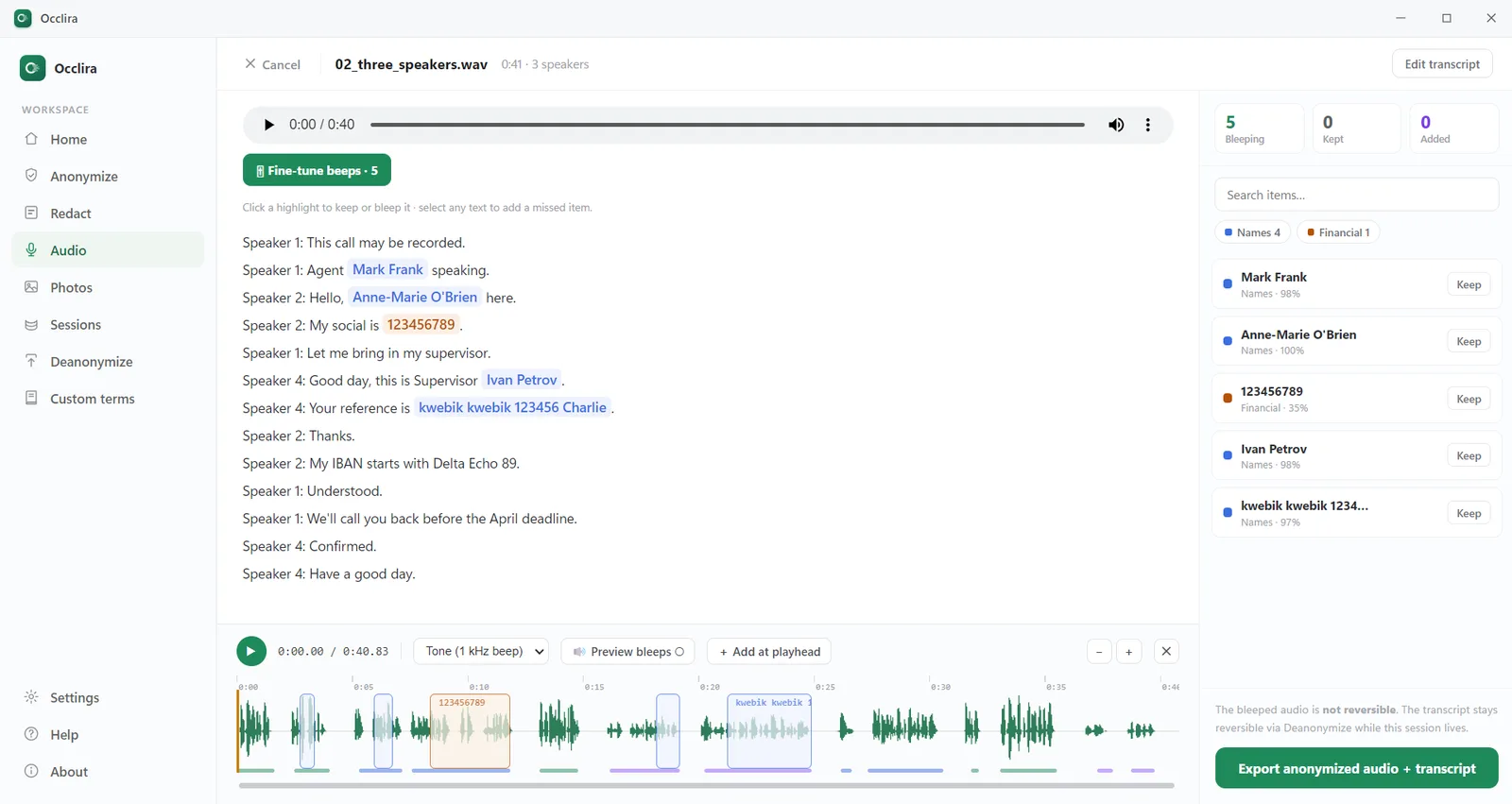
What audio redaction does to a recording
Redacting a document means removing text. Redacting audio means acting on the waveform: the seconds in which a name or number is spoken are overwritten with a tone or with silence, so the identifier can no longer be heard on playback. A tone tells the listener a deliberate redaction was made; silence is quieter but can be mistaken for a dropout. Masking a name in the transcript does nothing to the recording; share the audio and the name is still audible.
Specifications and limits
- Speech models: OpenAI’s Whisper (MIT-licensed, via faster-whisper) or NVIDIA’s Parakeet (CC BY 4.0; 25 European languages in the model, of which the app exposes ten), downloaded once and run offline. (Sources: Whisper; Parakeet TDT 0.6B v3.)
- Transcription languages: auto-detect, or English, German, French, Spanish, Italian, Russian, Ukrainian, Polish, Dutch and Portuguese.
- Speaker separation on-device; speaker count detected automatically or set by you.
- Detects: names, phone numbers, addresses, dates, and account, ID or card numbers, each with timestamp and confidence score; select any word it missed to add it. Detection works from the transcript, so a name the speech model mishears will not appear in the list, which is why the review step and the playback check in step 6 are part of the method. We publish what the detector scores on text: F1 ≈ 0.90 across 200 synthetic legal documents. Audio is harder than that figure, not easier; transcription adds its own errors before detection sees a word.
- Redaction: 1 kHz tone or silence, 0.15 s of padding on either side. The padding covers whatever else falls in those fractions of a second, including another speaker talking over the name.
- What it does not do: it overwrites segments. It does not alter pitch, disguise a voice or change who a listener can recognise. Where the voice itself identifies the speaker, releasing the transcript instead of the audio is often the safer call.
- Output: mono 16 kHz WAV plus a .txt transcript; the audio is irreversible, the transcript restorable from a local mapping for 7 days by default.
- Input: MP3, WAV, M4A, FLAC, OGG, OPUS, WEBM, AAC; up to 1 GB per file, 20 files per batch.
- First run: a one-time download of the detection model (about 2 GB), the speech model you pick and a speaker-separation model; after that everything runs offline. Transcription speed depends on your machine.
- License: one-time, per seat (€149 for one machine; team bundles on the pricing page). Node-locked to one device at a time (deactivate to move machines); updates are free within the major version. 14-day trial and a 14-day money-back guarantee. Windows and macOS on Apple Silicon only: no Intel Mac and no Linux build.
Audio redaction software compared (vendor-published, August 2026)
| Tool | Where the audio is processed | Pricing model | Automatic detection of spoken PII | Built for |
|---|---|---|---|---|
| Occlira | Your computer (Windows, macOS on Apple Silicon) | One-time license per seat (from €149); no per-minute or subscription fees | Yes, read off the on-device transcript (speaker separation; transcription in 10 languages) | Individuals and small teams: legal, HR, research, journalism, clinics |
| CaseGuard Studio | Your computer (Windows); on-premises and air-gapped deployments, though CaseGuard says transcription is unavailable on its offline keys | Per user per month, billed annually (Media Suite $299, Ultimate $379) | Yes | Law enforcement first; 14 listed industries including call centres and healthcare |
| VIDIZMO Redactor | Cloud, on-premises or air-gapped | Not published | Yes (82 languages, speaker diarization) | Criminal-justice agencies, CJIS deployments |
| Sighthound Redactor | Your computer or your own server: desktop, on-premises, offline or air-gapped deployments (the vendor says it is not a public SaaS app) | Published: Pro desktop $2,500 per year; Server $3,500 per year plus $500 per extra user (up to 5); Enterprise on quote | No: transcript keyword search; its auto-detect covers heads, plates, screens and documents, not speech | Law enforcement, FOIA and public-records offices, legal and corporate security teams |
| Axon Redaction Assistant (in Axon Redaction Studio) | Cloud only, inside Axon Evidence (“no on-premise hardware is required”) | Not published; a premium add-on, quote from Axon | Yes, since March 2026: Audio PII flags names, dates, addresses, emails, phone and national-ID numbers in the transcript | Law enforcement agencies and attorneys |
| Veritone Redact | Cloud SaaS hosted in AWS GovCloud or Azure Government; no on-premises option stated | Quote-only on veritone.com; its AWS Marketplace listing sells hour packages (24 h for $2,400 up to 5,000 h for $250,000, 12-month terms) | Yes: detects speech and PII from the transcript, and adds AI voice masking | Government agencies (the vendor cites 300+), law enforcement, courts, legal teams |
| Secure Redact (Pimloc) | Cloud | Credits (1 credit = 5 min of audio): Basic £59/month with 10 credits (£49 billed annually); Pro £99/month with 20 credits (£89 annually); top-ups £6.50 and £5.50 per credit | Yes | Law enforcement, public records |
| Reduct | Cloud | Per editor per month ($40 Professional is the first tier with audio redaction); pooled transcription hours, overages charged separately | Search-based, not automatic | UX research, media |
| Descript | Cloud (web and desktop client) | Per person per month ($16–$50 billed annually; $24–$65 monthly) | No (no redaction feature; you silence or cut a word by editing the transcript) | Podcasts and video |
| Audacity, Adobe Audition | Your computer | Free (Audacity); Creative Cloud subscription (Audition) | No (fully manual) | Audio editing |
Sources: CaseGuard pricing and CaseGuard FAQ on local installation, VIDIZMO Redactor, Sighthound Redactor with its pricing and FAQ, Axon Redaction Assistant and Axon release notes, March 2026, Veritone Redact, its government page and AWS Marketplace listing, Secure Redact pricing, Reduct pricing, Descript pricing. Prices change; check the vendor before buying. Audacity and Audition per Audacity (free, open source) and Adobe Audition (Creative Cloud subscription).
VIDIZMO, Axon and Veritone are built for agencies processing evidence at volume. Secure Redact sells by the minute: its published Basic tier is ten credits, fifty minutes of audio a month, before top-ups.
CaseGuard Studio and Sighthound Redactor install on your own machines, and VIDIZMO offers on-premises and air-gapped deployment; Axon and Veritone are cloud platforms for agencies; Secure Redact is a cloud audio redaction service; Reduct and Descript are cloud transcript editors first. Audacity and Audition are desktop tools too, but every bleep is found and placed by hand.
The table does not show two things. CaseGuard Studio, VIDIZMO Redactor, Sighthound Redactor, Axon, Veritone, Secure Redact and Reduct redact video as well as audio, which Occlira does not; Descript has no redaction feature at all, and is here because people reach for it first. VIDIZMO adds case workspaces, an audit trail and CJIS-compliant deployment, and CaseGuard adds a tamper-proof audit trail and markets CJIS compliance for its on-premises install. If you need any of that, buy one of them.
Occlira is the narrower tool: audio only, on a desktop, for one person or a small team, with automatic detection and a price that does not grow with the minutes.
Who needs audio redaction, and which rule applies
- Public records: 911 calls and body-cam audio. Florida makes “the name, address, telephone number, or personal information about, or information which may identify any person requesting emergency service” confidential and exempt from release. Washington presumes body-camera recordings of homes, minors, the deceased and domestic-violence or sexual-assault victims to be highly offensive to disclose, and lets agencies charge for “redacting, altering, distorting, pixelating, suppressing, or otherwise obscuring” them. (Sources: Fla. Stat. §365.171(12)(a); RCW 42.56.240(14), (14)(f).)
- Criminal-justice information. Agencies that handle it must also meet the FBI’s CJIS Security Policy, now at version 6.1 (25 June 2026; FBI audits still run against v5.9.5 until 31 March 2027), which imposes a full set of controls on any cloud provider that stores, processes or transmits that data. Vendors sell CJIS-aligned cloud and on-premises deployments; keeping the file on a machine the agency already controls takes a third-party provider out of that chain, though the agency’s own obligations for the device, the media and access to it still apply. (Source: CJIS Security Policy v6.1; Texas DPS, on the audit baseline.)
- Call centres: call recording redaction and card details. The PCI Security Standards Council says storing card validation codes in “.wav or .mp3 files” after authorisation breaches Requirement 3.3.1 of PCI DSS, the card industry’s security standard. Where technology exists to suppress or redact audio during data entry, “it should be enabled”; anything captured anyway must be securely deleted straight after authorisation, or, where that is not technically feasible, protected by documented compensating controls. Pause-and-resume handles new calls; redaction handles the archive you already have. The GDPR adds data minimisation and storage limitation (Article 5(1)(c) and (e)) for every other identifier on the call. (Sources: PCI SSC FAQ 1210, updated June 2025; GDPR Art. 5.)
- Legal: subject access requests and disclosure. When a recording requested under a data subject access request (DSAR) also captures another person, the ICO says you need not disclose what would reveal information about that person, unless they consent or disclosure is reasonable without consent. You “must still provide as much of the requested information as you can, without disclosing the third party’s identity.” Bleeping the third party’s details does both. (Source: ICO.)
- Research: interview recordings for ethics boards and archives. The UK Data Service notes that “bleeping names or altering voice pitch may reduce identification risk.” It also warns that “speech patterns or contextual information may still enable identification,” and that sharing anonymised transcripts may be more appropriate than releasing the audio itself. (Source: UK Data Service.)
- Healthcare: session and consultation recordings. HIPAA’s Safe Harbor list of 18 identifiers includes “biometric identifiers, including finger and voice prints.” The transcript can qualify as de-identified once all 18 identifiers are gone (dates, ages over 89, small geographic areas and more, not just names). The second condition, at §164.514(b)(2)(ii), is that you have no actual knowledge that what is left could still identify the person; it is half the Safe Harbor test and the half people forget. The audio is harder: a recording from which a patient’s voice could be matched sits close to that identifier, which is one reason to release the transcript rather than the recording. (Source: 45 CFR §164.514(b)(2).)
- Journalists and HR. No statute requires it, but the sensible rule is to take a source’s or a witness’s name, employer and phone number out before the recording goes to an editor, a panel or a lawyer.
How to bleep words out of audio by hand in Audacity or Adobe Audition
- Listen for the name and select that region in the waveform.
- Cover it. Audacity: keep the region selected and use Generate → Tone, setting the frequency to 1000 Hz (the box defaults to 440). Generating over a selection replaces it; generating with nothing selected inserts the tone and pushes every later timestamp out of place. Edit → Remove Special → Silence Audio is the quiet version. Adobe Audition: Effects → Generate → Tones over the selection.
- Export, then listen to the exported file again at that point.
Adobe Audition, Generate Tones; Audacity manual, Tone and Remove Special → Silence Audio.
The method fails on length. A 90-minute interview or a folder of call recordings means hunting for every occurrence by ear, and the name said quietly at minute 72 is the one you miss. Transcript-driven detection turns that into a list: every occurrence with its timestamp, reviewed once, bleeped on confirmation.
Is a voice recording personal or biometric data?
A recording is personal data whenever the speaker can be identified from it. Whether it is special-category biometric data depends on what you do with it. The ICO: “not all biometric data is automatically special category biometric data. It only becomes this if you use it to uniquely identify someone”, for example by building a voiceprint. Processing of that kind is high-risk, normally needs a data protection impact assessment (DPIA), and requires an Article 9 condition such as explicit consent on top of an Article 6 lawful basis. (Source: ICO biometric guidance.)
Consent and recording laws
Under the GDPR you need a lawful basis to record and transcribe someone. In the United States, federal law allows recording with one party’s consent, but the Reporters Committee for Freedom of the Press counts about eleven states that primarily require all-party consent, and six more that apply it in specific situations:
- All-party: California, Delaware, Florida, Illinois, Maryland, Massachusetts, Michigan (at least for recordings by someone not in the conversation), Montana, New Hampshire, Pennsylvania, Washington.
- Conditional: Connecticut and Nevada for phone calls; Oregon and Missouri for in-person conversations; Hawaii and Maine in particularly private places. Secondary guides disagree at the edges of this group, so read your own state’s statute before relying on any summary, including this one.
Under California’s Invasion of Privacy Act a person recorded without consent can sue for $5,000 per violation or three times actual damages, whichever is greater. On an interstate call, assume the stricter law applies. (Sources: RCFP Reporter’s Recording Guide; Cal. Penal Code §637.2.)
Can transcription services see or train on my audio?
Often, yes. The Freedom of the Press Foundation’s guide to transcription tools, updated in June 2026, says: “each of these companies has the technical ability to access the audio you’ve uploaded.” Rev routes work to “more than 60,000 freelance manual transcriptionists” and “by default, Rev does leverage user data to train its AI models, though customers may opt out at [email protected].” For the most sensitive recordings the guide advises severely limiting who has access to the audio and considering manual transcription; for automated work it points to running OpenAI’s Whisper on your own device. (Source: Freedom of the Press Foundation, updated 2 June 2026.)
Otter.ai is defending a consolidated privacy class action in the Northern District of California. On 13 August 2026 Judge Eumi K. Lee let the federal wiretap and California eavesdropping claims proceed, along with the Illinois voiceprint claims, while dismissing the computer-intrusion counts with leave to amend. The order’s reasoning: “Because Plaintiffs plausibly allege that Otter independently collects, retains, and uses communications for its own commercial purposes, they have sufficiently alleged that Otter is a third-party eavesdropper under section 631.” No liability has been found; the claims turn on what a transcription service may do with the audio it holds. (Sources: Metropolitan News-Enterprise, 17 August 2026; ID Tech Wire on the Illinois claims.)
Audio-redaction checklist
Before you share, archive or disclose a recording:
- Confirm consent or another lawful basis for the recording, and check the recording law of every state or country involved
- Keep the raw recording off cloud transcription services; transcribe on your own device
- Review every detected item, and add what the detector missed
- Bleep or silence the audio AND mask the transcript; a masked transcript alone leaves the name audible
- Play the exported copy back at each flagged timestamp
- Rename the released copy and strip embedded metadata: “Smith-interview-2026-03-11.wav” identifies the person you just bleeped
- For a public-records release, DSAR or disclosure, export a fresh copy and keep the reversible transcript mapping private
- Card payments: PCI DSS forbids keeping card validation codes after authorisation, so suppress them at capture and use redaction for the archive you already hold
- Where the voice itself could identify the speaker, treat the recording as identifying even after names are bleeped
- Log what you removed and why, and keep the unredacted original under your normal retention rule; the released copy is a new record
Frequently asked questions
Software that finds the identifying details spoken in a recording (names, phone numbers, addresses, account or card numbers) and removes them from the audio by bleeping or silencing those segments, usually while masking the same words in a transcript. Occlira runs on your own computer for a one-time fee per seat.
Cloud and agency tools are priced per user per month or per credit of media. CaseGuard’s media suites are $299 and $379 per user per month, billed annually, as of 30 August 2026. Secure Redact’s Basic top-ups were £6.50 per credit, and one credit covers five minutes of audio. Sighthound publishes $2,500 a year for its desktop license. Occlira is a one-time license per seat, €149 for one computer at the time of writing, with a 14-day free trial and no per-minute charge, because the processing runs on your own hardware.
Not directly in Occlira, which processes audio files only. Export the video’s audio track as a WAV or MP3 (most editors and free tools do this), redact it, and re-attach it in your video editor. If you also need faces or screens blurred, you need a video redaction tool.
Usually, yes. State public-records laws such as Florida’s and Washington’s make a caller’s identifying details confidential, exempt from release, or both. Where the details are confidential, an agency must remove them before it releases the recording; where they are only exempt, it may withhold them at its discretion. Florida, for example, makes confidential and exempt the name, address, phone number and other identifying details of a person requesting emergency service; Washington presumes body-camera footage of homes, minors, the deceased and domestic-violence or sexual-assault victims to be highly offensive to disclose and lets agencies charge for redaction.
Redaction is the fallback, not the rule. PCI DSS Requirement 3.3.1 bars keeping card validation codes after authorisation, so suppress them at capture; for recordings you already hold, bleeping the seconds in which the code is read out is one way to meet the deletion requirement. Record it in your PCI DSS procedures and confirm the approach with your assessor; the call-centre section above has the Council’s wording.
Not the audio. Occlira overwrites the samples for each redacted segment and writes a new file, so the exported recording cannot be un-bleeped, which is what you want for a copy you disclose. The anonymized transcript is a separate file and can be restored from the local mapping (kept 7 days by default) if you need to check an original value before you finish.
Yes, once the models are in place. The detection model, the speech model and the speaker-separation model download once, then run on your computer; recordings and transcripts are never uploaded. After that the app goes online only to re-check the license briefly on launch (it keeps working offline for a grace period) and to look for updates. Every call it makes is itemised on our data-practices page.
MP3, WAV, M4A, FLAC, OGG, OPUS, WEBM and AAC, up to 1 GB per file and 20 files per batch. Transcription can auto-detect the language or be set to English, German, French, Spanish, Italian, Russian, Ukrainian, Polish, Dutch or Portuguese. The redacted audio is exported as a mono 16 kHz WAV; the transcript as a text file.
By hand: find the name by ear, select that region in an editor such as Audacity (Generate → Tone) or Adobe Audition (Effects → Generate → Tones), and cover it with a tone or silence. Automatically: transcribe the recording, let the software list every spoken name with its timestamp, confirm the list, and it bleeps each occurrence. Occlira does the second, on your own computer.
Under the GDPR a voice recording is personal data whenever the speaker can be identified from it, and it becomes special-category biometric data only when it is technically processed to identify or verify someone (the biometric section above quotes the ICO on this). Under HIPAA’s Safe Harbor rule, “voice prints” are one of the 18 identifiers, so a recording from which a patient’s voice could be matched sits close to that line even after names are bleeped. That is one reason to release the transcript rather than the audio.
About eleven on the Reporters Committee for Freedom of the Press’s count, California, Illinois, Massachusetts, Pennsylvania and Washington among them. The full list, with Michigan’s caveat, is in the consent section above. Six more states apply all-party consent only in specific situations: phone calls, in-person conversations, or particularly private places. Federal law and the remaining states need one party’s consent, and on an interstate call the stricter state is the safe assumption.
If the recording also contains another person’s data, ICO guidance says you need not disclose what would reveal information about that other person, but you must still provide as much of the requester’s data as you can. Bleeping the third party’s details is how you do both with one file; the legal section above has the wording.
Try it on one recording
Transcribe locally, bleep the personal data, share safely. Free for 14 days on Windows and macOS (Apple Silicon).
More: for healthcare & therapists · for law firms · what is PII? · how your data is handled