How to anonymize text before ChatGPT (and get the real names back)
The reliable way to use ChatGPT on text that names real people is to anonymize it first, prompt with placeholders, and restore the real values afterwards, all on your own computer. The method is three steps; the rest of this page is how to do it by hand and what to strip.
Jump to: the three steps · video · what to remove · by hand · why ChatGPT’s settings aren’t enough · tools compared · GDPR · FAQ
<PERSON_1> before you paste, send that version, and swap the real values
back into the reply on your own machine. Occlira does the finding, swapping and restoring locally: from a file on Windows or macOS (Apple Silicon), or straight from the ChatGPT box with the Windows Chrome extension.
How to anonymize text before ChatGPT in three steps
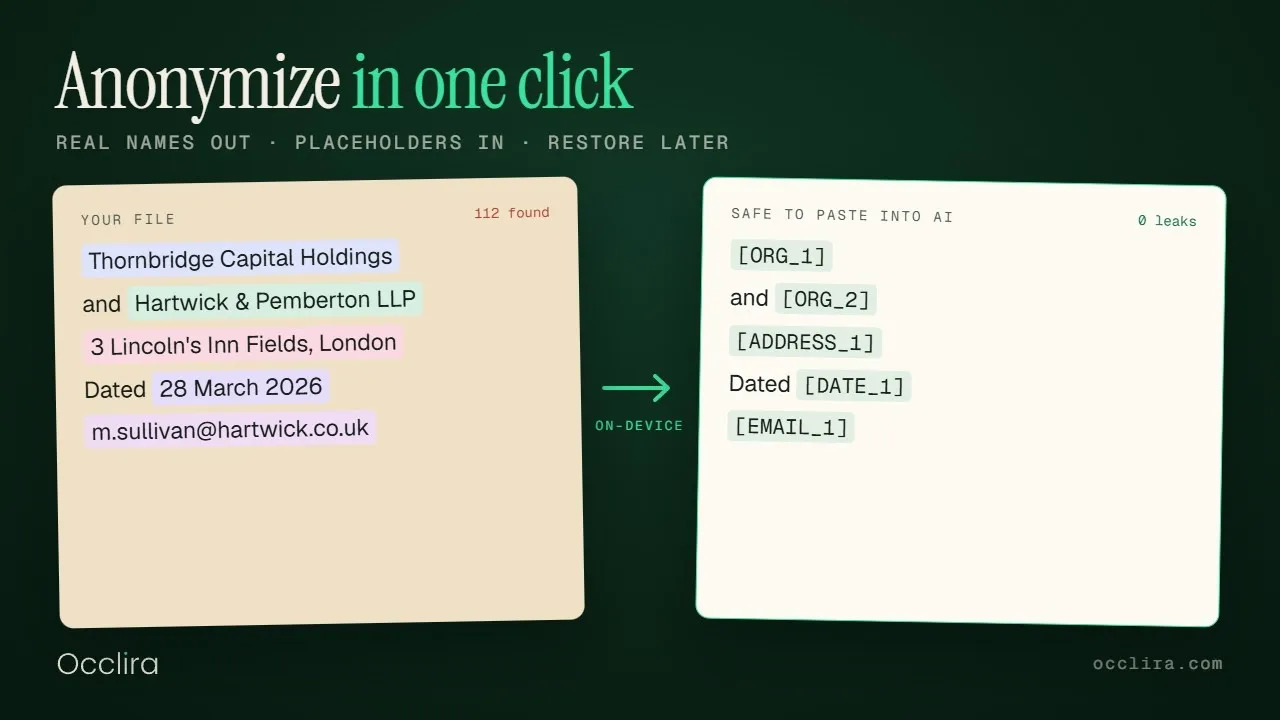
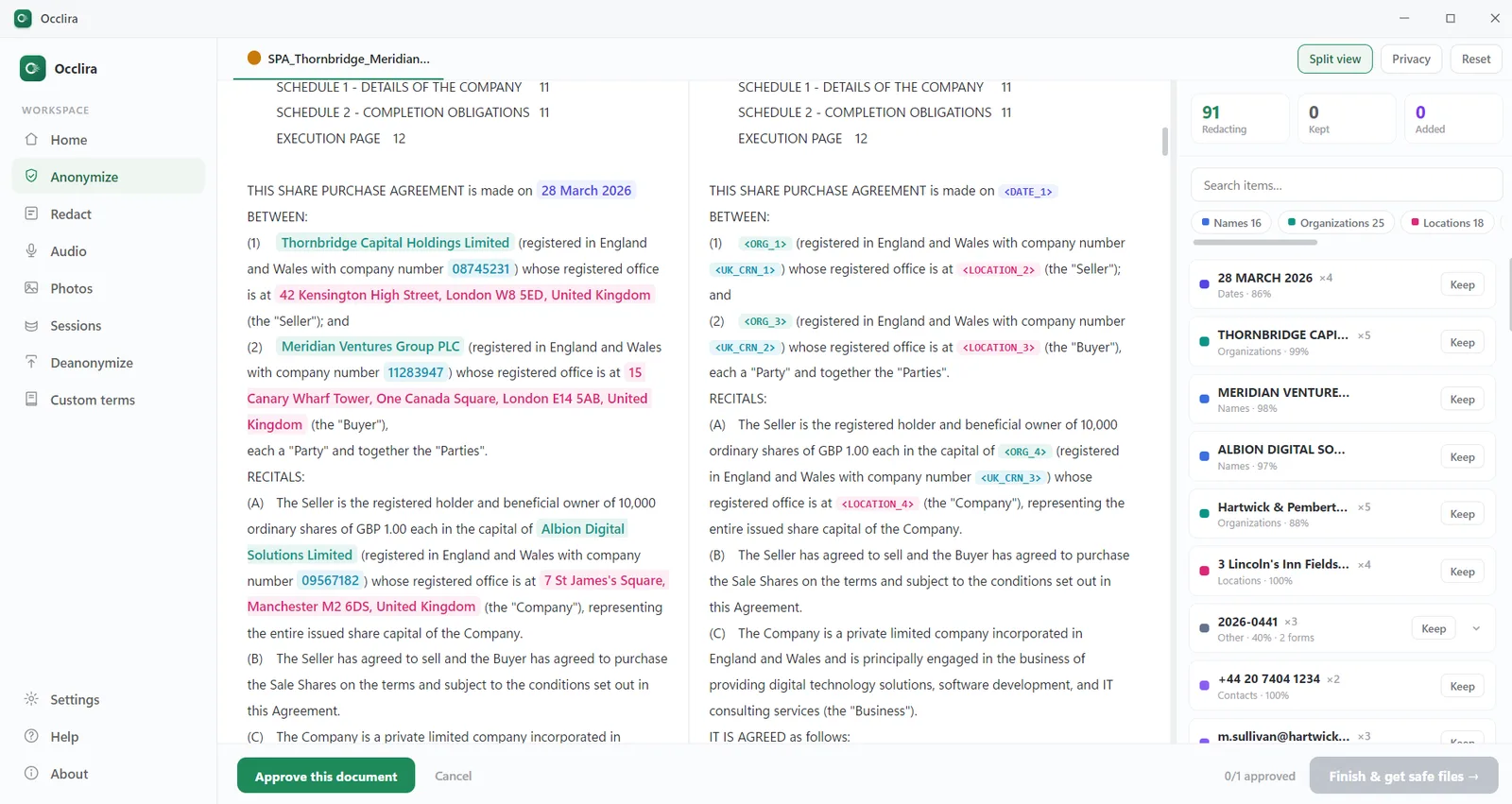
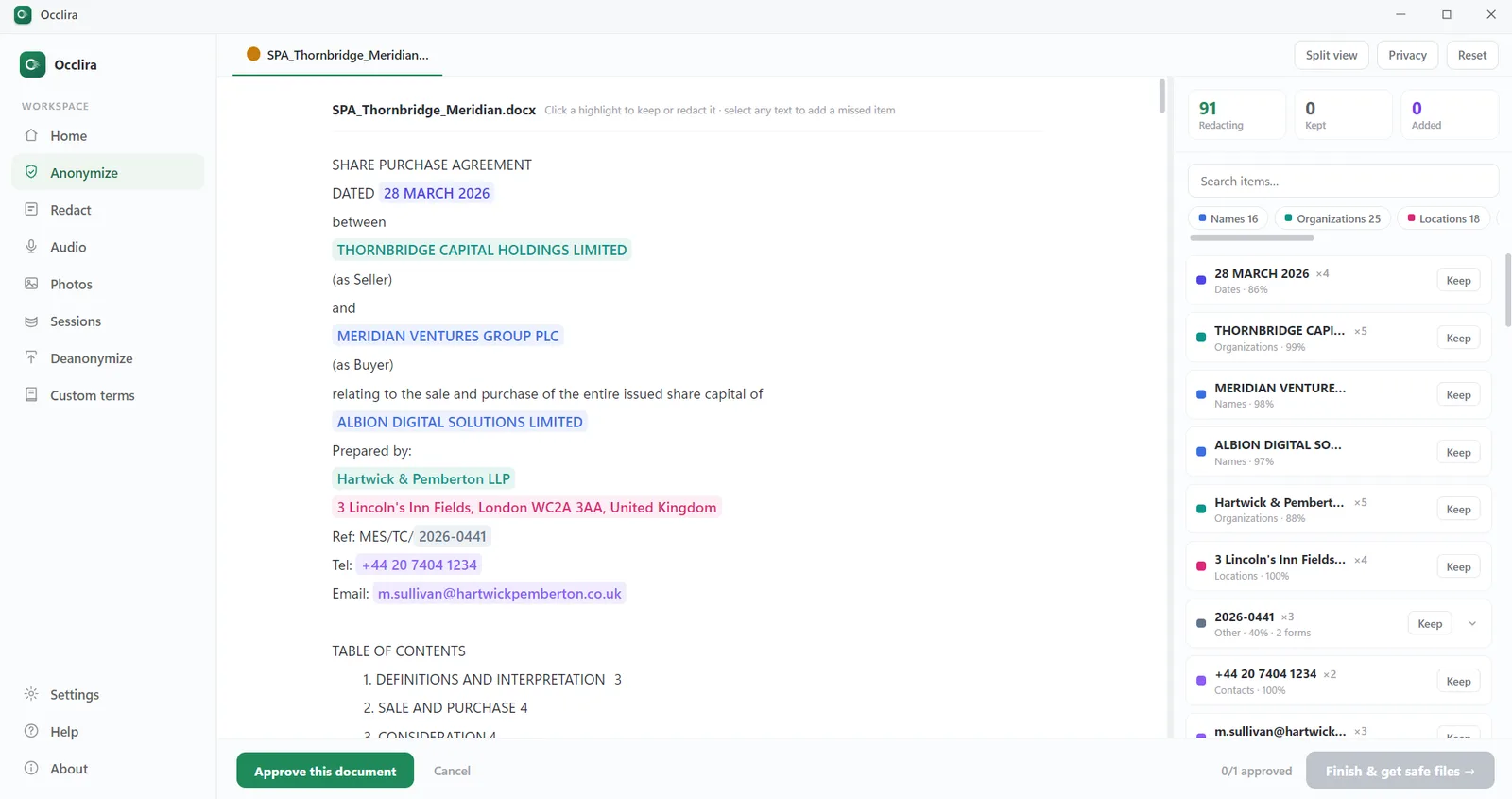
- Replace every identifier with a placeholder, on your own computer. Whatever tool you use, the rule is that no real name, address, phone number, email, ID or account number leaves your machine. With Occlira: open the desktop app (Windows, or macOS on Apple Silicon) and drop in your file. The app takes files, not pasted text, so save a typed paragraph as a .txt first. Occlira lists each detected item with its type and a confidence score; you tick Keep or Redact on each one and select anything it missed. On Windows there is a shortcut: the Chrome extension adds an Anonymize button to the ChatGPT, Claude and Gemini chat boxes and hands the text to the app on the same PC.
- Send the placeholder version. What you send has a consistent tag for each person, company and account: <PERSON_1>, <ORG_1>, <IBAN_1>. In the browser the extension replaces the text in the chat box; from the desktop app press “Copy anonymized text” and paste. Add one line to the prompt so the reply comes back restorable (the exact wording is under the steps). Without it, models sometimes turn <PERSON_1> back into “the client”, and then there is nothing to restore. The mapping from placeholders to real values is a file in a local folder on your computer, kept 7 days by default (Settings → Privacy & data → Mapping retention).
- Put the real values back, locally. In the browser, every reply that contains placeholders gets a “Restore real values” button; the restored text exists only on your screen. From the desktop app, save the reply as a text or Word file, open the Deanonymize screen and drop it in; Occlira writes a restored copy.
The line to paste with your text. Keep every placeholder exactly as written (<PERSON_1>, <ORG_1>, …). Do not expand, replace, translate or invent names, and use the same placeholders in your answer.
If the reply comes back with “the client” or “the company” instead of the placeholders, do not try to restore
it: ask again with the placeholders, or give the model its own reply and ask it to put
<PERSON_1> where it wrote the paraphrase. Restoring only works on text that still carries
the tags.
The extension is free to add to Chrome and included in the license; on a Mac, use the desktop app.
A worked example (fictional data)
| You have | Draft a polite payment reminder to Ms Marta Lindqvist at Nordvik Consulting AB ([email protected], +46 70 123 45 67). The invoice for SEK 48,000 has been overdue since 12 May 2026; payments go to IBAN SE45 5000 0000 0583 9825 7466. |
| ChatGPT sees | Draft a polite payment reminder to Ms <PERSON_1> at <ORG_1> (<EMAIL_1>, <PHONE_1>). The invoice for SEK 48,000 has been overdue since <DATE_1>; payments go to IBAN <IBAN_1>. |
| ChatGPT replies | Dear Ms <PERSON_1>, I hope this finds you well. Our records show that the invoice for SEK 48,000 issued to <ORG_1> has been outstanding since <DATE_1>… |
| You get back (restored locally) | Dear Ms Marta Lindqvist, I hope this finds you well. Our records show that the invoice for SEK 48,000 issued to Nordvik Consulting AB has been outstanding since 12 May 2026… |
The model needed the structure (one person at one company owing one amount since one date) and the typed placeholders carry exactly that. The amount, the currency and the request itself stay as they are.
What to remove, and what to keep
- Direct identifiers: names, email addresses, phone numbers, postal addresses, ID, passport and case numbers, account numbers and IBANs, dates that pin down a person (birth, admission, invoice).
- Quasi-identifiers: a rare job title plus a city, a diagnosis plus a date, any one-of-a-kind combination of facts. No name is needed to re-identify someone from these.
- Hidden data in files: comments, tracked changes, author and last-modified-by properties, headers and footers, text under black boxes in PDFs.
- Keep: amounts, quantities, dates that only matter relative to each other, and the substance of the request. That is what the model needs to help you.
Does ChatGPT still work with placeholders?
Measurably, yes. A 2025 study of personal writing tasks reported “minimal response quality loss (roughly 1 point on a 10-point scale) while achieving 97%–99% entity masking.” An earlier case study found classification essentially unchanged on pseudonymized text (an F1 score of 88.4 on the original against 88.1 pseudonymized) and summarization quality falling most when the anonymization was inconsistent, by roughly one to seven ROUGE-1 points depending on the method. (Sources: Balancing Privacy and Utility in Personal LLM Writing Tasks, ACL PrivateNLP 2025; Privacy- and Utility-Preserving NLP with Anonymized Data, 2023.)
Keep the placeholders consistent and typed (<DATE_1> tells the model it is a date), and leave
the non-identifying substance alone.
Can I just use find-and-replace?
For one short paragraph with one name, yes. Past that, hand-anonymization fails in predictable ways.
- You miss things. A surname mid-sentence, a phone number in a table, a case reference in a footer. Detection that reads the whole text and shows you a list to confirm is more reliable than scanning by eye, and a half-anonymized prompt gives a false sense of safety.
- Your tags drift. “Client A” on page one becomes “the client” on page three, and the model loses
track of who is who. Consistent placeholders (the same
<PERSON_1>every time) keep the answer usable and make restoring possible. - Files carry hidden identifiers. Microsoft’s own Document Inspector lists what a Word file can contain beyond the visible text: “Comments, Revisions, Versions, and Annotations,” “Document Properties and Personal Information,” “Headers, Footers, and Watermarks,” “Hidden Text.” Find-and-replace touches none of it. PDFs are worse: text under a black box is often still there to copy (see why black boxes aren’t redaction). (Source: Microsoft Support.)
- Names aren’t the only identifiers. Latanya Sweeney’s classic result, on 1990 census data: ZIP code, birth date and sex together likely identify 87% of Americans. Golle’s 2006 re-analysis on 2000 census data put it nearer 63%: still most people, from three facts and no name at all. (Sources: Sweeney, 2000; Golle, 2006.)
Doing it by hand, step by step
- Work on a copy. In Word, set Review → Tracking to “No Markup” and accept or reject the changes before you copy anything; in recent Word versions, deleted text can copy out with the markup displayed (reported on Microsoft Q&A). Then paste into a plain-text editor, which drops comments and document properties.
- Write your tag table before you start (Marta Lindqvist =
<PERSON_1>, Nordvik Consulting AB =<ORG_1>) and keep it in a file you delete afterwards. - Replace every occurrence: surnames on their own, initials, possessives, and anything in tables, headers and footnotes.
- Then blunt what identifies without a name. “The only paediatric cardiologist in Ålesund” becomes “a hospital consultant”; an exact birth date becomes a year; a street address becomes a city. If a detail is not needed for the answer you want, delete it rather than replace it. That is the only reliable answer to the 87% problem above.
- Read the placeholder version once before you send it. Search for “@” to catch emails, then for long digit runs:
[0-9]{5,}in any editor with regular expressions, or the same pattern in Word’s Find with “Use wildcards” ticked. Digit runs alone are not enough: +46 70 123 45 67 contains no run of five, so also search for “+” and, in a regex editor, for[0-9]{2,}([ .-][0-9]{2,}){2,}, which catches numbers written in groups. Finally scan the capitalised words mid-sentence by eye; that is where surnames survive. - In your document, replace the placeholders by hand from your tag table.
Why ChatGPT’s own settings aren’t enough
Everything you paste reaches OpenAI’s servers, and on the personal plans (Free, Go, Plus and Pro) it is used to train models unless you switch that off. The settings reduce the exposure without removing it.
- The training opt-out (Settings → Data controls → “Improve the model for everyone”) applies to new conversations only: “Once you opt out, new conversations will not be used to train our models.” Giving a thumbs-up or thumbs-down on a reply can still send that whole conversation for training. (Sources: OpenAI; OpenAI Help Center; What is ChatGPT Go?.)
- Temporary Chat is not used for training, but “for safety purposes we may still keep a copy for up to 30 days,” and such chats “may be reviewed only to monitor for abuse.” (Sources: Temporary Chat FAQ; Data Controls FAQ.)
- Deleting schedules removal within 30 days, except for chats “already de-identified and disassociated from you” or held for security or legal reasons. A court can override the policy. In the New York Times case, OpenAI was ordered on 13 May 2025 to preserve every consumer chat that would otherwise be deleted, Temporary Chats included, until 26 September 2025. In a separate order, upheld on 5 January 2026, OpenAI was told to hand the plaintiffs 20 million de-identified consumer conversations sampled from 2022 to 2024. (Sources: OpenAI Help Center; OpenAI on the preservation order; OpenAI on the 20 million logs; National Law Review, January 2026.)
- Sharing has its own accidents. At the end of July 2025, nearly 4,500 ChatGPT conversations that users had shared with a “Make this chat discoverable” checkbox turned up in Google results. OpenAI removed the feature, saying it “introduced too many opportunities for folks to accidentally share things they didn’t intend to.” Three weeks later, more than 370,000 Grok chats were found indexed by search engines. (Sources: Fast Company, 30 July 2025; Search Engine Land, 1 August 2025; Fortune, 22 August 2025.)
The settings are also the wrong size of control for the traffic they are meant to govern. Cyberhaven’s 2026 report found 39.7% of all data movements into AI tools involve sensitive data, with the average employee entering sensitive data once every three days. IBM’s 2026 Cost of a Data Breach study found the share of security incidents involving shadow AI had more than doubled year on year, to 43%; in the 2025 edition, one organization in five said it had already been attacked through shadow AI. (Sources: Cyberhaven, 5 February 2026; Cybersecurity Dive on IBM 2026; on IBM 2025.)
Nor does talking a problem through with a consumer AI tool create anything like a privileged record. In February 2026 Judge Rakoff of the Southern District of New York held, in United States v. Heppner, that a self-represented defendant’s prompts to a public AI platform and the answers it returned were protected by neither attorney-client privilege nor the work-product doctrine. The tool is not counsel, and nothing was prepared by or at the direction of counsel. The court also pointed to the platform’s privacy policy, which let it collect inputs and outputs and disclose them to third parties, including government regulators. The lesson generalizes past criminal defence: text you hand a consumer assistant is a record you cannot claw back, so the sensitive part should not be in it. (Source: Covington, Inside Privacy, on United States v. Heppner, S.D.N.Y., ruled 10 February 2026, memorandum 17 February 2026.)
What happens to your text after you send it is covered in does ChatGPT save your data?; this page is about keeping the sensitive part out of it.
Doesn’t OpenAI already anonymize what I paste?
Not in a way you control. OpenAI’s privacy policy says it “may use Content you provide us to improve our Services, for example to train the models that power ChatGPT.” OpenAI adds that it “take[s] steps to reduce the amount of personal information in our training datasets.” That happens on its servers after your text has arrived, covers training only, and is not a guarantee. (Sources: OpenAI privacy policy; OpenAI Help Center.)
In April 2026 OpenAI open-sourced Privacy Filter, a small masking model that runs in a browser or on a laptop; OpenAI says it uses a fine-tuned version in its own workflows. It is a useful component, and OpenAI describes it as “a redaction and data minimization aid, not an anonymization, compliance, or a safety guarantee.” It also under-detects uncommon names, can lose accuracy on non-English text and non-Latin scripts, is not a feature you can switch on in ChatGPT, and cannot put the real values back. (Sources: openai/privacy-filter; OpenAI, April 2026.)
What about uploading a Word or PDF file instead of pasting text?
On plans that have the Library, an uploaded file is saved there and stays there when you delete the chat (you have to delete it from the Library as a separate step). A file also carries the hidden layer described above, so the visible text is not the whole exposure. (Sources: OpenAI Help Center, file storage and Library and chat and file retention policies.)
Without a tool, the free route is the one in Doing it by hand: run Word’s Document Inspector (File → Info → Check for Issues → Inspect Document) to strip comments, tracked changes and properties, accept or reject the markup, then save as plain text and anonymize that. You lose the formatting; you keep the file’s hidden layer out of the upload. (Step by step: how to remove metadata from a Word document.) Occlira does the same work on the file itself and returns a cleaned file or anonymized text, depending on the format:
- Word and Excel come back as Word and Excel with the formatting intact, personal data replaced in the body, headers, footers and footnotes.
- Tracked changes are accepted with the deleted text removed; comments and their author list are stripped; document properties (author, company, last-modified-by) are cleared.
- PDFs, emails and scanned pages (read with on-device text recognition) come back as clean anonymized text, the version you paste or upload.
- Audio recordings and photos are covered too: see audio redaction and photo redaction.
Can ChatGPT re-identify someone from anonymized text?
Not from the placeholders. <PERSON_1> says only that a person was named there: no name, and no way back without the mapping, which never leaves your machine. The risk is what the surrounding text still says. ETH Zurich researchers showed that large language
models can infer a writer’s location, income or sex from ordinary text with “up to 85% top-1 and 95% top-3
accuracy.” They concluded that “common mitigations, i.e., text anonymization and model alignment, are currently
ineffective at protecting user privacy against LLM inference.”
(Source:
Beyond Memorization, ICLR 2024.)
A separate February 2026 study used LLM agents to link pseudonymous online accounts to real identities at “up to 68% recall at 90% precision compared to near 0% for the best non-LLM method”. On its two smaller Reddit datasets the same agent still managed 25–52% recall at 72–90% precision. The Cloud Security Alliance draws the practical conclusion: treat “anonymized” data as presumptively re-identifiable and minimize what you send. (Sources: Large-scale online deanonymization with LLMs, February 2026; CSA research note, 7 March 2026.)
Let the detector take the direct identifiers, then use the review step for the rest. No detector is complete: unusual names, transliterated names and non-English passages are where detectors lose recall, Occlira included.
Which tools anonymize text for ChatGPT?
The options, as published on each vendor’s own pages in August 2026:
| Approach | Runs where | Restores the originals? | Files, hidden data, media | Notes |
|---|---|---|---|---|
| Find-and-replace by hand | Your editor | Manual, if you kept a list | No: visible text only | Misses names mid-sentence and in tables; tags drift; hidden data (comments, tracked changes, properties) untouched |
| Browser tools such as PrivacyScrubber and Nonymize | PrivacyScrubber: in the browser tab. Nonymize: on its servers, which pass the text to third-party model providers; its privacy policy names Novita/DeepSeek, Cerebras and Fireworks | PrivacyScrubber: yes, while the tab stays open. Nonymize: no restore step; it exports a replacement key that expires after 7 days | PrivacyScrubber: text, PDFs and spreadsheets (spreadsheets returned as sanitized files); no audio or photos. Nonymize: text, and text extracted from TXT, DOCX or VTT | Nothing to install; the difference that matters is where the text goes: a browser tab you can close, or a vendor’s server. Check each vendor’s current statements before relying on either |
| Developer libraries (Presidio, formerly Microsoft Presidio and now under the Data Privacy Stack project; spaCy scripts) | Your own code | Partly: Presidio’s encrypt/decrypt reverses encrypted values; consistent placeholders and a mapping are yours to build, as it keeps no session state | Images via presidio-image-redactor; no audio | Needs a developer; good for pipelines, not for a Tuesday-afternoon prompt |
| OpenAI Privacy Filter (open-source model, April 2026) | Browser or laptop | None | No | Free, open weights, runs offline; a masking aid with no restore step |
| ChatGPT Business, Enterprise or the API instead of anonymizing | OpenAI’s servers | Not applicable | Files and media are accepted; OpenAI does not document stripping comments, tracked changes or properties before upload, so inspect and clean the file first | The data still leaves your device; Business (formerly Team) and standard-API data were covered by the 2025 preservation order, Enterprise and zero-retention API were not |
| Occlira (desktop app + Chrome extension) | Your computer | Yes for text and documents (local mapping); audio WAV and photo redaction are permanent, though the audio transcript stays restorable while the mapping lasts | Word and Excel cleaned in place (comments, tracked changes, properties); PDF, email and scans returned as clean text; audio and photos | Windows and macOS (Apple Silicon); the extension is Chrome-only, Windows-only, and needs the app running; paid after a 14-day trial (one-time license, €149 for one seat) |
PrivacyScrubber and Nonymize per its product page and privacy policy; Presidio per its anonymizer and image-redactor documentation; Privacy Filter per OpenAI’s model card; ChatGPT business plans per OpenAI, and the preservation-order scope per OpenAI’s account of the NYT litigation.
Is pseudonymized text still personal data under the GDPR?
In your hands, yes, and that is by design. The EDPB’s draft pseudonymization guidelines treat pseudonymized data that could be attributed to a person by use of additional information as information on an identifiable natural person, and therefore personal. On the draft’s reading, that holds even when the data and the key are held by different people. (Source: EDPB Guidelines 01/2025, adopted for consultation 16 January 2025; a final version was still pending in August 2026, and draft anonymisation guidelines are open for comment until 30 October 2026.)
The same guidelines describe pseudonymization as a way “to adhere to the data minimisation principle, to implement data protection by design and by default, or to ensure a level of security appropriate to the risk.”
The Court of Justice narrowed that in September 2025, less than eight months after the guidelines were drafted (EDPS v SRB): pseudonymized data is personal data for the controller holding the key, but for a recipient with no realistic means of re-identification it may not be. The EDPB has not yet issued a final pseudonymization text that reconciles its January 2025 draft with the judgment, though its July 2026 draft anonymization guidelines adopt the Court’s relative approach. (Sources: Future of Privacy Forum on C-413/23 P; EDPB Guidelines 02/2026 on anonymisation, version 1.0, adopted 7 July 2026, consultation open to 30 October 2026.)
For this workflow the distinction cuts the useful way. The copy you send holds no direct identifiers and no key, so the recipient may have no realistic means of re-identification, provided you also stripped the context that could single someone out. The original and the mapping on your machine remain personal data, and your obligations for them are unchanged.
What regulators say about pasting into ChatGPT
France’s CNIL advises (in French) never to share confidential information, personal or corporate, when using a consumer generative-AI service. Australia’s OAIC recommends that organizations “not enter personal information, and particularly sensitive information, into publicly available generative AI tools.” For US lawyers, the bar opinions that followed ABA Formal Opinion 512 are collected in our guide to Opinion 512. (Sources: CNIL, 18 July 2024; OAIC, updated 17 January 2025.)
That is what data minimization looks like at the keyboard. Your other obligations survive it; see use AI without breaking the GDPR.
Does this work with Claude, Gemini and Copilot?
Yes. The extension adds its Anonymize and Restore buttons inside ChatGPT, Claude and Gemini; Copilot has no button, so use the desktop workflow there; the Copilot-specific picture is on is Microsoft Copilot safe?, and Gemini’s on is Google Gemini safe?. That workflow is tool-agnostic: anonymize the file, give any assistant the placeholder copy, restore the reply locally. How the other assistants treat your data is compared in is Claude safe?
Frequently asked questions
Replacing the personal data in your text (names, contact details, ID and account numbers, dates that pin down a person) with neutral placeholders before the text is sent, so the AI provider never receives the real values. Stripping the quasi-identifiers that could point back to someone is still your job.
Treat anything you paste into a cloud AI tool as leaving your control. On the personal plans (Free, Go, Plus, Pro) the content trains OpenAI’s models unless you opt out, and in 2025 a US court ordered OpenAI to preserve chats users had deleted. Removing the personal data first is the one step that doesn’t depend on the provider’s settings.
Deletion is a request, not a guarantee. OpenAI schedules deleted chats for removal within 30 days, except where the chat has already been de-identified and disassociated from you or must be kept for security or legal obligations; the New York Times litigation, covered above, is the standing example of the legal exception.
It helps, but it isn’t anonymization. A Temporary Chat isn’t used for training and isn’t saved to your history, but OpenAI may keep a copy for up to 30 days and can review it for abuse. If you save the chat it becomes a normal one governed by your training setting.
It removes the hardest part of the problem. If no identifiers are sent, there is far less for a third party to store, train on or be compelled to disclose, and that is the data-minimization principle regulators expect. It is not a complete answer: context alone can still identify someone. Because you keep the mapping, the data is pseudonymized rather than anonymous in EU terms, so it is still personal data in your hands and your usual obligations continue.
Nowhere. Detection, anonymization and restore run on your computer; the detection model is downloaded up front and then runs offline. The placeholder mapping is a plain file under your own user profile, readable only by your account and not encrypted; it holds exactly the values you were protecting, so treat it like the source document. It is deleted after 7 days by default, and you can change that under Settings → Privacy & data if you only need the restore once. Uninstalling the app does not remove it: to clear it yourself, delete the .occlira folder in your user profile; our data-practices page has the details.
You can delete the chat (removal within about 30 days, with legal and security exceptions), delete memories in Settings → Personalization, and turn off model training for future chats. If the content has already been used for training, deleting the chat cannot pull it back out of the model.
Keep the personal data on your side of the screen
Anonymize once, use any AI tool, restore locally. Free for 14 days on Windows and macOS (Apple Silicon).
More: redact audio recordings · email redaction · local vs cloud PII redaction · for law firms · is ChatGPT HIPAA compliant? · how your data is handled