ChatGPT for lawyers: how to use AI without breaching client confidentiality (2026)
ChatGPT for lawyers is allowed — the ethics opinions regulate it rather than ban it — and there are two safeguards every opinion returns to. First: keep client-identifying and privileged material out of a tool that can store it or train on it; whether the client’s informed consent is needed depends on the tool, the matter and your jurisdiction’s rules, and in the US that question runs through ABA Formal Opinion 512 on Model Rule 1.6. Second: verify every output before it reaches a court, because unchecked citations now carry a sanctions record. The workable version of the first safeguard is not abstinence but taking the identifiers out of the document before it is pasted, on your own machine. This page is general information, not legal advice.
The duty behind the tool
Every bar imposes a duty of confidentiality, and AI use puts it under load: Cyberhaven’s 2026 report finds that “39.7 percent of all AI interactions involve sensitive data”. (Source: Cyberhaven, “Sensitive Enterprise Data Is Flowing Into AI Tools at Scale”, 11 February 2026, accessed 12 September 2026.) Your obligations depend on your jurisdiction. In the US, the ABA’s Formal Opinion 512 says that because self-learning tools could disclose what goes into them, “a client’s informed consent is required prior to inputting information relating to the representation into such a GAI tool”. In the EU, client identifiers are personal data under the GDPR and professional-secrecy rules sit on top. (Source: ABA Formal Opinion 512, p. 7, checked against the official PDF on 12 September 2026.)
The state and local bars that went further name the safeguard. Alaska: “To safely use GAI that self-learns outside of a closed system, lawyers must fully anonymize their inputs to protect client confidences and secrets, unless a client gives informed consent otherwise.” The New York City Bar treats it as the alternative to consent, which is “not needed if no confidential client information is shared, for example through anonymization of client information”. The D.C. Bar urges caution about exactly that move: “the more information a lawyer provides to a growing GAI dataset, the greater the likelihood that the GAI… will be able to connect the dots”. (Sources: Alaska Ethics Op. 2025-1, NYC Bar Formal Op. 2024-5, D.C. Bar Ethics Op. 388; all accessed 12 September 2026.) What they converge on is the instruction this page is about: don’t send the AI the client data it doesn’t need.
ChatGPT for lawyers: what you can and cannot paste
The account tier changes the answer before the task does. On a personal ChatGPT, Claude or Gemini account the defaults favor the model; on OpenAI’s business tiers the company states that “[b]y default, we do not train on any inputs or outputs from our products for business users, including ChatGPT Business, ChatGPT Enterprise, and the API”, repeats it on its enterprise page and publishes a data processing addendum for the contract layer. (Sources: OpenAI Help Center, “How your data is used to improve model performance”; Enterprise privacy at OpenAI; OpenAI Data Processing Addendum; all accessed 12 September 2026.) Not training is not the same as not keeping: the bar opinions ask who can read an input and how long it is held, not which brand it went to.
| Task | Personal ChatGPT, Claude or Gemini account | OpenAI business tier: no training by default, DPA signed | Do this first |
|---|---|---|---|
| Case-law research and doctrine questions with no client facts | Usually fine, provided the question itself does not identify the matter | Usually fine where the firm has approved the tool and the text carries no confidential content | Confirm every authority exists and says what you claim |
| Drafting from your own template, precedent or checklist | Usually fine while the text carries no client facts | Usually fine where the firm has approved the tool and the text carries no confidential content | Keep names, matter numbers and dates out of the prompt |
| Summarizing or analyzing a client document | Not on a personal account with training on | A Rule 1.6 judgment for the firm, with the client’s informed consent where the tool could disclose | Anonymize the file, prompt on the placeholders, restore the values locally |
| Discovery review or a bulk document set | Not on a personal account with training on | Firm decision plus vendor vetting, as for any outsourcing | Test it on a sample you checked by hand; write the scope down |
| Client emails and correspondence | Not on a personal account with training on | Same analysis as any other client document | Anonymize the exported message, headers and quoted thread included |
| A brief, motion or letter you will file or send | Only the parts that carry no client facts | Verify regardless of tier | Check every citation, and the court’s AI rule |
Read the table as a conservative firm rule built on the opinions, not a reading of them; your policy decides. The tier facts are OpenAI’s own, from the pages above; for Claude and Gemini, see our pages below. The duty column follows Opinion 512 and the state opinions quoted above. The vendors selling “ChatGPT legal” tools tell their own readers the same thing: MyCase — “Avoid pasting anything confidential, sensitive, or privileged into ChatGPT unless you use a secure legal AI tool” (17 December 2025); Spellbook — “Avoid entering sensitive client data into public AI tools” (31 August 2026); both accessed 12 September 2026.
So the honest summary for lawyers using ChatGPT: the tool is fine for the parts of the work that are not the client. For everything else the identifiers come out first: the mechanics are in anonymize text before ChatGPT, the retention picture in is ChatGPT private?, and the same questions for Claude, Gemini and Microsoft Copilot. Privilege is a separate risk: courts have reached different results on whether AI prompts and outputs are discoverable, and the privilege and work-product analysis is on attorney-client privilege and AI.
Verify before you file: the 2026 court rules and sanctions
The second safeguard has a case list, and it is no longer about warnings:
| When | Case | Consequence |
|---|---|---|
| June 2023 | Mata v. Avianca (S.D.N.Y.) | $5,000 jointly against two lawyers and their firm over fabricated ChatGPT cases |
| July 2025 | Johnson v. Dunn (N.D. Ala.) | Three lawyers received, as EDRM summarizes, “public reprimand, disqualification from the case, and referral to the Alabama State Bar” — the firm had a written AI policy |
| March 2026 | Whiting v. City of Athens (6th Cir.) | Two lawyers each ordered to pay $15,000 to the court registry as punitive sanctions, plus the appellees’ attorney fees on appeal and double costs, because “smaller fines have plainly been inadequate” — the court made no express finding that AI was used |
| April 2026 | Ibach v. Stewart (Ala.) | The appellants’ lawyer ordered to pay $17,200 in attorney fees and costs plus “double costs”, and “prohibited from filing anything else in this Court” unless another attorney co-signs |
Sources: Mata docket (CourtListener); EDRM on Johnson v. Dunn; LawSites (LawNext), 18 March 2026, on Whiting; FindLaw (Ibach v. Stewart, decided 24 April 2026); all accessed 12 September 2026.
The chronology of one Nebraska matter shows what an unverified brief can turn into. In February 2026 an Omaha lawyer argued an appeal before the state Supreme Court; by opposing counsel’s count, “57 out of 63 references contained in the legal document had some sort of problem”. Asked from the bench, “The elephant in the room is whether or not you used artificial intelligence. Did you?”, he answered “No, I did not.” In April he sent the court an affidavit admitting for the first time that he had used AI to write the brief, calling his failure to be forthright a “grave error of judgment”; the chief justice then suspended him from the practice of law until further notice — a temporary suspension, with a full investigation and disciplinary hearing to follow. (Source: WOWT, 16 April 2026, accessed 12 September 2026.) The scale is no longer anecdotal either: the AI Hallucination Cases database maintained by Damien Charlotin listed 2,038 decisions worldwide, 1,395 of them in the United States, as of 12 September 2026; 368 with a monetary penalty and 158 with a disciplinary referral, on the database’s own counters, and 20 of the rows are flagged there as alleged. (Source: AI Hallucination Cases, accessed 12 September 2026.)
Whether you have to tell the court is a separate, local question. New York’s statewide rule takes the permissive line: AI use in preparing papers “should not be prohibited, as long as such use is in accordance with the duties and responsibilities that apply to individuals who submit papers to a court” — and because those duties apply either way, attorneys and parties “should not be required, upon submitting papers, to disclose to the court that they have used AI in the preparation of such papers”. Other courts do require a signed certification that the authorities cited exist. Check the rule and the judge’s standing order before you file; the longer record is on our ABA Formal Opinion 512 page. (Source: NY Courts, 22 NYCRR Part 161, § 161.3, accessed 12 September 2026.)
A law firm AI policy you can adopt this week (free template)
Opinion 512 makes this a management duty rather than a nice-to-have: managerial lawyers “must establish clear policies regarding the law firm’s permissible use of GAI”, and supervisory lawyers must make reasonable efforts to see that the firm’s people comply. (Source: ABA Formal Opinion 512, p. 10, checked against the official PDF on 12 September 2026.) An AI policy for law firms that fits on one page and is actually read beats a manual nobody opens — but the Johnson v. Dunn sanctions in the table above landed inside a firm that already had a written AI policy. Eight clauses do the work:
- Approved tools and tiers. Name the tools and tiers the firm allows, and add none until someone has read the Terms of Use and privacy policy: who can read an input, whether it trains the model, how long it is kept (Opinion 512).
- What may never be entered. List what does not go into a general-purpose tool: client names and matter identifiers, privileged analysis, sealed or protective-order material, health and financial records (ABA Model Rule 1.6; Texas Rule 1.05 and Opinion 705). Barring such tools at every tier, business accounts included, is an optional stricter rule a firm may adopt, not what those opinions require.
- The anonymize-first rule. Where an outside model has to see a client document, the identifiers come out first and the output is checked: Alaska says lawyers “must fully anonymize their inputs” to a self-learning tool outside a closed system unless the client consents.
- Verification before filing or advice. Every authority is confirmed to exist and to say what the draft claims, and no AI output reaches a court, a client or a counterparty unread (Opinion 512).
- Client disclosure and consent. Say when the firm asks for informed consent and where it is recorded: the Florida Bar’s Proposed Advisory Opinion 24-1 recommended consent “prior to utilizing a third-party generative AI program” that would disclose confidential information (proposed text, quoted in the NYSBA Task Force report, April 2024; the final opinion was adopted 19 January 2024); Opinion 512 rejects boilerplate engagement-letter clauses.
- Court disclosure. Before filing, check the court’s rule and the judge’s standing order: New York’s statewide rule says AI use in preparing papers “should not be prohibited” where the usual duties are met, while some courts require a certification that the cited authorities exist.
- Supervision (Rules 5.1 and 5.3). Name the partner who owns the policy, the training everyone receives, and the vendor check that a tool “is configured to preserve the confidentiality and security of information” before it is approved (Opinion 512).
- Incidents, training and review cadence. One route for reporting a bad paste or a bad citation, training on secure data handling, and a fixed date to review the policy — the NYSBA Task Force report (April 2024): “you must take precautions to protect sensitive client data and ensure that no Tool compromises confidentiality.”
The same clauses, with the source under each one, are in a one-page law firm AI policy template (PDF) you can put in front of a partners’ meeting — a starting point to adapt to your jurisdiction and your insurer’s requirements. A template is not a policy, and none of this is legal advice.
Where Occlira helps
The two safeguards collide on one desk at one moment: the brief has to be summarized today, the client is identifiable in every paragraph, and the tool that could do it in a minute is the one the policy says not to feed. That is the gap Occlira was built for: it replaces the identifiers it detects, locally; you review what remains before anything is shared, and the real values are restored afterward on the same machine. Anonymize keeps Word and Excel files in their own format; PDFs, emails and scans come back as text you can paste.
| Task | How Occlira helps |
|---|---|
| Using ChatGPT / Claude on a matter | Anonymize the brief first, run the AI on placeholders, restore the names locally. |
| Court filings & disclosure | Redact third-party personal data in a reviewed pass, and burn true PDF redactions that can’t be copied back. |
| Data-subject access requests | Remove other people’s personal data before releasing records. |
| Sharing drafts with counsel or clients | Strip sensitive identifiers from a working copy before it leaves the office. |
| Interview & call recordings | Bleep names and numbers from audio, locally, before sharing. |
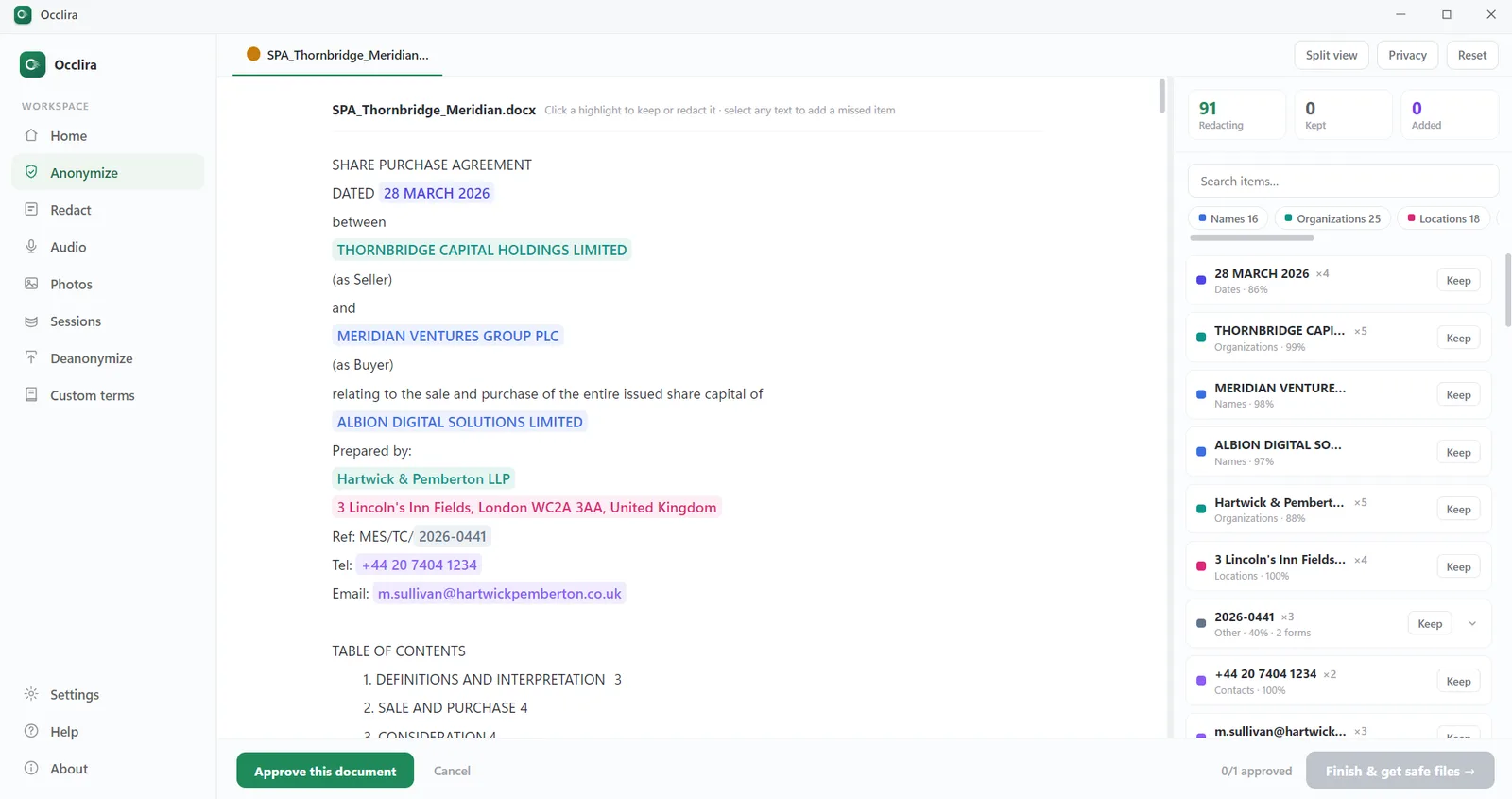
In the chat window, the Chrome extension anonymizes and restores inside ChatGPT, Claude and Gemini, with the desktop app running on the same Windows PC; in Word, the add-in does it inside the document (desktop Word on Windows and macOS). One caveat worth stating plainly: because the mapping that restores the real values stays on your machine, this is pseudonymization, not anonymization in the GDPR sense. It lowers what you expose; it does not make the data non-personal, or the firm compliant on its own.
Why on-device matters for confidentiality
A cloud redaction or transcription service means handing privileged material to a third party. Occlira keeps the work on the machine you already trust: detection runs on-device, and the app reaches the network only to activate your license (via Polar), download its model and check for updates. What stays on your device is set out on the Data & Privacy Practices page.
Human review, not blind automation
Detection combines a local AI model with pattern-based rules, and every finding is shown with a confidence score for you to keep or discard; anything the model missed you can add by selecting it in the text. The lawyer decides what leaves the machine, and going through that list is part of the work rather than a formality.
The full guide for lawyers
Occlira’s guides for legal work — the duties, the risks and the how-to:
Frequently asked questions
Yes — ChatGPT for lawyers is allowed, and the ethics opinions return to two safeguards. Keep client-identifying and privileged material out of a tool that can store or train on it; whether the client’s informed consent is also needed depends on the tool, the matter and your jurisdiction’s rules (in the US, ABA Formal Opinion 512). Then verify every output before it is filed.
Removing unnecessary client identifiers is one practical safeguard, not the whole answer: whether the client’s informed consent is needed depends on the tool, the matter and your jurisdiction’s rules (in the US, see ABA Formal Opinion 512). Occlira anonymizes the document locally, you work with the AI on the anonymized copy, and the real values are restored on your machine.
It can: putting privileged material into a public AI tool may be a voluntary disclosure to a third party. Courts have reached different results on whether AI prompts and outputs are discoverable, and the privilege and work-product analysis is unsettled — our attorney-client privilege and AI guide has the cases. Until it settles, keep privileged material out of public AI.
If you supervise anyone, effectively yes: Opinion 512 says managerial lawyers must establish clear policies on the firm’s permissible use of generative AI, and supervisors must make reasonable efforts to see that people follow them. Paper alone is not enough: in Johnson v. Dunn the firm had a policy the sanctioned lawyers had not followed.
Document processing runs locally. The app connects only to activate the license via Polar, download its model and check for updates. Detection, anonymization and restore all run on your own machine — Windows and macOS (Apple Silicon) — and client documents are never uploaded to us or any cloud service.
Yes. You can remove third-party personal data before sharing, disclosure or a subject-access response — and for PDFs, Redact mode burns the boxes in and deletes the underlying text instead of covering it. The output is a flattened, image-only PDF and the redaction is irreversible; your original file is untouched.
Not from a personal account with training on. On a business tier it becomes a Rule 1.6 judgment, with the client’s informed consent where the tool could disclose what you put in. Either way the safe default is to anonymize the document first and prompt on the placeholders; the paste table on this page shows where each task lands.
No. Automated detection is a strong first pass, but you review and confirm every item. Occlira helps you meet your confidentiality obligations; it is not legal advice, and it does not remove the consent judgment for facts that still relate to the representation.
Try it on a real matter
Free for 14 days on Windows and macOS (Apple Silicon). One-time license, no subscription. Rolling it out across the firm? See multi-seat team licenses.
More: audio redaction software for interviews & calls · how to redact an email · what is PII? · local vs cloud redaction · how your data is handled