Occlira: features, file formats and offline use
Occlira is desktop software for Windows and macOS (Apple Silicon) that finds personal data (PII) in Word, PDF, Excel, email, audio and photo files and redacts or anonymizes it on your own computer; Occlira does not upload your documents. It has two tools for documents: Redact removes text permanently, and Anonymize replaces names and numbers with placeholders you can restore later.
Occlira at a glance
| Platforms | Windows 10 and 11 (64-bit); macOS on Apple Silicon (M1 or newer). No Intel Mac, no Linux. |
| What it finds | 38 types of personal data, from names and phone numbers to national IDs such as the US Social Security number or the German tax ID. |
| Files | Documents (PDF including scans, Word, Excel, email, plain text), audio recordings, photos. |
| Where processing happens | On your computer. Files are not uploaded. |
| What needs the internet | License activation and re-checks, one-time model downloads, update checks (details below). |
| Two tools | Redact: black boxes burned in, irreversible. Anonymize: placeholders you restore later. |
| Scanned PDFs | Read with on-device OCR. |
| Review | By default, every finding is shown for review before anything changes (the “Skip review” setting can turn this off). |
| License | One-time, from €149 for one device; 14-day free trial, no account. |
Three things people call “redaction,” and which Occlira does
A black box drawn over a page often leaves the text underneath in the file. Occlira’s document tools do not work that way: Redact removes the text, Anonymize replaces it.
Redact: burned in, irreversible
Redact works on PDFs, text-based or scanned, and on images of text (JPG, PNG, WEBP, TIFF, BMP). Scanned pages are first read by on-device OCR (EasyOCR, at 200 DPI). In the preview you keep or remove each finding, add a term the detector missed, or draw a box by hand.
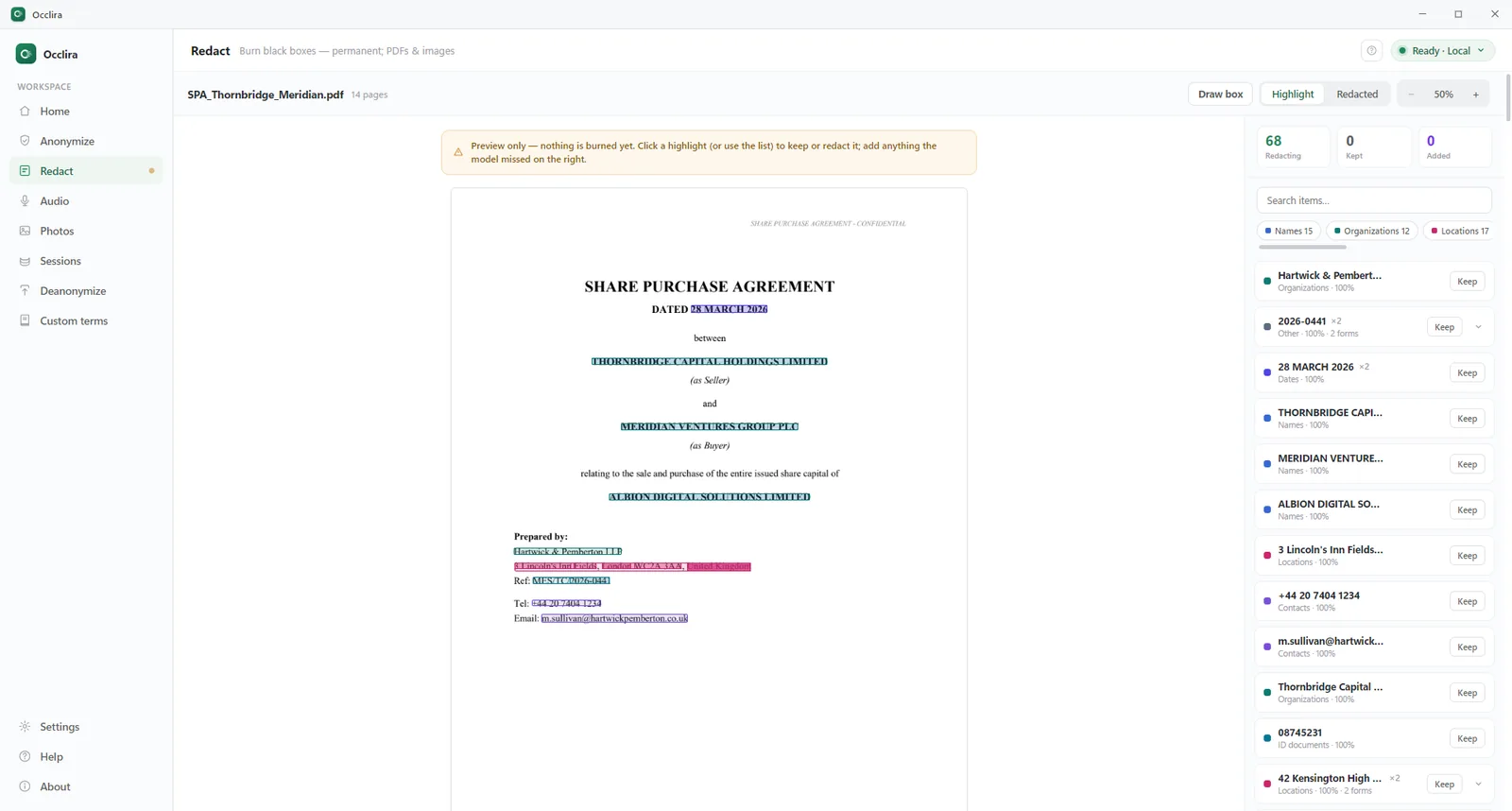
Burning renders each page as an image and paints the boxes into it. The result is an image-only PDF with no text
layer, no metadata from the source file and no annotations, saved as <name>_redacted.pdf in a
subfolder next to the original, which is left untouched. PDFs of up to 2,000 pages are supported.
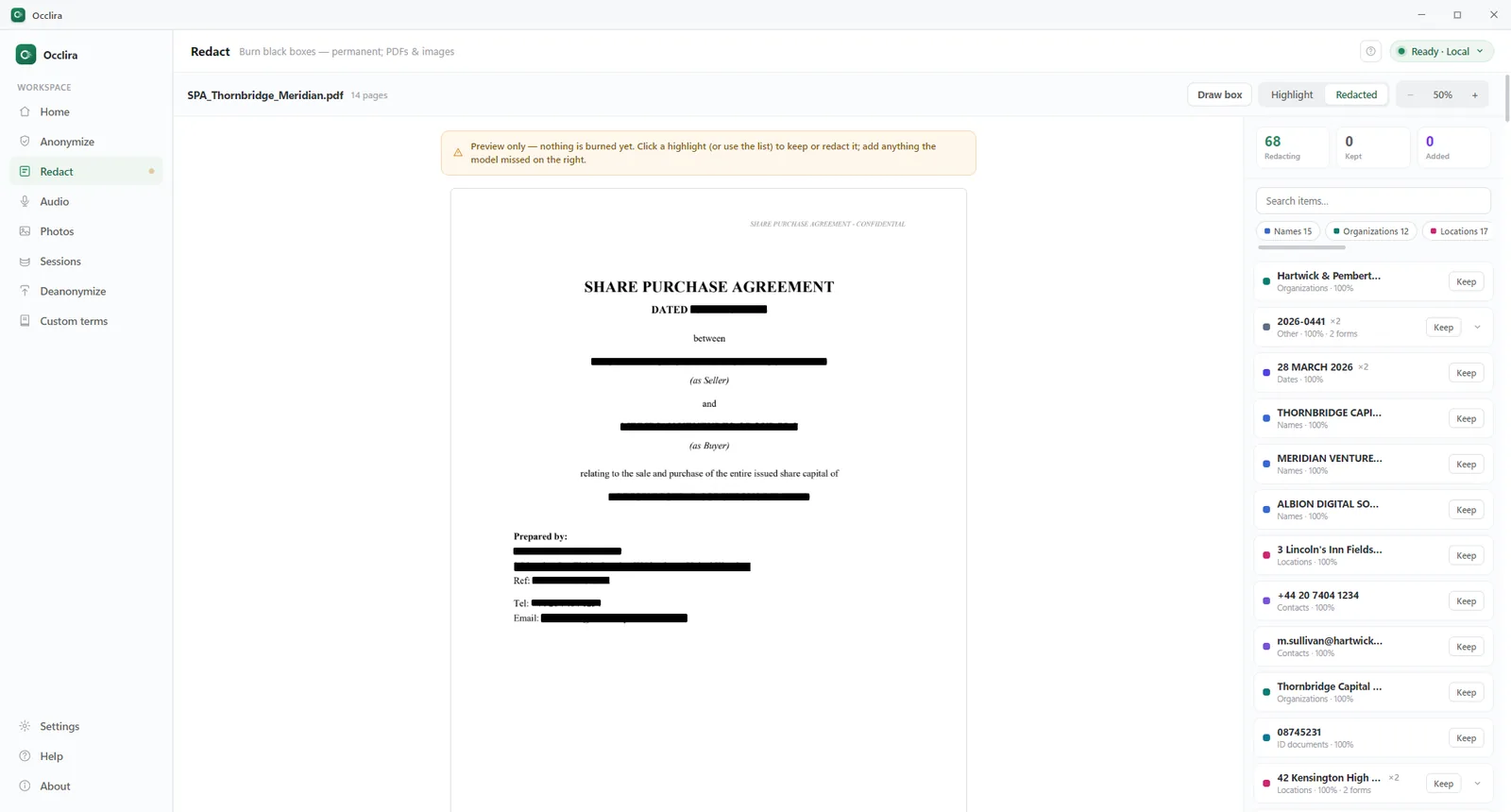
Occlira then extracts the text of the new PDF again and checks that none of the redacted terms can still be found. On scans that check relies on a second OCR pass and can only warn, so look over those pages yourself. Redaction cannot be undone, and the output has no selectable or searchable text. Step by step: how to redact Word, PDF and Excel files.
Anonymize: placeholders you can restore
Anonymize replaces each detected value with a placeholder such as <PERSON_1>, using the same
placeholder for the same value throughout the document. Word and Excel files stay DOCX and XLSX with their
formatting; PDFs, emails (EML) and images become a .txt file. Each result is a new copy in a subfolder next to the original, and the anonymized text can also be copied to the clipboard.
To put the real values back, for instance into an AI answer that uses the placeholders, save the answer as a file and open it in Deanonymize; the result is saved with the suffix _restored. The mapping stays on your
computer for 7 days by default (1 to 30 days in Settings). It holds the original personal data and is not
encrypted, so treat it like the original file.
Metadata removed along the way
- Word: comments deleted; tracked changes accepted; author, company and other document properties cleared; the people list, thumbnail preview and embedded OLE objects removed (more on Word metadata).
- Excel: hidden sheets, rows and columns are anonymized along with the visible cells; cell comments are removed.
- Photos: EXIF and GPS data removed by default.
- Redacted PDFs: no metadata from the source file.
What it detects: 38 types of personal data (PII)
Detection combines a local AI model, based on GLiNER2 and running on your device, with pattern rules that check a value’s shape, the words around it and, for card numbers, IBANs and several national IDs (such as the German tax ID, the French NIR, the Italian codice fiscale and the Spanish DNI/NIE), the check digits. Every finding has a confidence score, and Settings → Detection → Sensitivity runs from Fewest matches (fewer false alarms) to Most matches.
| Group | Types |
|---|---|
| People and places | Person names · organizations · locations · nationality, religion or political affiliation |
| Contact and network | Email addresses · phone numbers · URLs · IP addresses |
| Financial and ID | Credit card numbers · IBANs · crypto wallet addresses · ID documents · passport numbers |
| United States | Social Security number · passport · driver’s license |
| United Kingdom | NHS number · National Insurance number · passport · company registration number · driving license |
| European Union | EU VAT number · EU passport |
| Germany | Tax ID (Steuer-ID) · social security number |
| France | NIR (social security number) · national identity card (CNI) |
| Italy | Codice fiscale · VAT number (partita IVA) |
| Spain | DNI · NIE |
| Finland | Personal identity code (HETU) · business ID |
| Cyprus | Tax identification code (TIC) · ID card |
| Other | Dates and times · medical license numbers · secrets such as API keys, access tokens and private keys |
You choose the categories for each run; unchecked types are left as they are. An “always hide” list catches terms you add even when detection misses them, and a “never hide” list leaves terms such as your company name alone. Custom terms can be regular expressions and can be imported from CSV. Detection is tuned for 8 languages: English, German, French, Spanish, Italian, Dutch, Portuguese and Russian.
Supported file formats and limits
| Type | Formats | Limits | Output |
|---|---|---|---|
| Documents | PDF (text and scanned), DOCX, XLSX, EML, TXT, MD, CSV | Up to 100 MB per document; Redact: PDFs up to 2,000 pages | Redact (PDF input only): image-only PDF. Anonymize: DOCX, XLSX, TXT, MD and CSV keep their format; PDF and EML become .txt |
| Audio | MP3, WAV, M4A, FLAC, OGG, OPUS, WEBM, AAC | Up to 1 GB per file, 20 files per batch | Mono 16 kHz WAV plus an anonymized .txt transcript |
| Images | JPG, PNG, WEBP, TIFF, BMP, HEIC/HEIF (iPhone) | Up to 40 photos per batch | Cleaned copy; HEIC, TIFF and BMP sources saved as PNG |
| Video | Not supported | – | – |
For email (.eml) files, see how to redact an email.
Audio: spoken names and numbers bleeped on your computer
Recordings are transcribed on your computer by an open speech model, NVIDIA Parakeet or OpenAI Whisper, downloaded once. You set the language (English, German, French, Spanish, Italian, Russian, Ukrainian, Polish, Dutch or Portuguese) or let it auto-detect, and speakers are separated on the device. Personal-data detection in the transcript is tuned for the same 8 languages as for documents; Ukrainian and Polish are not among them. After review, each spoken name or number is replaced with a 1 kHz beep or with silence. The audio is exported as a mono 16 kHz WAV that cannot be un-bleeped; the anonymized transcript stays restorable for as long as its mapping is kept. More in the audio redaction guide.
Photos: faces masked, EXIF and GPS data removed
Faces are detected on the device, in a fast or a thorough mode, and covered with a mosaic, a blur or a solid box; you can draw a box over anything the detector missed. Mosaic and box cannot be reversed; blur is only cosmetic, so use mosaic or box for any copy you share. EXIF and GPS data (location, camera model, timestamps) are removed by default, and the original stays untouched. iPhone HEIC photos are accepted; their cleaned copies are saved as PNG. See how to blur faces and remove EXIF data.
What runs offline, and what needs the internet
Documents, recordings, photos and the personal data in them are processed on your computer; Occlira does not upload them. The app uses the network for three things:
- License. Activation, then a re-check with the licensing provider, Polar, at launch and every six hours while the app runs, sending the license key and a device identifier but no file content. Offline, the app keeps working for 14 days. The free trial makes no license calls.
- One-time downloads on first use: the detection model (about 1.2 GB, from Hugging Face); helper components and the speaker-separation model from Occlira’s GitHub releases; speech models from Hugging Face or GitHub; OCR models the first time you run OCR.
- Updates. The app checks Occlira’s GitHub releases. Updates download automatically and are installed only when you confirm.
Crash and usage reporting is off by default; no reports are sent unless you turn it on. How to check it yourself: once the models have downloaded, disconnect from the network and process a test file. The full list of network calls is on the data practices page.
Review, accuracy and the audit log
By default, nothing is written until you have seen the findings: click a highlight to keep or redact it, select missed text to add it, then approve the document. The “Skip review” setting turns this step off.
On Occlira’s own PII detection benchmark (200 synthetic legal documents, 10 jurisdictions, English-language text), the detector located about 97% of the sensitive values. That is recall (how many of the values were found at all), not overall accuracy; scans and audio are not part of it, and it is an internal test, not a third-party audit.
A local audit log records each run (action, time, number of files and findings, outcome, whether the check after redaction passed) without personal data: file names are stored only as a hash. Entries are hash-chained so that tampering shows, can be exported to CSV, and are kept for one year by default (90 days to 7 years in Settings).
Browser extension, Word add-in and Claude Desktop connector
All three are optional and need the desktop app running; the processing happens in the app.
- Chrome extension for ChatGPT, Claude and Gemini: anonymize text or a file before it goes into the chat, and restore the answer. It needs the desktop app on the same Windows PC, each connection is approved in the app, and it talks only to the app on your computer.
- Microsoft Word add-in for desktop Word on Windows and macOS: review and anonymize a document inside Word, and restore it later.
- Claude Desktop connector: Claude can ask Occlira to anonymize a document. Claude receives file paths and the anonymized copy, not the original; the real values stay on your computer.
Limits
- No video.
- A redacted PDF has no selectable or searchable text.
- Word and Excel files are anonymized, not redacted; to redact one, save it as a PDF and use Redact.
- Batches of up to 40 photos or 20 audio files; documents up to 100 MB.
- The Chrome extension needs the desktop app on Windows.
- No Intel Mac and no Linux version.
- National IDs not listed above have no dedicated recognizer; add the numbers you know to the “always hide” list.
- Automatic detection can miss things. Review the findings, and check redacted scans page by page.
Anonymization and pseudonymization under the GDPR
GDPR Article 4(5) defines pseudonymization as processing personal data so that it “can no longer be attributed to a specific data subject without the use of additional information,” provided that this information is kept separately and protected. Anonymize output is pseudonymized, not anonymous: the mapping is the additional information that links each placeholder back to a person, so as long as the mapping exists, the placeholder copy remains personal data.
Redact output has no mapping and is meant for disclosure, though whether a document is truly anonymous still depends on what remains in it, such as context that points to a person. Occlira helps you minimize the personal data you share; it does not by itself make a process compliant. More in using AI without breaking the GDPR.
Price, free trial and who uses it
A license is a one-time purchase: €149 for 1 seat, €399 for 3 seats, €599 for 5 seats, €999 for 10 seats. It does not expire, each seat activates one device (deactivate to move it), and updates are free within the major version. The 14-day trial is the complete app and needs no account; purchases carry a 14-day money-back guarantee. See the pricing page.
Occlira is built for work where files carry other people’s data; there are guides for law firms, healthcare and therapy practices, accountants and journalists.
Frequently asked questions
Yes, once its models are downloaded: detection, OCR, transcription and redaction run on your computer. It goes online for license activation and re-checks (offline it keeps working for 14 days), first-use model downloads and update checks. No file content is sent.
Yes. Pages without a text layer are read by on-device OCR, and the redaction boxes are burned into an image-only PDF. On scans the automatic check after burning can only warn, so look over the redacted pages before you send them.
They are anonymized, not redacted: names and numbers become placeholders, and the file stays a DOCX or XLSX with its formatting, minus comments, tracked changes and author properties. For a permanently redacted copy, save the document as a PDF and use Redact.
Yes, on Macs with Apple Silicon (M1 or newer). Intel Macs are not supported, and there is no Linux version. The Word add-in works in desktop Word on macOS; the Chrome extension requires the Windows app.
No. Each page is turned into an image with the boxes painted in, so there is no text underneath and no mapping to reverse. The original file is left untouched; keep it if you may need it again.
Yes. As long as you hold the mapping, it is pseudonymized, not anonymous. Anonymize uses reversible placeholders, which the GDPR treats as pseudonymization (Art. 4(5)): with the mapping, the real values can be put back. Deleting the mapping later does not by itself make the copy anonymous if other details still point to a person.
A one-time license: €149 for 1 seat, €399 for 3 seats, €599 for 5 seats, €999 for 10 seats, with free updates within the major version. The 14-day free trial is the complete app and needs no account.
No. Occlira does not upload your files or the personal data in them; the licensing provider receives a license key and a device identifier, nothing from your files. Anonymized content leaves your computer only when you choose to send it to another service.
More: anonymize before ChatGPT · local vs cloud PII redaction · redact a bank statement · what is PII? · how your data is handled · privacy policy