Protecting sources: PII redaction and metadata removal for journalists
A source can be exposed by the smallest thing you overlook: a document’s hidden metadata, a black box that isn’t really a redaction, an interview uploaded to a transcription service, or the GPS tag inside a single photo. Occlira helps you remove that identifying data from documents, audio and images on your own computer, so it never touches a cloud service. This page is general information, not legal or security advice — and it’s no substitute for a full operational-security plan.
How a leaked document can unmask a source
In 2017, an NSA report about election-system intrusions was published as a scan of a printed page. It still carried the printer’s near-invisible yellow tracking dots — and when researchers inverted the colours, the dots decoded to the printer’s serial number (29535218) and the date it was printed (9 May 2017). Combined with the agency’s print logs, that hidden data helped identify the leaker, Reality Winner. (Source: Errata Security.) She pleaded guilty in June 2018 and was sentenced to five years and three months — described by prosecutors as the longest federal sentence for an unauthorised disclosure to the media. (Source: NPR.) It wasn’t the content of the document that caught her — it was the metadata.
The hidden data inside a document
Those printer dots are one example of a larger truth: every file carries a forensic signature you can’t see. Many colour laser printers secretly encode a Machine Identification Code — a grid of tiny yellow dots with the printer’s serial number and the print date and time — which the EFF publicly decoded in 2005; the EFF warns there are “no laws to stop the Secret Service from using printer codes to secretly trace” a document to its source. (Source: EFF.) Digital files are no different. The Freedom of the Press Foundation shows how a scanner’s model string embedded in a PDF can help pinpoint where in a building a document was made, and how PDFs and Office files hide additional identifying metadata in author fields, revision history and embedded objects — all of which should be stripped, and re-checked, before you publish. (Source: Freedom of the Press Foundation.)
Black boxes are not redaction
A visual black box is not the same as removing text. In January 2019, Paul Manafort’s lawyers filed a court document in which the blacked-out passages could be revealed simply by copying and pasting them — exposing that he had shared 2016 campaign polling data with a Russian associate. The bars sat on top of an intact text layer, and journalists recovered the hidden content within hours. (Source: Columbia Journalism Review.) True redaction deletes the underlying data — and verification means more than a copy-paste test. Our guide to redacting Word, PDF and Excel walks through doing it properly — and Occlira does that deletion-based redaction for you, locally, with a review step before anything is published.
The risk of cloud transcription for confidential interviews
Uploading a source interview to a transcription service means handing a copy of that recording to a company. When the Freedom of the Press Foundation examined the popular tools, it found they can technically access uploaded audio and transcripts, and that several use recordings to train AI or for human review — Descript to train artificial-voice models (validated by crowd workers), Otter to train its AI, and Rev using customer data by default unless you opt out. None offered a transparency report, so there’s no way to know how often they receive or disclose data to law enforcement. (Source: Freedom of the Press Foundation.) The exposure isn’t hypothetical: Otter faces a class action alleging it obtained consent “at most” from a meeting’s host — not the other people recorded — and reused those recordings to train its models. (Source: National Law Review.) And in 2022, Politico reporter Phelim Kine received an unsolicited Otter survey that referenced, by title, his recorded interview with a Uyghur human-rights advocate — the company first confirmed it, then retracted it. (Source: Otter.ai, reported by Politico.)
The press-freedom advice is to match the tool to the sensitivity. FPF security trainer Dr. Martin Shelton recommends reserving offline transcription — OpenAI’s Whisper, on-device phone transcription, or hand-transcription — for interviews too sensitive to entrust to a third party, and using cloud tools only for non-sensitive audio you intend to publish in full. (Source: Freedom of the Press Foundation.)
Photos can betray a location
In December 2012, Vice published a photo of fugitive John McAfee taken on an iPhone with the GPS EXIF metadata still intact; the embedded coordinates pinpointed him in Guatemala near the Belize border, and he was located shortly after. No hacking was needed — the coordinates were simply left in the file. (Source: NPR.) The Freedom of the Press Foundation cites that case to make the point to reporters: a photo’s metadata means “if I texted or emailed it to you right now, you would immediately be able to determine exactly when and where it was taken” — which makes it a source-protection matter, not just a personal-privacy one. (Source: Freedom of the Press Foundation.) Blurring a face before publication helps — but only if the blur is irreversible; weak blur and pixelation can be undone, so use a solid box. See blur faces and strip EXIF for the full method.
Where Occlira helps
| Task | How Occlira helps |
|---|---|
| Handling a leaked document | Real PDF redaction that deletes the underlying text — not the black boxes that exposed Manafort — and strips the file’s hidden metadata as it goes. |
| Removing hidden metadata | Strips document and photo metadata (author fields, scanner strings, EXIF/GPS) on your own machine — the kind of invisible data that has unmasked sources. |
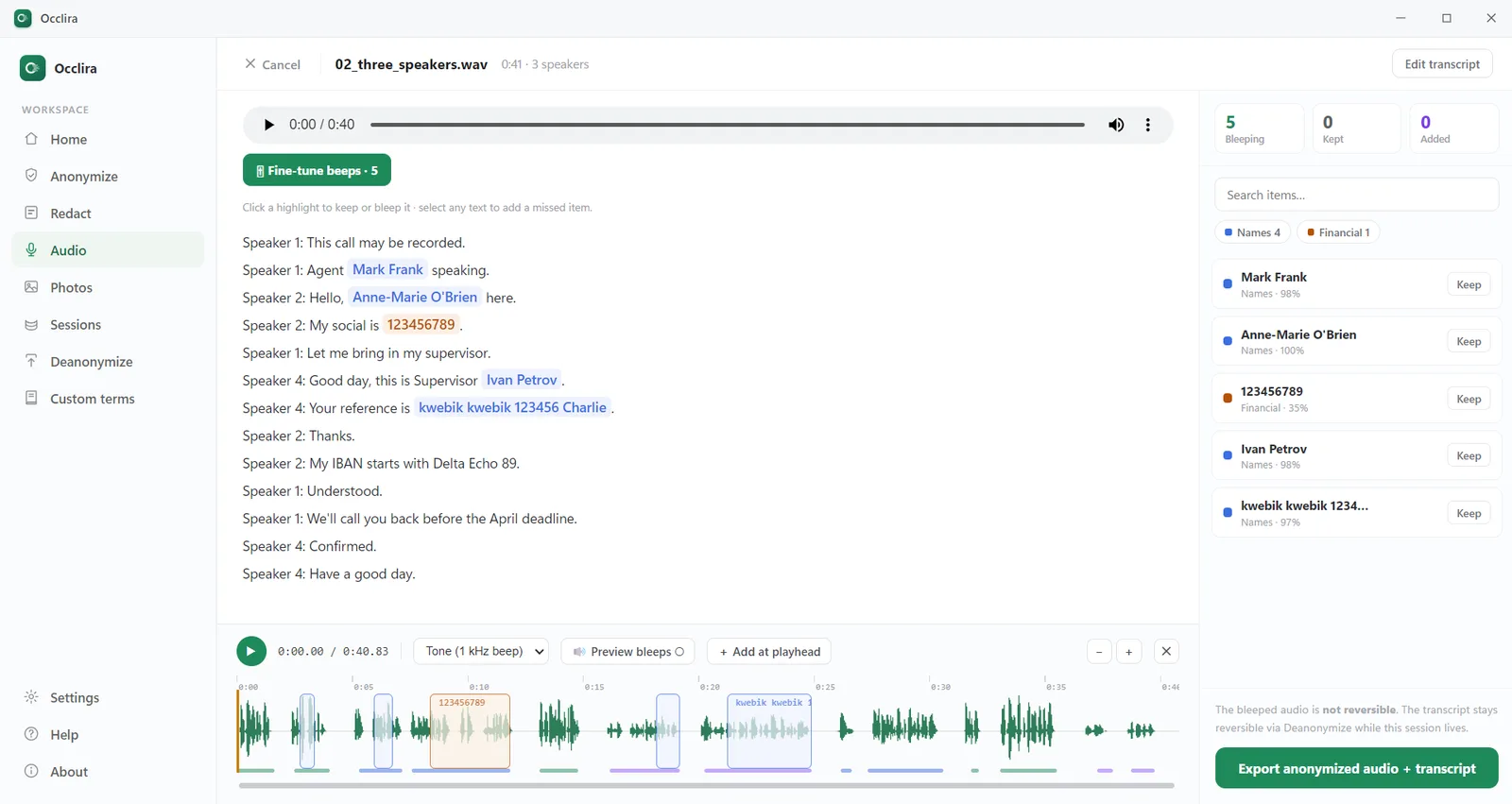
| Transcribing a sensitive interview | On-device transcription plus bleeping of names and numbers, so the raw recording is never uploaded and there’s no transcription company to subpoena. |
| Publishing a photo | Cover faces with a solid box and strip the photo’s EXIF/GPS location before it goes out. |
| Sharing a draft | Remove identifying details from a working copy before it leaves your machine for an editor or colleague. |
Why doing it on your own computer matters
The thread running through every one of these cases is the same: identifying data left somewhere it could be found. Doing the removal on your own machine means there’s no upload, no account, and no third-party company holding your source’s audio or documents to be subpoenaed or breached. Nothing leaves the computer you already trust. You can read exactly what stays on your device on the Data & Privacy Practices page. One honest caveat: Occlira’s reversible anonymization mode swaps identifiers for placeholders and keeps the mapping locally — that’s pseudonymization, so the output is still personal data. Real PDF redaction, an exported bleeped recording and a stripped EXIF block, by contrast, are irreversible by design — which is what you want for anything you publish.
A source-protection checklist
- Strip document metadata (author, revision history, scanner/printer strings) before publishing or sharing.
- Use real redaction that deletes text — never a black box over an intact text layer — and verify it can’t be copied back.
- Transcribe sensitive interviews offline, on your own machine, not a cloud service.
- Bleep a source’s name and identifying numbers out of any audio you share.
- Strip EXIF/GPS from photos and cover faces with an opaque box (not a reversible blur).
- Re-check every exported file — metadata empty, redactions un-recoverable — before it leaves your device.
Occlira is a tool that helps you protect sources — you review and confirm every item. It doesn’t replace the rest of a security plan: encrypted communications, secure drop boxes, and a threat model for the story you’re working on.
Frequently asked questions
The leaked NSA document that was published was a scan of a printed page, and it still carried the printer’s near-invisible yellow tracking dots. Decoded, they revealed the printer’s serial number and the date it was printed — metadata that helped narrow the source to Reality Winner, who had printed it. She pleaded guilty in 2018 and received 63 months, at the time the longest US sentence for a leak to the media. It’s the clearest example that a document’s hidden data, not its content, can betray a source.
Many colour laser printers secretly add a “Machine Identification Code” — a grid of tiny yellow dots, less than a millimetre across, repeated over every page — that encodes the printer’s serial number and the date and time of printing. The EFF publicly decoded the pattern in 2005 and warns there are no laws stopping the Secret Service from using it to trace a document to its source.
Because a box is usually just a shape drawn on top of an intact text layer — the words are still in the file and can be recovered by copying and pasting. In January 2019, Paul Manafort’s lawyers filed a document whose blacked-out passages were readable that way within hours. Real redaction deletes the underlying content; then verify it’s gone.
Treat it as a risk. The Freedom of the Press Foundation found the popular cloud transcription services can technically access your uploaded audio, and several use recordings to train their AI or for human review. Otter also faces a class action over recording without all participants’ consent. For a sensitive source, the raw recording shouldn’t leave your machine at all.
Transcribe offline. FPF security trainer Dr. Martin Shelton recommends reserving on-device or manual transcription — tools like OpenAI’s Whisper, on-device phone transcription, or hand-transcription — for interviews too sensitive to entrust to a third party, and using cloud tools only for non-sensitive audio you plan to publish in full.
Strip it as a deliberate step — it won’t go away on its own. For documents, remove author fields, revision history and embedded objects; for photos, strip the EXIF, which includes GPS coordinates, the camera model and timestamps. Occlira does this on your own computer across documents, spreadsheets, email and photos, with nothing uploaded.
Often, yes — blur and pixelation can be reversed by software, so they’re not safe redaction. To hide a face before publication, cover it with a solid, opaque box. We cover the evidence and the fix in our guide on blurring faces and stripping EXIF.
No. It’s a source-protection tool that helps with a specific set of tasks — redaction, metadata removal, on-device transcription and audio bleeping, photo blur and EXIF stripping — with you reviewing every result. It is not legal or security advice, and it doesn’t replace encrypted communications, secure drop boxes or a threat model for a given story.
Try it on your own machine
Strip metadata, redact for real, transcribe offline and blur faces — all on your own computer. Free for 14 days on Windows and macOS.
More: how to redact in Word · how to redact an email · audio redaction software · blur faces & strip EXIF · what is PII? · how your data is handled