How to redact an email: Outlook, Gmail and .eml files — headers, threads and attachments (2026)
To redact email, you work on an export, not on the message in your mailbox. Outlook has no built-in redaction feature, and the help pages for Gmail and Apple Mail document saving, printing and headers — no redaction command. Save the message as a PDF or an .eml, then redact that copy with a tool that deletes the underlying text rather than covering it. Then check the three places email redaction fails: the headers, the quoted thread below the reply, and the attachments. If the message is going to an AI assistant or a vendor rather than to a court or a requester, anonymize it instead: replace the identifiers and the text stays usable. (Source: Logikcull: “Outlook does not have a built-in redaction feature”, accessed 11 September 2026.)
How to redact an email in Outlook or Gmail: why the client can’t do it
The clearest statement of the gap sits on Microsoft’s own site. A question posted on 23 October 2018 — “How do I blackout certain information in an Outlook email” — still carries the counter “Same question (500+)”. The answer that collected the votes is blunt: “Since email is just text, you’ll need to type over it - with something like ‘[redacted]’.” (Source: Microsoft Q&A — a community thread, not an official article.)
Gmail’s own forum carries the same question — “Is there any way to redact or cover certain information within a short email thread?” What people try instead, and where each attempt can leak:
- Black highlight in a forwarded copy. Live text, formatted: the recipient selects it or changes the color.
- Typing over the words. It edits your copy; the original sits in every other mailbox on the thread.
- Deleting lines from a reply. The quoted chain sits below your cursor; check whether the attachments travel with it.
- Screenshot plus Paint. Pixels do go, but you send a picture: no header, no searchable text, no attachments. SecureRedact’s own how-to leans on it: “Capture the email window, paste into Paint … then use brush tools to black out sensitive bits”. (Source: SecureRedact.)
Recall is not redaction
Search for redaction in Outlook and you mostly find message recall, a different question. The classic dialog sets the bar: it works only if “both you and the recipient have a Microsoft 365 work or school email account in the same organization, and the recipient hasn’t opened the message yet”, and personal Gmail, Hotmail and Outlook.com accounts “cannot use message recall.” For Exchange Online, Microsoft now contradicts that dialog: “The message recall dialog in Outlook states that only unread messages are recalled. This statement is no longer accurate.” An admin setting decides “Whether to recall messages that were already read”, and the service keeps trying “for up to 24 hours”. The message still has to stay inside the same organization, and either way recall never produces a copy you can hand to someone else. (Sources: Microsoft; Microsoft, cloud-based message recall.)
Step 1 — export the email (Outlook, Gmail, Apple Mail)
Every client produces two kinds of file: the message itself (.eml or .msg) and a print of what you see. A court or a requester usually wants the readable document; a dispute about who sent what wants the header, which sits behind its own command — File → Properties in classic Outlook — and does not travel with a printed PDF. (Source: Microsoft, internet message headers.)
| Client | Save the message as a file | Get a PDF | See the full header |
|---|---|---|---|
| Outlook for Windows (classic) | File → Save As, then a folder | No PDF save type: Microsoft Print to PDF | File → Properties → Internet headers |
| New Outlook, Outlook on the web, Outlook.com | Save As: “will be saved as an .eml or .msg file” | No PDF save type: Microsoft Print to PDF | More actions → View → View message details |
| Gmail | More → Download message (.eml); opening it needs a desktop mail client | More → Print | More → Show original → Copy to clipboard |
| Apple Mail | File → Save As → Raw Message Source (.eml) | File → Export as PDF | Not covered by the page we sourced |
The PDF line surprises people. Microsoft states it twice on one page: “Classic Outlook doesn’t include PDF as one of the default Save as types. The Microsoft Print To PDF utility included in Windows 10 or Windows 11 allows you to print any email message directly to a PDF,” and repeats it for Outlook on the web. (Source: Microsoft Support.)
In Gmail, check the label before following an older guide: today’s help page reads “Click More. Click Download message.” Show original is the separate command for the header, and Apple Mail keeps both routes in one File menu. (Sources: Google, download a message; Google, full header; Google, print; Apple’s Mail User Guide, archived copy of 13 October 2025 — the live topic URL now redirects to the guide’s landing page.)
Step 2 — redact the exported copy
From here the rules are document rules: a black rectangle is an overlay, real redaction deletes the text objects underneath, and a separate pass strips the metadata. Format by format, with the verification tests: how to redact in Word, PDF and Excel. SecureRedact’s instruction for Outlook: “Print the email to PDF, open in a PDF editor (Adobe Acrobat or other), use the redact tool to mark content, then save.” (Source: SecureRedact.)
Acrobat Pro states the split: “Redaction permanently hides sensitive information from a PDF document … redacted content, such as text or images, is replaced with colored boxes”, and sanitization is the separate step: “Hidden data, such as metadata or embedded content, must be sanitized separately.” macOS Preview’s Redaction Selection: “Select text to permanently remove it from view … once you close the document, the redaction becomes permanent.” If you saved a .msg, open it in Outlook and print it to PDF — Occlira does not read .msg. (Sources: Adobe, quoted from the 17 May 2026 capture; the live page blocks automated requests; Apple, Preview User Guide.)
How to redact an .eml file
An .eml is a plain-text file: header fields, then the body parts. You can open it in a text editor, and that is the trap. RFC 5321 tells mail software to leave the trace chain alone: “An Internet mail program MUST NOT change or delete a Received: line …” The chain is meant to arrive untouched, which is why a hand-edited .eml no longer matches what every other copy of the message shows. Preserve the original and label any edited export as a redacted copy. Two routes hold up: print the .eml to PDF from a mail client and redact the PDF, or anonymize the text and work from that copy, as the product section describes. (Source: RFC 5321 §4.4.)
Redact email headers: what a message carries that the screen doesn’t show
RFC 5322 groups the routing fields as trace fields: “an optional ‘Return-Path:’ field, and one or more ‘Received:’ fields.” Inside one, per RFC 5321, the FROM clause “SHOULD contain … an address literal containing the IP address of the source”. Every hop adds a line and no later handler may remove it: the mailbox copy holds a route map of server names and addresses.
Two more fields decide what you can disclose. Message-ID: “every message SHOULD have a ‘Message-ID:’ field”, a unique string tying your copy to every other copy. Bcc: on sending, the “‘Bcc:’ line is removed even though all of the recipients … are sent a copy of the message”, but which of the three methods the RFC describes a client uses “is implementation dependent”. Sent copies, and some Bcc recipients’ copies, can still carry the line — inspect the actual export. (Sources: RFC 5322 §§3.6.3–3.6.7; RFC 5321 §4.4.)
A header you have copied out can be read in Google’s Admin Toolbox, which “analyzes SMTP message headers” — a web tool, so paste in only a header you would send to Google. (Source: Google Admin Toolbox, tool listing.)
How to redact an email thread
Every earlier message in a chain is a document in its own right: redactor.ai’s rule is to export the whole thread rather than the top message, and Gmail’s print help covers a “Print all” route for a conversation. The hard part is consistency. A name in message two reappears in the quoted copy inside messages three to twenty, in a signature, in a To line and inside an attachment. CNN reported on 22 December 2025, on the Justice Department’s Epstein-file release, that “Jane Doe alerted DOJ officials over the weekend that her information was not redacted”. That was a document release rather than an email mechanism, but large sets break on consistency. eDiscovery platforms treat it structurally, grouping “families of documents such as threaded emails and attachments”. (Sources: CNN; Logikcull.)
How to redact email attachments
Redacting the body does nothing to what was attached, and a cleaned PDF sent alongside an untouched spreadsheet is the classic release error. Logikcull’s review guide asks the question that catches it: “Does the chosen format preserve family relationships between messages and attachments?” (Source: Logikcull.)
Each attachment is its own document with its own hidden layer: a .docx carries tracked changes, comments and properties (how to remove metadata from a Word document), an .xlsx hides rows and a pivot cache (the Word, PDF and Excel guide). An attached call recording is audio redaction; an attached bank statement has its own rules (redacted bank statement).
Email redaction for a DSAR or subject access request
Subject access requests are a common reason to redact email. The ICO’s starting point is the search: “You must make a reasonable and proportionate search to respond to a SAR.” That search lands in mailboxes, and what comes back is full of other people. (Source: ICO.)
Article 15(4), identical in the UK GDPR, limits the copy: “The right to obtain a copy … shall not adversely affect the rights and freedoms of others.” That does not turn every other name in the thread into a deletion. The ICO’s test runs person by person: you do not have to disclose information about someone else unless “the other person has consented” or “it is reasonable to disclose the information without their consent”, weighing “all the relevant circumstances, including: the type of information … any duty of confidentiality … any steps you have taken to try to get the third party’s consent”. Disclose where consent or reasonableness allows, redact where neither does. (Sources: GDPR Art. 15; UK GDPR, legislation.gov.uk; ICO, information about other people in a SAR.)
The ICO’s guidance on disclosing documents securely (31 July 2025) carries a banner saying it is under review. Its announcement names the trigger: breaches “including at the Police Service of Northern Ireland and the Ministry of Defence, which have involved documents being disclosed without proper checks for hidden personal information”. (Sources: ICO guidance; ICO news, Emily Keaney, Deputy Commissioner.)
In the United States, FOIA Exemption 6 covers “personnel and medical files and similar files the disclosure of which would constitute a clearly unwarranted invasion of personal privacy”. For court filings, Rule 5.2 lists what must be cut down: social-security and taxpayer-identification numbers, birth dates, the name of anyone known to be a minor, and financial-account numbers. General information, not legal advice. (Source: 5 U.S.C. § 552(b)(6).)
Email redaction tools compared
The market splits on one question: does the message leave your computer? Every quoted claim comes from the vendor’s own page, read on 11 September 2026; “not stated” and “none published” mean we did not find it there, not that the tool lacks it or is free.
| Email redaction tool | Where it runs | Formats it names | Price it publishes |
|---|---|---|---|
| Hexamail Flow | Windows: “All operations are performed on your computer with no requirement to share data with any third party” | Email, PST and MSG; sold for GDPR and SAR work | None published |
| RedactBox (UK) | Not stated on the page we read | “MBOX, PST, EML, MSG and PDF files with search, bulk redact, and audit-ready exports” | Free tier of one document; £25/month |
| Redactable | Cloud: a “cloud-based platform” importing “from … Box or Dropbox” | Files you upload, marked up in its Redaction Wizard | None published |
| CaseGuard Studio | “On premise all-in-one solution” | “PDF, PST, Excel, & Word” | None published |
| Intradyn | Not stated on the page we read | Pattern matching over “Social Security numbers, home address, email addresses, phone numbers, credit card numbers and dates” | None published |
| Objective Redact | Alongside your authoring app; it “always creates a working copy, so the original is unchanged” | “Microsoft Word, PowerPoint and Excel, as well as other formats such as email, PDF and more” | USD $274 p.a. per single user (1–20 users) |
| Docuflair Redact | “Runs on-premises or dedicated private cloud” | “PDF, Word, Excel, PowerPoint, TIFF, JPG, PNG, email (MSG/EML) and many more” | None published |
| VIDIZMO (redactor.ai is its blog) | Not stated in the articles we read | “Preserve original email formats such as EML and MSG for legal and archival integrity” | None published |
| Occlira | Your own computer: Windows and macOS (Apple Silicon) | .eml in, anonymized .txt out; no .msg, PST or MBOX. A printed PDF → an image-only redacted PDF | From €149 one-time per seat; 14-day trial |
Read the formats column first: VIDIZMO, whose product blog is redactor.ai, is the one promising that the container survives the process. Then read where it runs: a cloud tool asks you to upload the message you are trying to keep confidential, which for a privileged thread is itself the disclosure (local vs cloud PII redaction). The other serious route is eDiscovery — Logikcull’s advice for Outlook mail is to import the messages into a discovery tool with solid redaction features, right for a mailbox, wrong for three emails. (Sources: each vendor’s own page — RedactBox, Hexamail, Redactable, CaseGuard, Intradyn, Objective Redact, Docuflair, VIDIZMO, Logikcull.)
Redact or anonymize an email?
| Where the email is going | What you need | What you produce |
|---|---|---|
| A court, a regulator, a FOIA or subject access requester | Removal you cannot undo | A redacted PDF: the marked text deleted, then checked |
| An AI assistant, a vendor, a colleague who does not need the names | Text that still works as text | Consistent placeholders, reversible only on your machine |
| Publication | Assume someone else holds the unredacted thread | Irreversible removal, attachments checked twice |
A forty-message thread with fifteen people in it is not fifteen redactions: each name sits in a To line, in a signature, in the quoted copy inside every later reply, and again in the spreadsheet attached halfway down. Marking each one by hand is slow, and the mistake it produces is the one above — the same name blacked out on page four and readable on page nineteen. When the destination is an assistant, a vendor or a colleague rather than a court, leave the sentences intact and take the identifiers out, consistently, in one pass.
Anonymize an .eml on your own computer
Occlira is a desktop app for Windows and macOS (Apple Silicon). Detection runs on your own machine; the app goes online only to activate the license (via Polar), download its model and check for updates. Open an .eml and it decodes the message the way a client would: the From, To, Cc, Bcc, Reply-To, Subject and Date headers, both forms of the body, and the text of PDF, DOCX, XLSX, TXT and HTML attachments. Reading the plain-text and the HTML part together matters: content that exists only in the HTML part is included in detection. Other attachment types are listed by name and type, not read.
What comes back is one anonymized text file, <name>_anonymized.txt. Identifiers become
consistent placeholders such as <PERSON_1>, so the same person keeps the same placeholder
from the first message of the thread to the last. The text stays usable: paste it with
Copy anonymized text, or attach it to a prompt, as in
anonymize before ChatGPT. The mapping
that reverses it stays on your computer (~/.occlira/mappings, owner-only permissions, deleted after
seven days by default), and Deanonymize turns the answer file back into a copy with the real
values.
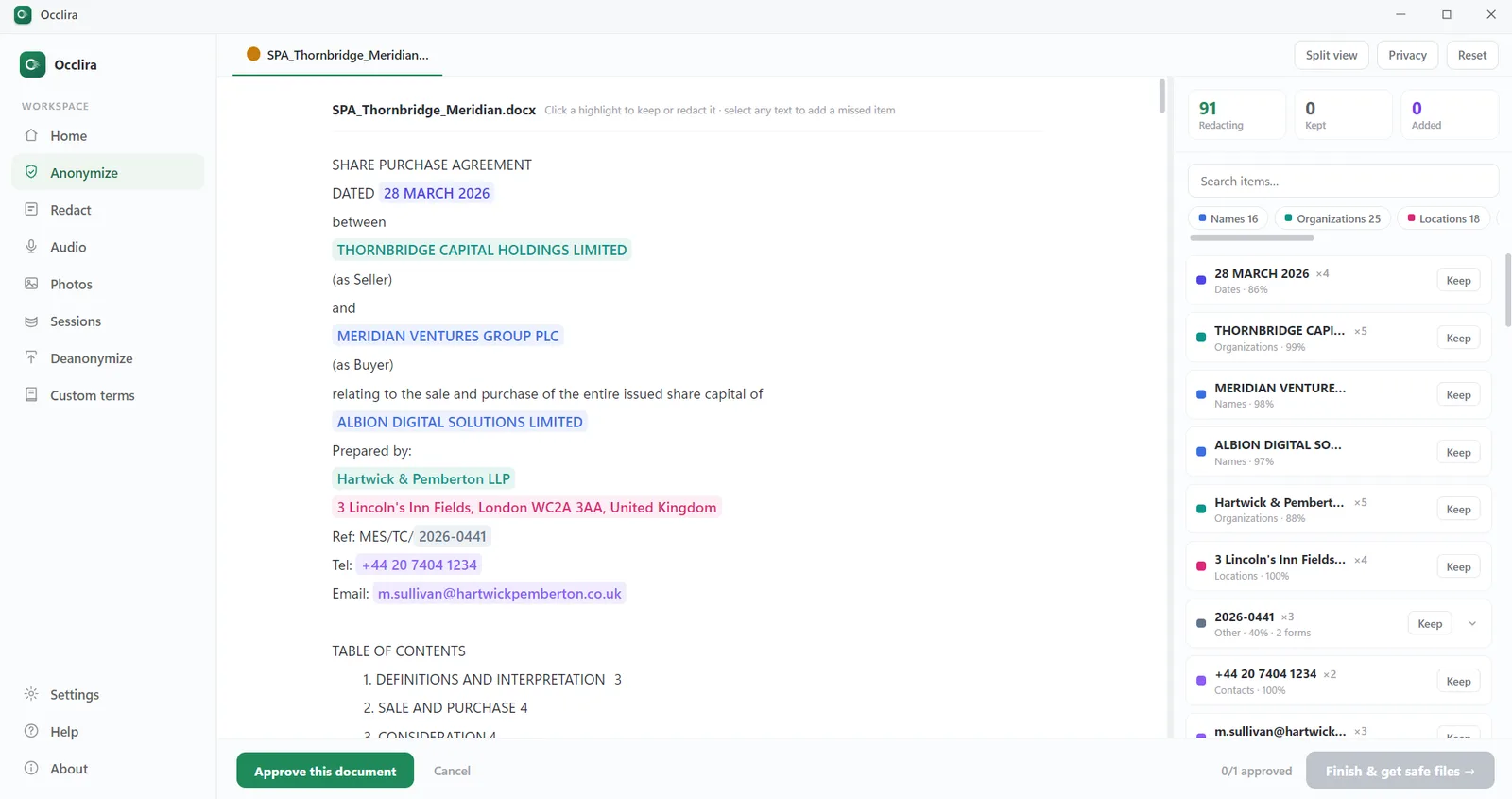
The honest limits. Occlira does not connect to a mailbox and has no button inside Outlook or Gmail. It reads .eml, not .msg, and not the PST or MBOX archives an eDiscovery platform ingests. It does not hand back a redacted .eml: this mode’s output is text. And swapping names for placeholders while keeping a mapping is pseudonymization, not anonymization — the result is still personal data under the GDPR. Treat it as data minimization: it helps, it does not guarantee compliance, and none of it is legal advice.
If you need a black-box copy — for a court, a requester or publication — print the message to PDF and use
Redact mode, a separate tool. It shows every detected term as a box you can keep, drop or add
to, including one you draw yourself. Burning them writes <stem>_redacted.pdf beside the
untouched original: an image-only PDF with no text layer and none of the source metadata or annotations.
Nothing is left under the boxes to copy out, so the copy-paste test comes back empty. It is irreversible by design, and afterwards the app re-extracts the text and checks that no selected term is still extractable — on a scan that check runs through OCR and is advisory, so the last look is yours. The trade-off is a flat PDF in which nothing is selectable.
Checklist before you send a redacted email
- Work on an export, never on the message sitting in your mailbox.
- Decide whether the header travels with it: it names the servers that handled the message, their IPs and a Message-ID.
- Check for a Bcc line — Sent copies, and some Bcc recipients’ copies, can still carry addresses the recipients never saw; inspect the actual export.
- Export the whole thread, and redact every quoted repetition of the same detail.
- Open every attachment and redact it separately, and check inline images and signature blocks: a pasted screenshot needs a box burned in, not a text redaction.
- Search the final file for each removed value and its variants — nickname, initials, the part before the @ — then run the copy-paste test and reopen it in a different viewer.
- Keep the unredacted original under your retention rule and record what you removed; the redacted copy is a new record.
Frequently asked questions
Export the message first, then redact the export. Save it as a PDF or an .eml, open that copy in a tool that deletes text rather than covering it, and work through the header, the body, the quoted thread and every attachment. Nothing you do inside your mailbox counts as redaction.
Not in Outlook itself — the client has no built-in redaction feature, as Logikcull states. Recall is a different thing: both accounts have to sit in the same Microsoft 365 organization, and Microsoft’s cloud-based recall for Exchange Online can now reach messages the recipient has already read, if an admin enables it. Save the message as a file or print it with Microsoft Print to PDF, then redact that copy.
Open the message, click More, then Download message for an .eml, or More → Print for a PDF. Redact the downloaded file, not the message in your mailbox. If the header is part of the disclosure, take it from More → Show original first. Gmail’s help pages cover downloading, printing and headers — no redaction command among them.
Removing personal or privileged details from a copy of a message before you disclose it, so the content is gone rather than hidden. CaseGuard defines it as “the process of removing or censoring all personal information from a given email message.” In practice that means the message header, the signature, every quoted reply underneath and each attachment.
Print it to PDF from a mail client and redact the PDF, or replace the identifiers in the text and share that copy. What not to do is hand-edit the .eml in a text editor: it travels as plain text, so the recipient can open it, read the Received chain and the Message-ID your edit left behind, and compare them with any other copy.
Only if the header goes out with the message, but check before it does. Each Received line records a server that handled the message and its IP address, the Message-ID ties your copy to every other copy of it, and a Sent copy — or some Bcc recipients’ copies — can still carry the Bcc line. Inspect the actual export.
Article 15(4) caps the right to a copy where it would affect “the rights and freedoms of others”, and the ICO expects a “reasonable and proportionate search”. Assess each third party in the thread: disclose where they consent or disclosure is reasonable without consent, redact where it is not. Work through the attachments too, not only the top message. General information, not legal advice.
Partly. RedactBox publishes a free tier of one document, £25 a month beyond that. Microsoft Print to PDF is free but only produces the file you then have to redact. A server-based tool means uploading the message; check whether a browser tool processes locally or remotely.
It depends on volume, and on whether the message may leave your computer. At mailbox scale, the products naming email formats on their own pages include RedactBox (MBOX, PST, EML, MSG, PDF), Hexamail Flow (email, PST, MSG), CaseGuard (PST), Docuflair (MSG/EML) and VIDIZMO. For a handful of messages, exporting and redacting a PDF locally beats buying a platform.
It anonymizes them. Open an .eml and it replaces the identifiers in the headers, in both body parts and in readable attachments with placeholders, writing one anonymized .txt file; the mapping stays on your computer, which makes it pseudonymization. For a black-box copy, print the email to PDF and use Redact mode, which burns the boxes into an image-only PDF.
Take the names out of an email, on your own computer
Anonymize an .eml and its readable attachments locally; for a black-box copy, print the message to PDF first and burn the boxes in Redact mode. Free for 14 days on Windows and macOS (Apple Silicon); the license is one-time, from €149 per seat.
More: for law firms · for journalists · remove metadata from a Word document · what is PII? · how your data is handled