How to redact in Word (and PDF and Excel): remove the text and the hidden data, then verify
Learning how to redact in Word starts with one fact: Word has no dedicated redaction feature, so you delete or replace the words instead of covering them. To redact a Word document, work on a copy, resolve tracked changes and delete comments, replace every name and number with [REDACTED] using Find and Replace, run Document Inspector, then share a PDF copy and search it for what you removed. Black highlighting or a shape only covers the text. The same logic covers PDF and Excel below.
Does Word have a redaction tool?
No. As of 28 September 2026 we found no redaction command in Microsoft’s documentation for Word. When someone asked on Microsoft’s Q&A forum in 2018 for the best way to redact text in Word 2016, the answer was a method, not a button: “The safest way would be to make a copy of the document from which the redacted text had been removed or replaced with x characters.” Another reply in the thread pointed to a third-party add-in as a Word redaction tool. (Source: Microsoft Q&A, a community answer.) Two federal courts’ filing guides give the same instruction; in the Southern District of Alabama’s words, “replace all the text you wish redacted with the word [REDACTED], and/or do a FIND AND REPLACE of all the text you wish redacted.” (Sources: U.S. District Court, Southern District of Alabama; U.S. Court of Appeals, D.C. Circuit.)
So to redact in Word, you delete or replace the words. The tricks people reach for instead change only how the words look:
| Method | What it does to the text | Removes it? |
|---|---|---|
| Black highlight or shading | Colors the background behind the characters | No |
| Black rectangle or other shape | Sits on the page as a separate object above the text | No |
| White (or black) font color | Recolors the characters | No |
| Hidden font effect | Formats the characters as hidden text | No: the text stays in the file; Document Inspector has a Hidden Text check for it |
| Delete, or Find and Replace with [REDACTED] | Takes the characters out of the document | Yes, the visible text (then clean the hidden data) |
The D.C. Circuit’s filing guide is blunt about the white-font trick: “Changing the text’s font to white will make it look as though the words disappear, but they don’t!” Microsoft describes hidden text as “a font effect that is available in the Font dialog box”: formatting, not deletion. (Sources: U.S. Court of Appeals, D.C. Circuit; Microsoft.)
How to redact a Word document, step by step
- Work on a copy. Save a duplicate and redact that, so the original stays intact for your records.
- Accept or reject all tracked changes, then delete comments. Do this before you replace anything. On the Review tab, go to Tracking and choose Accept All Changes or Reject All Changes, delete the comments, then switch tracking off. Why first: if tracking is still on when you replace a name, the deletion is stored as a revision that Reject All Changes would bring back. Document Inspector in step 6 catches any comments you miss.
- Replace each name and number with Find and Replace. Go to Home → Editing → Replace (Ctrl+H). Type the name or number in Find what and [REDACTED] (or XXXX) in Replace with, then choose Replace All. Select Match case or Find whole words only when a short name would also match inside longer words.
- Search again for every variant. Replace All matches only the exact string. A federal court’s guide warns that replacing “John Wilkes Booth” will not catch “John Booth” or “John Wilkes Booth’s”. Search separately for initials, nicknames, possessives, email addresses, and numbers written with and without spaces.
- Go through the parts a quick read skips. Check by eye (our own checklist, not Microsoft’s): headers, footers, footnotes, text boxes, captions and picture alt text. Text search can’t read words inside a picture, so delete or replace any pasted screenshot or scan that shows a name.
- Run Document Inspector (Windows). Go to File → Info → Check for Issues → Inspect Document, run the inspection, then select Remove All next to each result you want to clear. Microsoft recommends running it on a copy. Leave Headers, Footers, and Watermarks unchecked if you need your letterhead, and check them by hand. On a Mac, see below.
- Save a PDF copy for sharing. If the recipient does not need to edit, save a copy as PDF and clear the Document properties option so the properties stay out of the PDF. Conversion is no substitute for steps 1 to 6: whatever is left in the text goes into the PDF.
- Verify the file you will send. Search the final file for everything you removed and run the copy-paste test from the checklist below.
(Sources: Microsoft, tracked changes; Microsoft, find and replace; Microsoft, replace text; S.D. Alabama; Microsoft, Document Inspector; Microsoft, save as PDF.) The D.C. Circuit’s filing guide goes further: after the replacements, copy all the text into Notepad, which “will remove all hidden code from the document”, and make the PDF from there. You lose most of the formatting as well; check the result before you share it. (Source: D.C. Circuit.) On a Mac there is no step 6: “Word for Mac doesn’t have a document inspector”, Microsoft states. (Source: Microsoft, “Inspect document”.) The Mac section of how to remove metadata from a Word document covers the manual route.
Why you can’t just black out text in Word
A blacked-out passage looks finished on screen and on paper. In the file, the characters are still there, and saving to PDF carries them into the PDF’s text layer, under the black. The same failure keeps turning up in documents that were meant to be redacted:
| Case | What went wrong |
|---|---|
| Paul Manafort filing (2019) | Parts of a filing by Paul Manafort’s lawyers were meant to be redacted and sealed. When the text was selected, copied and pasted into another document, the redacted passages showed up in full, including allegations that he lied about sharing polling data with Konstantin Kilimnik. |
| DOJ Epstein files (reported 2026) | The Epstein Files Transparency Act limited redactions to victims, yet some identifying information still made it into the released files. Todd Blanche said the Justice Department erred in redactions 1% of the time and that errors were corrected as soon as they were brought to the department’s attention. |
| Ghislaine Maxwell deposition (2020) | The redactions held, but the document included an alphabetized index of its redacted and unredacted words. Slate showed how a redacted word filed between “clients” and “clock” led to an unredacted page reading “Clinton”. |
| Glyph-position study (2022) | Researchers tested 11 popular PDF redaction tools, including Adobe Acrobat. Sub-pixel shifts in the characters left around a redaction let them recover first and last names, and they recovered the text behind hundreds of real-world PDF redactions. |
In three of the four, the data survived outside the visible page: in the text layer, a word index, the positions of the letters around the gap. No redaction is finished until the saved file has been checked.
If you need a PDF with nothing under the black boxes, save the Word file as a PDF and open it in Occlira’s Redact mode: it burns the redactions into an image-only copy on your own computer, with no text layer left to copy.
The hidden data in a Word file
Deleting the visible words is half the job. A federal court’s redaction guide warns that Word’s metadata “can reveal anything that was contained in the file at any time, even text that was previously deleted or changed, and even if the file was re-saved”, and that anyone can view it “even after it has been converted to PDF.” (Source: S.D. Alabama.)
Microsoft’s Document Inspector exists to find that data. In a Word file it looks for comments, revisions, versions and annotations; document properties and personal information; headers, footers and watermarks; text formatted as hidden; custom XML data; and objects formatted as invisible. It has limits. It “cannot detect text that was hidden by other methods (for example, white text on a white background)”, and the ICO adds that it “cannot remove information that might stop your document from working properly.” (Sources: Microsoft; ICO.) The full procedure: how to remove metadata from a Word document.
How to redact a PDF
Whether the PDF came from Word or arrived as one, how to redact a document at this stage comes down to the tool. The D.C. Circuit notes that Acrobat’s graphic and “commenting” tools “can black-out, cover over or remove sections of text”, but “the edits these tools make can still be removed by anyone to reveal the text underneath.” A real redaction removes the marked content, and in Acrobat even that is only part of the job: “Redaction removes only visible text and graphics. Hidden data, such as metadata or embedded content, must be sanitized separately.” (Sources: D.C. Circuit; Adobe, via the Internet Archive’s capture of 16 September 2026.)
The Acrobat sequence for a Word file, following Loughborough University’s staff guide:
- Save the Word document as a PDF copy (or start from a copy of the PDF you received).
- Open it in Adobe Acrobat and search the tools for “redact”.
- Choose Mark for Redaction and highlight each item you want removed.
- Apply the redactions. Once the document is saved, “this operation cannot be undone”, which is why you work on a copy.
- Sanitize the file, which “will delete metadata, attached files, and embedded content”. Acrobat asks whether to sanitize when you save the redactions.
(Source: Loughborough University.) Even a correctly applied redaction can leak. The 2022 glyph-position study found that “many current redactions of PDF text are insecure due to non-redacted character positioning information”. The ICO suggests going further: you could convert the PDF to a simple image format such as Windows Bitmap (BMP) and back to PDF. An image has no text layer to copy; the cost is that nothing in it can be selected or searched. (Sources: arXiv 2206.02285; ICO.)
How to redact in Excel
Spreadsheets hide data in more places than documents do. In the ICO’s words, you can hide rows, columns “or even entire worksheets, so that they remain in the document without being visible.” That is how the Police Service of Northern Ireland exposed its whole workforce: the surnames, initials, ranks and roles of all 9,483 officers and staff were “included in a ‘hidden’ tab of a spreadsheet published online in response to a freedom of information request.” The ICO fined PSNI £750,000 (penalty notice of 26 September 2024, announced that October), and the notice observes that it is “particularly easy for spreadsheet files (such as Excel files) to contain hidden data.” (Sources: ICO guidance; ICO, May 2024; ICO, October 2024; ICO penalty notice.)
How to redact in Excel without leaving the data in the workbook:
- Work on a copy and delete, don’t hide, every row, column and worksheet the recipient should not see. Microsoft warns that people who get a workbook with hidden rows, columns or worksheets “might unhide them to view the data that they contain.”
- Delete comments and notes. Excel has both: threaded comments for discussions, and notes, which work the way comments did in earlier versions.
- Deal with pivot tables before the file leaves. The ICO warns that a pivot table or pivot chart “remains linked to its underlying information source, even if you have copied it into a new workbook, deleted a worksheet containing the information or attempted to redact a table summary by removing columns or rows.” Microsoft says its “Save source data with file” option “should not be used to manage data privacy”. If the recipient needs only the summary, send the figures, not the pivot table.
- Replace the names and numbers in the cells you keep with [REDACTED] or a code.
- Run Document Inspector. In Excel it looks for hidden rows, columns and worksheets and for cached data behind PivotTables and PivotCharts. Microsoft warns you “might not be able to restore it by selecting Undo”, and that removing hidden data can change formula results, so check your totals.
- Export each worksheet to CSV, read it, and build the shared workbook from the CSV files: the ICO suggests this round trip, and notes that Document Inspector “cannot detect information that is hidden by moving it to remote rows or columns in a spreadsheet.”
(Sources: Microsoft, Document Inspector; Microsoft, comments and notes; Microsoft, PivotTable options; ICO, spreadsheets; ICO, redacting.)
How to verify a redaction worked
However you redact a document, test the file you will send, not the one you worked on:
- Search test, for a Word file or a PDF with a text layer: press Ctrl+F in the final file (the Word copy or the PDF, whichever you will send) for every name, number and variant you removed. There should be no hits.
- Copy-paste test, same files: select across each redacted passage and paste it into a plain-text editor. Nothing you removed should appear.
- Image-only or scanned PDF: search finds nothing there by design, so check every page by eye.
- Re-run Document Inspector on the final Word copy. It should flag nothing you meant to remove.
- Open the file’s properties, in Word and in your PDF reader, and check the author, title and any custom fields.
- For a PDF redacted in Acrobat, confirm the sanitize step ran after the redactions were applied.
- For a spreadsheet, unhide every row, column and worksheet, then export each worksheet to CSV and read it.
- Look past the text itself: read any index, table of contents or cross-reference in the file (the Maxwell leak came through an index), and when the letters around a gap could give a name away, share an image-only PDF.
What the rules require
Before you redact PII from a filing in a US federal civil case, read Rule 5.2: unless the court orders otherwise and subject to the rule’s exceptions, the filing may show only the last four digits of a Social Security, taxpayer-ID or financial-account number, the year of birth, and a minor’s initials. A bank statement filed in such a case follows Rule 5.2 too; other recipients may ask for different fields (see redacted bank statement). The rule is plain about who checks: “The clerk is not required to review documents filed with the court for compliance with this rule”, and “The responsibility to redact filings rests with counsel and the party or nonparty making the filing.”
In the UK, the ICO’s guidance on disclosing documents to the public securely, published on 31 July 2025, recommends the practice described above: use tools such as Document Inspector “where available”, do not rely on a PDF conversion on its own, and convert spreadsheets to simpler formats such as CSV “to reveal all the displayable information.” (Sources: ICO, documents; ICO, redacting; ICO, spreadsheets.) For health data, check the HIPAA identifiers in what is PII? This page is general information, not legal advice.
Redact a Word document with Occlira, on your device
Occlira is a desktop app for Windows and macOS (Apple Silicon) with two tools for documents. For a Word
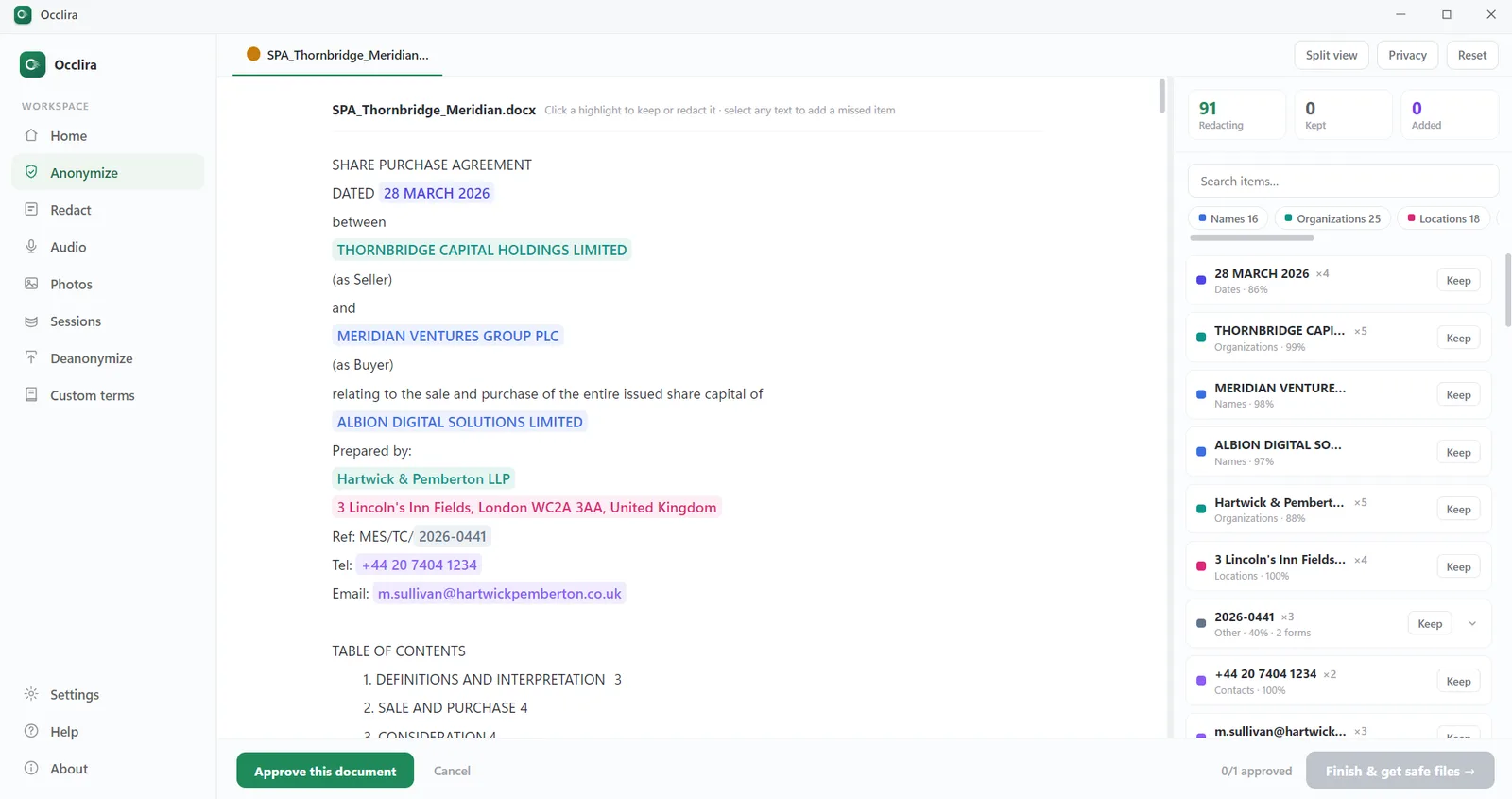
file, Anonymize finds the personal data with a local AI model plus pattern-based rules and
replaces it inside the DOCX with consistent placeholders such as <PERSON_1>, keeping the
formatting. Comments, tracked changes and document properties are cleaned in the same pass. On the review screen
you click each highlighted finding to keep or redact it, and select any text it missed, before the copy is
exported. Excel (XLSX) files work the same way. Every supported format, limit and network call is listed on
the features page.
Anonymize is reversible on purpose. The mapping stays on your computer, and Deanonymize restores the real values in a returned file, which helps when a colleague or an AI tool works on the placeholder copy. In GDPR terms that is pseudonymization, not anonymization: the result is still personal data.
For an irreversible result, save the Word file as a PDF and open it in Redact. It shows a box
for each detected term; keep or drop each one, add a term it missed, or draw a box by hand. Burning writes
<name>_redacted.pdf beside the untouched original: an image-only PDF with no text layer and
none of the source metadata or annotations. It cannot be undone, and the app extracts the text again afterwards
to check that no redacted term can still be found; on scanned pages the check reruns OCR and is only a
warning, so the final check is visual. The trade-off: nothing in the result is selectable.
The Occlira add-in for desktop Word does the same inside the open document: you review the findings, replace them, and restore the real values later. Email has its own route: how to redact an email. For spreadsheets, still do the hidden-sheet and pivot-table cleanup above yourself: Occlira handles the PII in the cells, not Excel’s internal structures. Detection runs offline; the app goes online only to activate the license (via Polar), download its model and check for updates. It helps; it does not guarantee compliance, and the final checks are still yours.
Frequently asked questions
Here is how to redact in Word: work on a copy, accept or reject all tracked changes and delete comments, then swap each name and number for [REDACTED] with Find and Replace and search again for variants. Run Document Inspector, share a PDF copy if nobody needs to edit, and search it for everything you removed.
Not a dedicated one. As of 28 September 2026 we found no redaction feature in Microsoft’s Word documentation, and on Microsoft’s Q&A forum the answer was a manual method: a copy with the text removed or replaced. A reply in the same thread pointed to a third-party add-in. Either way, delete the words rather than cover them.
No. When you black out text in Word with highlighting, shading, a black font or a shape, the characters stay in the file. Anyone can select, copy or search them, or clear the formatting, and they travel into a PDF export. Delete or replace the words instead, then search the saved file for them.
The text is removed the same way: resolve tracked changes and comments, then use Find and Replace. The metadata step differs. Microsoft states that “Word for Mac doesn’t have a document inspector. You can, however, view or change properties manually”, so clear the fields under File → Properties and test the exported PDF with search and copy-paste.
Usually yes, if the recipient does not need to edit, and with the Document properties option cleared. But conversion is not redaction. The ICO says it can remove some metadata yet is not a completely secure method on its own, and a federal court warns that uncleaned metadata stays readable after conversion. Clean the Word file first, then convert.
Delete the rows, columns and worksheets you are not sharing rather than hiding them, remove comments and notes, and don’t send pivot tables built on private data. Replace identifiers in the remaining cells, run Document Inspector, then round-trip each worksheet through CSV into a new workbook, as the ICO suggests.
No. A drawn box or comment annotation sits on top of text that is still in the PDF, so it stays selectable and searchable. The D.C. Circuit lists these tools among the methods not to use. Real redaction removes the marked content; in Acrobat that means Mark for Redaction and Apply, then sanitize for metadata and embedded content.
Because only its appearance changed. If the text layer under a box or highlight is intact, selecting across it and pasting elsewhere returns the words, which is how the sealed parts of a 2019 Manafort filing were read. Once redactions are applied the text is gone from that spot, and an image-only PDF has no text layer at all.
In a federal civil case, Federal Rule of Civil Procedure 5.2 allows only the last four digits of Social Security, taxpayer-ID and financial-account numbers, the year of birth, and a minor’s initials, unless the court orders otherwise and subject to the rule’s exceptions. Counsel and the filer, not the clerk, are responsible for compliance.
It depends on the tool. Redact burns a PDF into an image-only copy and cannot be undone; your original file stays untouched. Anonymize, the tool for Word and Excel files, swaps identifiers for placeholders and keeps the mapping on your computer, so Deanonymize can restore them. That is pseudonymization, not anonymization: the placeholder copy is still personal data.
Redact your files locally
Replace the personal data in Word and Excel files, or burn it out of PDFs, on your own computer. Free for 14 days on Windows and macOS (Apple Silicon).
More: for law firms · for accountants · anonymize before ChatGPT · audio redaction software · how your data is handled