Shadow AI: when employees paste company data into personal chatbots
“Shadow AI” is staff using unsanctioned, personal-account AI for work — and it’s already in almost every organisation. The reflex is to ban it, but bans backfire. The approach that works is to give people a sanctioned tool, a clear policy, and a habit of removing confidential data before it reaches a chatbot. This is the organisational view; if you’re deciding for yourself, start with is ChatGPT private? General guidance, not legal advice.
What is shadow AI (and how it differs from shadow IT)
Shadow AI is the AI-specific slice of shadow IT: employees using AI tools their organisation hasn’t vetted, usually through personal accounts. What makes it sharper than ordinary shadow IT is the input — instead of storing a file in an unapproved app, people paste the confidential text itself straight into a chatbot. And unlike sanctioned enterprise AI (which comes with a contract and no-training terms), a personal account has neither.
How widespread it is — the numbers leaders need
This isn’t a fringe behaviour. An MIT study found employees at over 90% of companies regularly use personal AI tools for work, while only about 40% have bought official subscriptions — a whole shadow economy running parallel to the sanctioned one. (Source: Fortune, on the MIT NANDA report.) Browser telemetry backs it up: 45% of employees use generative AI, 77% of them paste data in, and 82% of those pastes come from unmanaged personal accounts — a blind spot file-based DLP never sees. (Source: LayerX.) And 73.8% of workplace ChatGPT accounts are personal, lacking enterprise controls. (Source: Cyberhaven.)
Why it’s a business risk, not just a personal one
The data flowing into these tools is exactly the data you can’t afford to lose. By 2025, 34.8% of what employees put into AI was sensitive — concentrated in source code, R&D, sales, health and HR records — and 71.7% of the AI tools in use ranked as high or critical risk. (Source: Cyberhaven.) It shows up in breach data: IBM found one in five breached organisations were compromised through shadow AI, and high shadow-AI use added about $670,000 per breach, disproportionately exposing customer PII. (Source: IBM.) There’s a legal tail, too: US courts treat AI chats as discoverable evidence, so a personal-account prompt can be produced in litigation. (Source: National Law Review.)
Why blocking usually fails
The instinct is to ban it — Samsung did, in 2023, after engineers leaked source code into ChatGPT. But blanket bans mostly move the problem out of view: research found 45% of workers find workarounds for blocked apps, and around 81% of employees admit using unapproved AI anyway. (Source: UpGuard.) People simply switch to a personal phone or network your controls can’t see. The effective response, security vendors agree, is to make the compliant path the path of least resistance — a governed alternative plus a clear policy — not prohibition. (Source: Kiteworks.) The governance gap is real: IBM found 63% of breached organisations had no AI policy or were still writing one.
How to manage shadow AI — a 5-part playbook
- Discover the real usage. You can’t govern what you can’t see. Survey teams and check browser/network telemetry to learn which AI tools are actually in use and for what.
- Offer a sanctioned alternative. People reach for personal ChatGPT because it’s the easiest path. Give them an approved, no-training option so the compliant path is also the convenient one.
- Write a clear acceptable-use policy. Say which tools are allowed, what data may go in, and what never can. Ambiguity is what drives shadow use.
- Train staff on what never to paste. Most leaks come from a small group who don’t realise the risk. Short, concrete guidance beats a ban.
- Make minimization the default. The most reliable control is to strip identifiers before anything reaches a chatbot — so even a mistake exposes nothing sensitive. This is the local minimization step Occlira is built for.
What to put in an AI acceptable-use policy
A workable policy is short and concrete. Cover these:
- Scope — who and what it covers (all staff, contractors, all AI tools).
- Approved vs prohibited tools — a named list, kept current.
- Data tiers — public / internal / confidential / never-share, with examples.
- A mandatory data-minimization step before any confidential data reaches an AI tool.
- A no-training / business-tier requirement for anything beyond public data.
- Account rules — corporate SSO, no personal logins for work.
- Human-in-the-loop — verify AI output before relying on it.
- Logging & accountability, and the consequences for breaches.
- A fast route to request a new tool — so people ask instead of going around you.
Make the sanctioned path the easy path with Occlira
The playbook’s last two steps — a sanctioned tool and minimization by default — are exactly where Occlira fits. It removes personal data from documents, spreadsheets, email, audio and images on each employee’s own computer — no cloud, no account — so staff can anonymize a file locally and then use any sanctioned AI on the anonymized copy, restoring the real values on their machine. Nothing sensitive reaches a server to leak, train a model, or become discoverable. It complements your enterprise AI (Team/Enterprise no-training tiers), it doesn’t replace it: minimize first, then use the approved tool. And multi-seat team licenses make it easy to roll out.
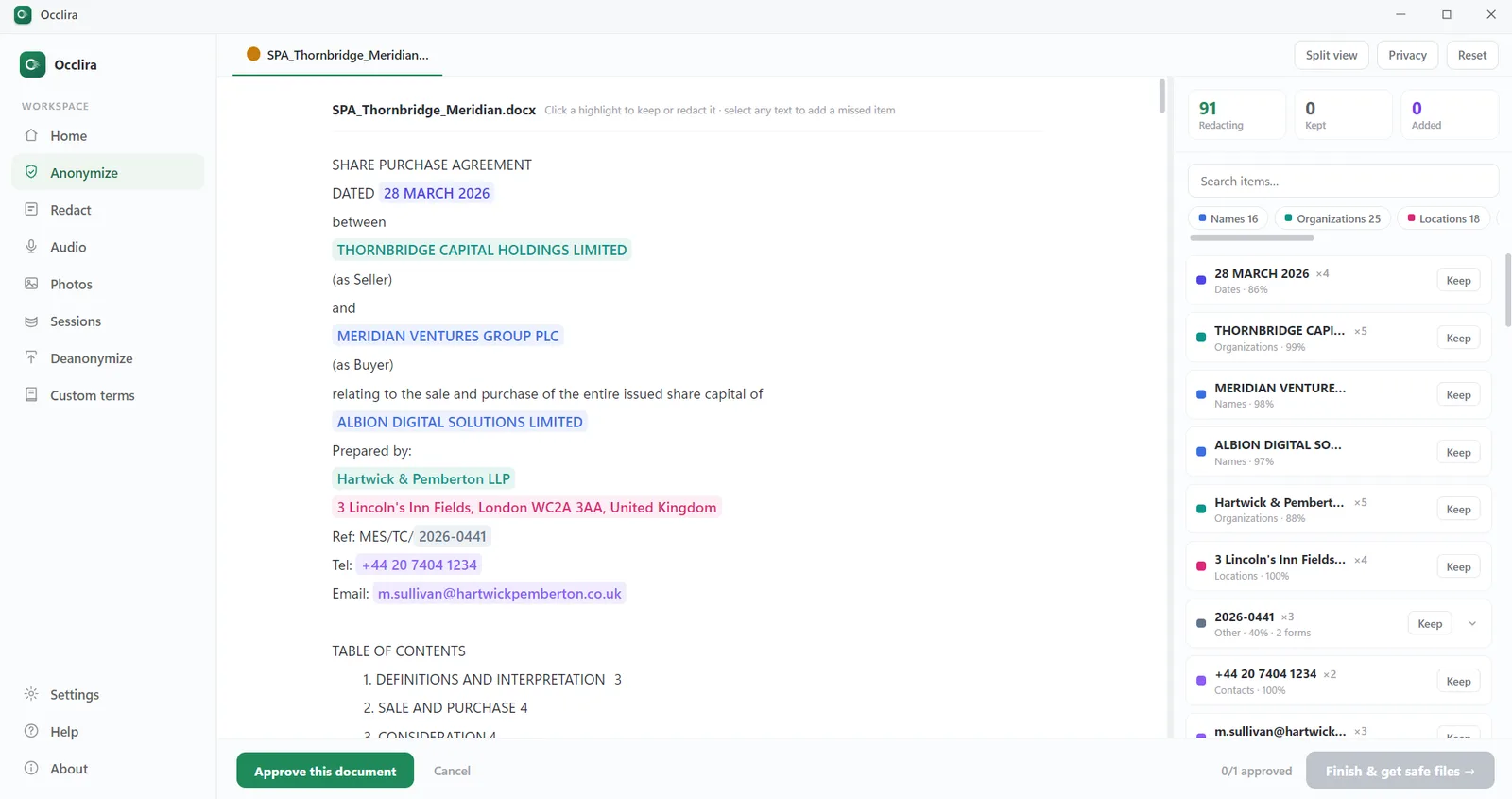
One honest caveat, the same one we use elsewhere: reversible anonymization is pseudonymization, so the local mapping is still personal data — strong minimization kept under your control, not a loophole. Occlira is the minimization control, not a shadow-AI detection or DLP platform.
A 30-day rollout
- Week 1 — Discover. Survey teams and check telemetry; list the tools actually in use.
- Week 2 — Equip. Pick sanctioned no-training tools and a minimization step; set up team licenses.
- Week 3 — Publish. Release the acceptable-use policy with the data tiers and approved list.
- Week 4 — Train & measure. Short sessions on what never to paste; track adoption of the sanctioned path.
Frequently asked questions
Shadow AI is employees using unsanctioned, usually personal-account AI tools for work — outside IT’s visibility, contracts and controls. It’s a business risk because confidential data, source code and client information get pasted into tools with no data-processing agreement, which can leak, train a model, or be produced in litigation.
Shadow IT is unsanctioned software and services generally; shadow AI is the AI-specific slice of it — and it’s riskier because the “input” is often your confidential text itself, pasted straight into a chatbot, rather than a file stored in an unapproved app.
Near-universal. An MIT study found staff at over 90% of companies regularly use personal AI tools for work while only ~40% have official subscriptions. Other 2025 telemetry found most workplace ChatGPT accounts are personal, and a large share of pastes contain sensitive data.
Because people route around it. Research found 45% of workers find workarounds for blocked apps, and blocks push usage onto personal phones and networks IT can’t see — including photographing a screen to upload it elsewhere. Traditional file-based DLP also misses copy-paste from personal accounts.
IBM’s 2025 report found one in five breached organisations were compromised through shadow AI, and those with high shadow-AI use paid about $670,000 more per breach — while only 37% had any policy to manage or detect it.
At minimum: which tools are approved, tiers of data (public / internal / confidential / never), a mandatory minimization step before confidential data goes in, a no-training/business-tier requirement, account rules (corporate SSO), human verification of outputs, and a fast way to request new tools. See the checklist above.
Yes. US courts treat AI chatbot conversations as discoverable electronically stored information — prompts can be produced in litigation and preservation duties attach. Every time staff paste work into a personal chatbot, they create a record your organisation may later have to hand over.
Combine a sanctioned tool with a data-minimization step: give people an approved AI, and have them remove the confidential identifiers before anything is sent. Occlira does the minimization on each person’s own computer, so staff can use any AI on an anonymized copy.
Give staff a safe way to use AI
A sanctioned, on-device minimization tool your whole team can run. Free for 14 days on Windows and macOS; multi-seat licenses available.
More: does ChatGPT save your data? · what is PII? · for law firms · how your data is handled