Does ChatGPT save your data and chats? Retention, training and deletion, plan by plan
Short version: yes. ChatGPT saves your chats and keeps your data: everything you type or upload is stored on OpenAI’s servers until you delete it, and deletion takes up to 30 days, with exceptions. On the four personal plans (Free, Go, Plus and Pro) your chats train OpenAI’s models unless you turn off Settings → Data controls → “Improve the model for everyone”. That switch covers new chats only, and it does not touch ads: since February 2026, chats on Free and Go can also be used to choose which ads you see, under a separate Ad Controls setting. Business, Enterprise and Edu chats are not trained on by default, and your workspace admin sets retention; API data has not been trained on since 2023. In 2025 a US court suspended deletion for most users, with European conversations later carved out.
Jump to: plan table · opt out of training · what “delete” does · Temporary Chat and memory · ads · the court orders · Claude, Gemini, Copilot · FAQ
What ChatGPT saves, plan by plan
| Plan | Trained on by default? | How long chats are kept | Who controls it | Covered by the 2025 preservation order? |
|---|---|---|---|---|
| Free, Go, Plus, Pro (personal) | Yes, until you switch off “Improve the model for everyone” | Until you delete; purged within 30 days unless already de-identified or under a security/legal hold | You, in Settings (Data controls; Ad Controls on Free and Go) | Yes: Free, Plus and Pro (Go did not exist when the order issued and is not named) |
| Business (formerly Team) | No | Set by your workspace admin; deleted chats removed within 30 days | Your organization’s admins; DPA available | Yes (as “Team”) |
| Enterprise, Edu and ChatGPT for Healthcare | No | Set by the admin; deleted chats removed within 30 days unless a law requires longer | Your admin; Enterprise adds a Compliance API audit log; DPA (Enterprise) or student-data agreement (Edu) | No: Enterprise and Edu were excluded (Healthcare launched after) |
| ChatGPT for Teachers | No | Each member sets their own retention | The member; student-data agreement | No (launched after) |
| API (standard) | No, since 1 March 2023 | Abuse-monitoring logs kept up to 30 days | The developer; DPA available | Yes |
| API with Zero Data Retention | No | Inputs and outputs are never logged | The developer; ZDR needs OpenAI’s prior approval and covers specific endpoints only | No, excluded |
Sources: OpenAI pricing (training row per plan), Chat and file retention policies, Enterprise privacy, API data guide and OpenAI’s statement on the preservation order. All OpenAI documents cited on this page were checked on 30 August 2026.
Your plan decides who controls the copy; every plan keeps one, except API calls under an approved Zero Data Retention agreement. Go, the $8-a-month tier (US price) that OpenAI rolled out worldwide in January 2026, sits in the same bucket as Free: trained on by default, ad-supported. Paying for Plus or Pro buys more usage and no ads; the training default and the 30-day deletion window are the same as Free. (Source: OpenAI, “Introducing ChatGPT Go”.)
The default matters because sensitive data already flows through personal accounts. Cyberhaven’s 2026 report found that 39.7% of data movements into AI tools involved sensitive data, and that 32.3% of workplace ChatGPT use ran through personal accounts rather than company ones. Harmonic Security analysed 22.4 million enterprise prompts in 2025 and found 579,113 instances of sensitive company data, 98,034 of them in prompts sent through personal free-tier accounts. (Sources: Cyberhaven, 5 February 2026; Harmonic Security, 15 January 2026.)
What “save” actually covers
- Chat history. Every conversation is stored in your account until you delete it. On plans that have the Library, uploaded files are saved there, and deleting the chat does not delete them. (Source: OpenAI Help Center.)
- Model training. On Free, Plus and Pro, “data sharing is enabled for you by default”; Go is listed the same way on the pricing page. You can opt out. (Sources: OpenAI Help Center; pricing page.)
- Human review. Stored chats can be read by people, not only processed by machines. OpenAI’s enterprise privacy page says business data “is only subject to human review as described below on a service-by-service basis”: for ChatGPT Business, ChatGPT for Teachers and the API, that means “authorized employees” for engineering support, abuse investigation and legal compliance, plus “specialized third-party contractors” who review for abuse; for Enterprise, Edu and Healthcare it is narrower, employees only, for incidents, with your explicit permission, or where the law requires. Its Data Controls FAQ says even Temporary Chats “may be reviewed only to monitor for abuse,” without saying whether that review is human. (Sources: OpenAI Enterprise privacy; Data Controls FAQ.)
- Memory. Separately from the chats themselves, ChatGPT keeps an automatically updated summary of what it has learned about you. It survives chat deletion.
- Ads. New in 2026: on Free and Go, the same stored chats can also be used to select ads.
How to stop ChatGPT training on your data (2026)
Four routes, not four steps: use the one that matches how you sign in, or the last one if the setting is missing.
- On the web, signed in: click your profile icon → Settings → Data controls → turn off “Improve the model for everyone”.
- On mobile: open the side menu → tap your profile → Data controls → turn off “Improve the model for everyone”.
- On the web, without an account: click the “?” icon bottom-right → Settings → turn off “Improve the model for everyone”. OpenAI does not say how far this reaches; with no account to attach it to, do not assume it follows you to another browser or device.
- If you cannot reach the setting: use OpenAI’s privacy portal (privacy.openai.com) and submit a “do not train on my content” request.
Per OpenAI’s Data Controls FAQ and How your data is used to improve model performance.
What the toggle does not do:
- Reach backwards. “Once you opt out, new conversations will not be used to train our models”; earlier chats that were already used stay used.
- Override feedback. “If you choose to provide feedback, the entire conversation associated with that feedback may be used to train our models.” A thumbs-up counts.
- Cover Voice mode or Codex, OpenAI’s coding agent. Each has its own training setting.
- Stop ads. Personalization for ads on Free and Go is a separate switch, under Settings → Ad Controls. Free users can also drop ads altogether in exchange for lower message limits (Settings → Ad Controls → change plan to go ad-free).
- Delete anything. Your chats stay in your history and on OpenAI’s servers; the toggle only changes what they are used for.
Does deleting a chat delete it?
Eventually, usually. OpenAI’s policy is that a deleted chat “is removed from your account immediately and scheduled for permanent deletion from OpenAI systems within 30 days.” The policy names exceptions: a chat that “has already been de-identified and disassociated from you,” and data OpenAI “must retain” longer for security or legal obligations. (Source: OpenAI Help Center.) The first exception is the one that bites: deletion reaches the copy attached to your account, not a copy that has already been stripped of the link to you. And nothing you delete reaches a model that has already trained on the text; the opt-out above stops future use, not past use. Opt out before you chat; deleting afterwards does less.
Where the controls are: a chat deletes from its own menu, and Settings → Data controls holds “Export data” and “Delete account”; account deletion is permanent. Both run into the same exceptions, including the legal hold below. In the EEA, the UK and Switzerland deletion is also a right, not only a setting: OpenAI takes access, correction and erasure requests through privacy.openai.com, subject to the same exceptions. (Sources: OpenAI EU privacy policy; OpenAI privacy portal.)
Temporary Chat and memory
Temporary Chat is not saved to your history, is not used for training and creates no memories, but “for safety purposes we may still keep a copy for up to 30 days.” Since 27 August 2026 you can also save a Temporary Chat, at which point “it becomes a regular chat and follows your account-level data controls, including your model-improvement preference.” A Temporary Chat can also now be started as “personalized”, in which case it can draw on your existing memories and custom instructions while still creating none; that choice cannot be changed once the conversation begins. And if the chat uses a custom GPT that calls an outside service (a “GPT action”), “the recipient may keep that data for longer than 30 days and may use it for other purposes.” (Source: Temporary Chat FAQ.)
Memory is now an auto-updating “memory summary” (Settings → Personalization → Memory) alongside the older list of saved memories. What that means in practice:
- Deleting a chat does not delete what was remembered from it.
- “Delete and turn off memory” clears the summary, but “this does not delete your past chats. If you turn memory back on later, ChatGPT may create new memories from chats that remain in your chat history, including older chats.”
- To remove something completely, “you’ll need to delete every source where it appears, including past chats, archived chats, files, the memory summary, and disconnect any connected apps…” A log of deleted saved memories may itself be kept for up to 30 days.
Source: Memory FAQ.
Ads in ChatGPT: a new use of your chats (2026)
OpenAI began testing ads on 9 February 2026, for logged-in adult users on Free and Go in the US. Canada, Australia and New Zealand were announced on 26 March and went live that April; the UK, Mexico, Brazil, Japan and South Korea on 11 August; and 31 European countries from the week of 24 August 2026, about 40 markets in all. Plus, Pro, Business, Enterprise and Edu have no ads. (Sources: OpenAI, updated 11 August 2026; OpenAI on the European launch, 18 August 2026; Search Engine Land, 19 August 2026.)
With Personalized Ads on, OpenAI says ad selection can use your current chat “including personalized model responses”, your past chats and memory, and how you interact with ads. Advertisers “never receive your chats, chat history, memories, name, email, precise location, IP address…”. In Europe the two questions come apart. Ads themselves reached 31 European countries in the week of 24 August. But as of 30 August, OpenAI’s help page still described personalized ads, the kind that draw on your chats and memory, as “not initially available in the European Economic Area (EEA) or Switzerland.” If you are in the EEA or Switzerland, read that as ads without chat-based personalization until the help page says otherwise.
- No ads run in Temporary Chats or near personal-health, mental-health or political topics.
- Personalization is controlled under Settings → Ad Controls. OpenAI’s help page does not state whether it is on by default, so check the switch yourself.
- Deleting your “ads data” (how you interact with ads) is not instant either: OpenAI gives itself up to 30 days.
Source: Ads in ChatGPT, checked 30 August 2026.
2025–2026: when “deleted” stopped meaning deleted
A copyright case, not a privacy one, produced the clearest test of how conditional a deletion promise is. In The New York Times v. OpenAI:
- 13 May 2025. Magistrate Judge Ona Wang orders OpenAI to “preserve and segregate all output log data that would otherwise be deleted,” overriding users’ deletions and Temporary Chats. Scope: Free, Plus, Pro and Team subscribers and API customers without a Zero Data Retention (ZDR) agreement. Enterprise and Edu were excluded (Enterprise’s exclusion was clarified at a hearing on 27 May). (Sources: Order, 13 May 2025; OpenAI.)
- 26 September 2025. The going-forward obligation ends. OpenAI says it “will securely store limited historical April–September 2025 user data”, with access limited to a small audited legal and security team. Note the start date: OpenAI’s own description of the preserved set begins a month before the order. Conversations originating in the EEA, Switzerland and the UK were prospectively carved out. (Source: OpenAI update, 22 October 2025.)
- 7 November 2025. Judge Wang orders OpenAI to hand the news plaintiffs the full de-identified sample of 20 million consumer conversations that OpenAI had itself proposed, drawn from December 2022 to November 2024; the plaintiffs had asked for 120 million. She denies reconsideration on 2 December and extends the production to the class plaintiffs on 5 December. (Source: Order, Dkt. 1087, pp. 1–2; OpenAI, for the sampling window.)
- 5 January 2026. District Judge Sidney Stein affirms. The orders were “neither clearly erroneous nor contrary to law,” and Judge Wang “adequately balanced ChatGPT users’ privacy interests against the relevance of the documents in light of the privacy protections already in place.” Those protections were de-identification by OpenAI’s own tool and a protective order. (Source: Order, Dkt. 1087, S.D.N.Y..)
- Where it stands. The production order stands. Under the last scheduling order we could verify (24 March 2026), summary-judgment briefing runs to November 2026, and no fair-use ruling had been issued as of 30 August 2026. (Source: case tracker, 24 March 2026.)
None of this required a breach. Chats were preserved against users’ deletions, and a court has ordered 20 million of them, de-identified, produced to the other side, because relevance outweighed privacy. Once your text is on a provider’s servers, that weighing is done by other people. It is also why a chat is not a confidential channel in the legal sense; see does using ChatGPT waive attorney-client privilege? and, for US lawyers, ABA Formal Opinion 512. The contractual routes out, an Enterprise agreement or a Zero Data Retention API, depend on the provider keeping its side, and on no court ordering otherwise.
Business, Enterprise and the API: what actually changes
The business products change the defaults. OpenAI’s enterprise privacy page states: “By default, we do not use your business data for training our models.” OpenAI will sign a Data Processing Addendum for Business, Enterprise and the API. Admins set retention, and deleted chats are removed within 30 days. On the API, abuse-monitoring logs are kept up to 30 days, and eligible customers can be approved for Zero Data Retention, where “inputs and outputs are never logged.” (Sources: OpenAI Enterprise privacy, updated 8 January 2026; API data guide; OpenAI on ZDR.)
What it does not change: the data still leaves your device and lives on a third party’s infrastructure. A Business workspace belongs to your organization. OpenAI’s enterprise privacy page says workspace admins “can view, access, export, and delete end user conversations,” while its Business help article says admins “cannot automatically view other members’ private chat history”, so check your own workspace settings. Private from OpenAI is not the same as private from your employer. And a court can still reach it: the 2025 preservation order covered Team and standard API customers. (Sources: OpenAI Enterprise privacy; ChatGPT Business help.)
How Claude, Gemini and Copilot compare
| Assistant | Trained on by default? | Retention |
|---|---|---|
| Claude Free / Pro / Max | Yes, unless you turn off “Help improve our AI models” (Settings → Privacy) | 30 days if training is off; up to 5 years, de-identified, if it is on. Deleted chats leave the back end within 30 days; safety-flagged chats up to 2 years |
| Claude for Work / API | No | API inputs and outputs deleted within 30 days; zero-data-retention by agreement; enterprise admins set their own retention |
| Gemini app (personal) | Yes, while “Keep Activity” is on | Auto-deleted after 18 months by default (3 or 36 months, or no auto-delete). Turning “Keep Activity” off does not stop storage: future chats are “still saved for 72 hours”. Chats reviewed by humans are kept up to 3 years even after you delete them, separately from your account. Temporary Chats: 72 hours |
| Gemini in Google Workspace | No, not without your permission | Admin auto-delete at 3, 18 or 36 months (default 18) |
| Microsoft Copilot app (personal) | No, as the app released 18 August 2026 states: prompts, responses and file contents “aren’t used to train foundation models”. In the older app, conversation activity fed model training unless you switched off “Training on conversation activity” | Older app: 18 months by default. The new app’s pages state no period; delete or export via the Microsoft privacy dashboard |
| Microsoft 365 Copilot (now “Microsoft Copilot” for work) | No | Kept under your organization’s Microsoft 365 retention settings |
Sources: Anthropic privacy policy (effective 8 July 2026), Claude retention and organization data retention, Anthropic, 28 August 2025, for the 30-day period; Gemini Apps privacy hub (updated 10 August 2026) and Workspace privacy hub; Microsoft Copilot app activity, older-app privacy FAQ and Microsoft 365 Copilot privacy. Checked 30 August 2026.
Most personal plans train by default with an opt-out; the Copilot app released in August 2026 is the exception (see is Microsoft Copilot safe?). Anthropic switched its consumer plans to train-by-default with an opt-out on 28 August 2025, giving existing users until 8 October to choose, and allowing training stretches retention from 30 days to 5 years. Business plans do not train. And “delete” has exceptions: Google keeps human-reviewed Gemini chats for up to 3 years after you delete them. (Sources: Anthropic, 28 August 2025; Google.) On Claude specifically, see is Claude safe?; on Gemini, is Google Gemini safe?
How Occlira keeps the identifiers out of what you send
Every setting above reduces exposure; none can un-send data or bind a judge. What you send is the one control that does not depend on OpenAI’s policy, and Occlira applies it on your own computer.
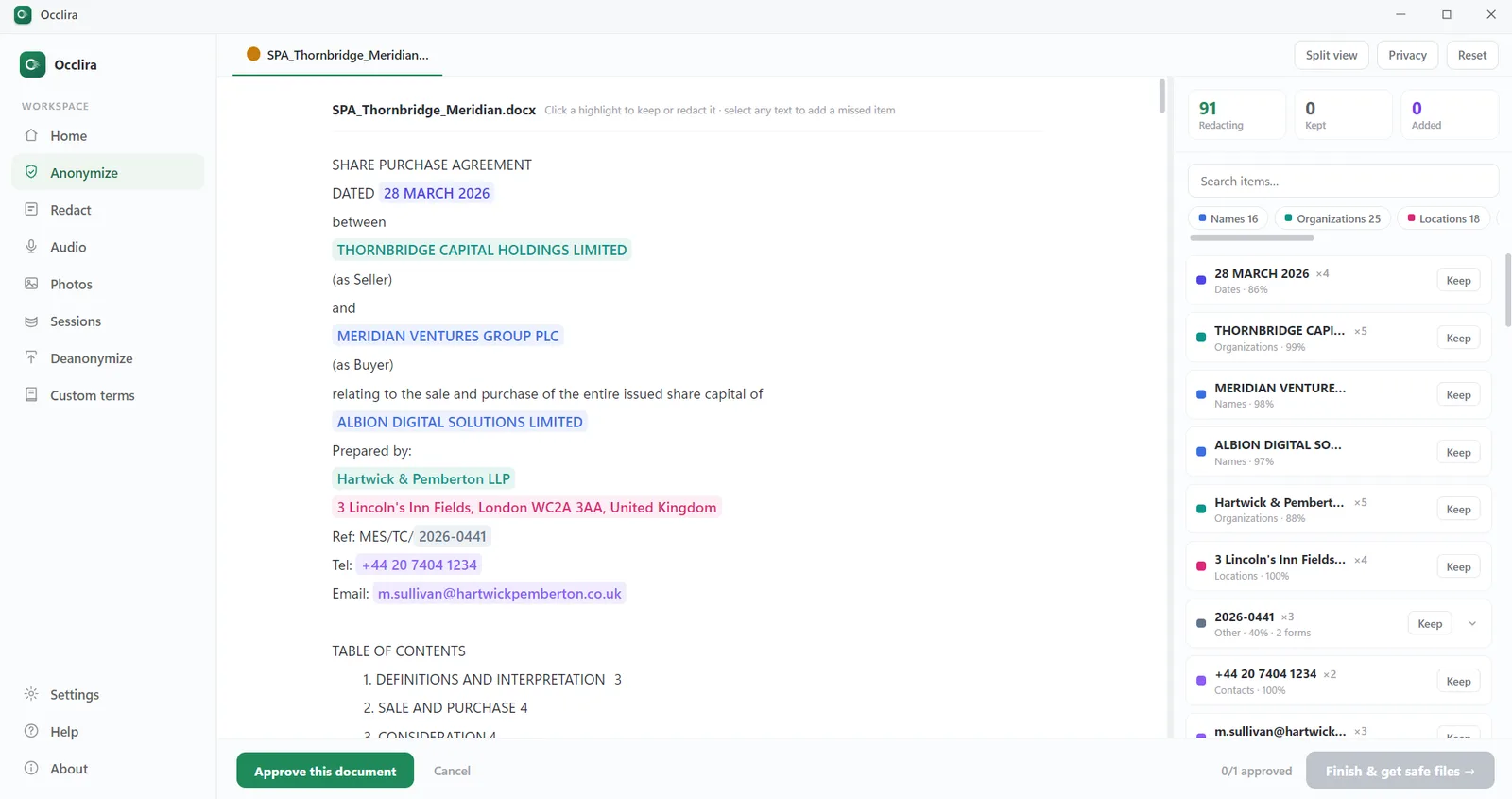
Open a document, spreadsheet, email, PDF, scan, photo or audio recording. Occlira flags the personal data
in it (names, addresses, phone numbers, ID and account numbers, dates), shows a confidence score for each and
leaves the decision to you. Confirmed values become placeholders that stay consistent within a session, such as
<PERSON_1> and <IBAN_1>, and the mapping stays on your device, so you can
restore the real values afterwards on your own machine.
One caveat: because the mapping lets you restore the originals, this is pseudonymization in GDPR terms. It reduces exposure; it does not take you outside the GDPR, because the mapping on your device is still personal data. The step-by-step workflow is in anonymize text before ChatGPT.
Frequently asked questions
Yes. On every ChatGPT plan, every message, upload and reply is stored on OpenAI’s servers, and, except for Temporary Chats, your chats stay in your account history until you delete them. On the personal plans (Free, Go, Plus and Pro) the content is also used to train OpenAI’s models by default, and since February 2026 it can be used to personalize ads on Free and Go. Business, Enterprise, Edu and API customers are not trained on by default. Standard API requests enter no chat history but can sit in abuse-monitoring logs for up to 30 days; only the API under an approved Zero Data Retention agreement is not logged at all.
Yes: every chat is kept in your history until you delete it, and for up to 30 days after that, sometimes longer. OpenAI removes a deleted chat from your account immediately and schedules permanent deletion within 30 days, unless the chat has already been de-identified and disassociated from you or OpenAI has to keep it for security or legal reasons. In 2025 a US court order suspended deletion for Free, Plus, Pro, Team and standard API users from May to September, with conversations originating in the EEA, Switzerland and the UK carved out from October. OpenAI still holds the preserved data, which it dates from April 2025, under legal hold.
Settings → Data controls → turn off “Improve the model for everyone” (on mobile: side menu → profile → Data controls). The setting applies to your whole account but only to new conversations; it does not pull your earlier chats out of a training run that already happened. It also has holes. Rate a reply with a thumbs-up or thumbs-down and the whole conversation may be used for training. Voice mode and Codex, OpenAI’s coding agent, have their own training settings, which this toggle does not change.
Yes. Plus and Pro store your chats exactly like Free, and they train on them by default unless you opt out. Paying buys more usage and no ads; the data controls are the same, minus the ad settings only Free and Go have. Only the Business, Enterprise, Edu, Healthcare, Teachers and API products are excluded from training by default.
No. OpenAI states that business data is not used for training by default, and it will sign a Data Processing Addendum for Business, Enterprise and the API. Retention is set by your workspace admin, and deleted chats are removed within 30 days. But a Business workspace belongs to your organization. OpenAI’s enterprise privacy page says workspace admins can view, export and delete members’ conversations, while its Business help article says they cannot automatically view other members’ private chats; what your admin sees depends on how the workspace is configured, and private from OpenAI is not the same as private from your employer.
Partly. A Temporary Chat is not saved to your history, is not used for training and creates no memories, but OpenAI may keep a copy for up to 30 days for safety review. Since 27 August 2026 you can also save a Temporary Chat, which turns it into a normal chat governed by your training setting. And if the chat uses a custom GPT that calls an outside service, that third party may keep the data longer. The text is still transmitted and processed by OpenAI either way.
On Free and Go, yes, if Personalized Ads are on. OpenAI started testing ads on 9 February 2026 in the US. It announced Canada, Australia and New Zealand on 26 March and launched there in April, added five more countries on 11 August, and 31 European countries from the week of 24 August 2026: about 40 markets in all. With personalization enabled, ad selection can use your current chat, your past chats and your memory. OpenAI’s help page does not say whether personalization is on by default, so check Settings → Ad Controls yourself. OpenAI says advertisers never receive your chats or identity, and that no ads run in Temporary Chats or near health, mental-health or political topics. As of 30 August 2026 OpenAI’s help page still described personalized ads as “not initially available” in the EEA or Switzerland. Plus, Pro, Business, Enterprise and Edu have no ads.
Yes. On 13 May 2025, in the New York Times copyright case, Magistrate Judge Ona Wang ordered OpenAI to preserve all output logs that would otherwise be deleted, overriding users’ deletions and Temporary Chats. The order covered Free, Plus, Pro and Team users and standard API customers; Enterprise, Edu and Zero Data Retention customers were excluded. The going-forward duty ended on 26 September 2025, but the data preserved until then remains under legal hold. On 5 January 2026 District Judge Sidney Stein affirmed a different set of orders, requiring OpenAI to hand over a sample of 20 million de-identified conversations from 2022–2024.
Yes. ChatGPT keeps an automatically updated memory summary about you. Deleting a chat does not delete what was already remembered from it. “Delete and turn off memory” clears the summary but leaves your past chats in place, so if you turn memory back on later, ChatGPT can rebuild memories from them. To fully remove something, OpenAI says you must delete every source it appears in: past and archived chats, files, the memory summary and any connected apps.
On OpenAI’s own servers and those of its cloud providers, mainly in the United States. Since February 2025, Enterprise, Edu and API customers have been able to choose data residency in Europe, and the API now offers residency in several other regions. Wherever the data sits, the retention and training rules above are what govern it.
Take the identifiers out before you send anything. Occlira, a desktop app for Windows and macOS (Apple Silicon), does this on your own computer: it finds the names, IDs, contact details and other personal data in a file, replaces them with consistent placeholders such as <PERSON_1>, and keeps the mapping locally. You work in ChatGPT on the placeholder copy, then restore the real values on your machine. The identifiers you removed are never in what ChatGPT stores, trains on or is ordered to preserve; the rest of the document still is, so review what remains before you send it.
Try it on your own files
Anonymize locally, then use any AI tool on the copy. Free for 14 days on Windows and macOS (Apple Silicon).
More: what is PII? · local vs cloud redaction · shadow AI at work · how your data is handled