Is ChatGPT private? What it stores, who can see your chats, and how to use it safely (2026)
No — not in the everyday sense of the word. A ChatGPT conversation is stored on OpenAI’s servers. On the personal plans (Free, Plus, Pro — and Go, see does ChatGPT save your data?) it trains the models by default. A limited number of authorized OpenAI staff and trusted service providers can read it for a defined set of reasons, and a court can order it preserved and produced. Your chats are private from other users, not from OpenAI. “Is ChatGPT safe?” and “is ChatGPT private?” are different questions — the app is not going to infect your laptop, but nothing you type into it is confidential. The one thing you fully control is what you send: a chat that never contained a name, a case number or an address has nothing to leak.
Who this is from. Occlira is a desktop app that replaces the names, IDs and addresses in a file with placeholders on your own computer, so the copy you paste into ChatGPT carries placeholders instead of the details it found. This guide is what we tell our own users. How it works ↓ · Free 14-day trial
Jump to: who can see your chats · named incidents · Temporary Chat & the training toggle · risky vs okay · the safe workflow · FAQ
What ChatGPT stores
Everything you type or upload is stored on OpenAI’s servers and attached to your account until you delete it, and on a personal workspace it feeds model training: “if you are on a ChatGPT Plus, ChatGPT Pro or ChatGPT Free plan on a personal workspace, data sharing is enabled for you by default”, with an opt-out under Settings → Data controls. Alongside the chats themselves, ChatGPT keeps a separate store of memories about you. (Source: OpenAI Help Center, accessed 3 September 2026.) Plan-by-plan retention, what “delete” really does and the exact opt-out steps are covered in does ChatGPT save your data? — here the question is narrower: given that it is all stored, who can get at it?
One use is new. On 9 February 2026 OpenAI began testing ads in the US, for logged-in adult users on the Free and Go tiers. The exclusions are listed by name: “Plus, Pro, Business, Enterprise, and Education tiers will not have ads”. OpenAI says the ads themselves “do not influence the answers ChatGPT gives you, and we keep your conversations with ChatGPT private from advertisers”. What the ad system does use is the conversation itself: OpenAI decides which ad to show “by matching ads submitted by advertisers with the topic of your conversation, your past chats, and past interactions with ads”.
Europe is inside the rollout. On 18 August 2026 OpenAI said “ChatGPT Ads will expand to 31 European countries” the following week. On 31 August it confirmed that self-service access through Ads Manager “is now available across the 31 European markets”. The chat-based targeting is a separate matter: OpenAI’s help page says personalized ads are “not initially available in the European Economic Area (EEA) or Switzerland”. Which markets, and where the ad controls live, are in does ChatGPT save your data? (Sources: OpenAI, “Testing ads in ChatGPT”, 9 February 2026, updated 11 August 2026; OpenAI on the European launch, 18 August 2026, updated 31 August 2026; OpenAI Help Center, “Ads in ChatGPT”, accessed 3 September 2026.)
Who can see your ChatGPT conversations?
Six answers, from the routine ones to the ones people do not expect.
- OpenAI staff, in four defined cases. “A limited number of authorized OpenAI personnel, as well as trusted service providers that are subject to confidentiality and security obligations, may access user content only as needed for these reasons: (1) investigating abuse or a security incident; (2) to provide support to you if you reach out to us with questions about your account…; (3) to handle legal matters; or (4) to improve model performance (unless you have opted out).” Access is on a need-to-know basis, OpenAI says it monitors and logs all access to user content, and staff must complete security and privacy training first. (Source: OpenAI, Data Usage for Consumer Services FAQ, accessed 3 September 2026.)
- Vendors OpenAI works with. Content goes to “a select group of trusted service providers”, limited to “the minimum amount of content we need”, under confidentiality obligations — and, OpenAI states, “we do not share your chat content for marketing or advertising purposes”. (Same source, accessed 3 September 2026.)
- Law enforcement, on a valid request. The privacy policy lists “providing information to law enforcement when required by a valid legal request” among the disclosures OpenAI makes. (Source: OpenAI Privacy Policy, updated 24 August 2026.)
- Anyone you send a share link to. Shared conversations are readable by whoever has the URL. In mid-2025 an extra option went further and let those pages be indexed by search engines — see the incident below.
- Your admin, on a business workspace. On ChatGPT Enterprise, “workspace admins can access an audit log of conversations and GPTs through the Enterprise Compliance API”, while OpenAI employees access conversations only “for the purposes of resolving incidents, recovering end user conversations with your explicit permission, or where required by applicable law”. (Source: OpenAI enterprise privacy, updated 8 January 2026.) ChatGPT Business is different, and the difference is worth knowing before you assume your manager reads everything. OpenAI’s Business help article says usage analytics do not give admins chat-transcript access: “each user still has their own chat history unless they choose to share a specific chat, GPT, or other resource”. (Source: OpenAI Help Center, accessed 3 September 2026.)
- A court, and through it the other side of a lawsuit. This is the one no setting controls. On 13 May 2025, in The New York Times v. OpenAI, Magistrate Judge Ona T. Wang directed OpenAI “to preserve and segregate all output log data that would otherwise be deleted on a going forward basis until further order of the Court”. The order explicitly covered data that would be deleted “at a user’s request”. The going-forward duty ended on 26 September 2025, except for logs already preserved and for accounts flagged by the plaintiffs. Then, on 5 January 2026, District Judge Sidney Stein affirmed an order compelling OpenAI to hand the plaintiffs a de-identified sample of 20 million conversations, produced under a protective order. The full timeline, and who was carved out of it, is in does ChatGPT save your data? (Sources: Preservation order, 13 May 2025; Engadget, 11 October 2025; National Law Review, 6 January 2026; Order, Dkt. 1087, 5 January 2026.)
Is ChatGPT safe to use? The real risks, ranked
Safe for your device and safe for your data are separate questions. Most “is ChatGPT safe” advice answers the first one. This is the second, ranked by how often it actually bites people:
- Accidental leaks (“shadow AI”). Staff paste confidential material into personal accounts, invisibly to IT.
- Model-training exposure. On consumer accounts your text trains the model by default.
- Provider & subprocessor breaches. The provider — or one of its vendors — can be hacked.
- Discoverability & legal holds. Prompts can be retained by court order and produced as evidence.
- Accidental public exposure. A wrong setting or shared link can put a conversation on the open web.
Notice what they have in common: every one of them is a risk about content. None of them can hurt you if the confidential parts never left your computer.
It already happened — named incidents
- Samsung (2023). Samsung confirmed on 2 May 2023 that it was “temporarily restricting the use of generative AI products, such as ChatGPT, through the company’s personal computers”. Staff in one of its biggest divisions were told in a memo at the end of April “after there had been cases of misuse of the technology”. Bloomberg reported that some employees had uploaded sensitive code. (Source: CNBC, 2 May 2023, accessed 3 September 2026.)
- The March 2023 ChatGPT bug. A flaw in the redis-py library let some users see other people’s chat titles and, in some cases, the first message of a new conversation. The same bug exposed payment details — name, email, billing address, card type, expiry and the last four digits, never the full number — for 1.2% of ChatGPT Plus subscribers active in a nine-hour window. (Source: OpenAI, 24 March 2023, accessed 3 September 2026.)
- Shared chats on Google (mid-2025). An option that made shared conversations discoverable put them into search results. Hours after TechCrunch published on 31 July 2025, OpenAI removed the feature, calling it a short-lived experiment that “introduced too many opportunities for folks to accidentally share things they didn’t intend to”. (Source: TechCrunch, 31 July 2025.)
- The Mixpanel subprocessor breach (Nov 2025). On 9 November 2025 Mixpanel, OpenAI’s analytics vendor, became aware that an attacker had gained unauthorized access to part of its systems and exported a dataset. It shared the affected data with OpenAI on 25 November. The affected account profile data was limited to names, email addresses, approximate coarse location, browser and operating system, referring websites and organization or user IDs. No chats, then — but proof that even a careful provider’s vendors are an attack surface. (Source: OpenAI, accessed 3 September 2026.)
Is ChatGPT confidential? What Temporary Chat, memory and the training toggle really do
These three settings are what most “make ChatGPT private” advice comes down to. Each helps; none of them makes a conversation confidential.
- Temporary Chat. It does not appear in your history, creates no memories and is not used to train the models — but “for safety purposes we may still keep a copy for up to 30 days”. Since 27 August 2026 a Temporary Chat can also be saved, and OpenAI is explicit about what that means: “Saving converts it into a regular chat. From that point forward, it follows your account-level personalization and model improvement settings.” The official @ChatGPT account announced the change the same day. (Sources: OpenAI, Temporary Chat FAQ, accessed 3 September 2026; @ChatGPT, 27 August 2026.)
- Memory. Saved memories live apart from your chats, so deleting the conversation does not delete what was learned from it: “even if you delete a chat, any saved memories from it can still be used in future conversations”. To remove something completely you have to “delete every source where it appears, including past chats, archived chats, files, the memory summary”, and disconnect connected apps. OpenAI also “may retain a log of deleted Saved Memories for up to 30 days”. (Source: OpenAI, Memory FAQ, accessed 3 September 2026.)
- “Improve the model for everyone”. Switching it off (Settings → Data controls) works only forwards: “once you opt out, new conversations will not be used to train our models”. Two carve-outs survive it. Feedback: “if you choose to provide feedback, the entire conversation associated with that feedback may be used to train our models” — a thumbs-up counts. And Codex keeps its own switch, since “adjusting your settings in the ChatGPT interface or privacy portal will not affect these full-environment Codex settings”. (Sources: OpenAI Help Center and How your data is used to improve model performance, both accessed 3 September 2026.)
Read together, they change what happens to your text inside OpenAI. They do not stop the text arriving there, and none of them creates the kind of protected channel people mean by “confidential” — which is why a chat is not privileged, and why the preservation order above could reach conversations users had deleted.
Is ChatGPT secure? Encryption, audits and where the data sits
On the infrastructure question OpenAI’s answers are concrete. Its enterprise privacy page lists “data encryption at rest (AES-256) and in transit between our customers and us, and between us and our service providers (TLS 1.2+)”, a “successfully completed… SOC 2 audit” and “enterprise-level authentication through SAML SSO”. Business customers can also pin where data lives: OpenAI says data residency “is currently available in Europe, the United Kingdom, the United States, Canada, Japan, South Korea, Singapore, India, Australia, and the United Arab Emirates”, for ChatGPT Enterprise, ChatGPT Edu and the API Platform. On the API, eligible customers can get Zero Data Retention. OpenAI reaffirmed it on 19 August 2026 as a promise that it “does not retain their prompts or model responses after a request is processed” and that the content “is not available to OpenAI personnel for review”. (Sources: OpenAI enterprise privacy, updated 8 January 2026; OpenAI on data residency, accessed 3 September 2026; OpenAI on Zero Data Retention, 19 August 2026.)
That is a serious security posture against outsiders, not an answer to the privacy question. Nothing OpenAI publishes describes end-to-end encryption, and there could not be any while authorized personnel may read content for the four reasons above. Encryption at rest does nothing about a court order or a share link. “Secure” and “private” are different promises, and only the first one comes with an audit report.
ChatGPT privacy concerns at work: the shadow-AI numbers
Occasional pasting adds up to a systemic leak. Cyberhaven’s 2026 report finds that “39.7 percent of all AI interactions involve sensitive data”. Menlo Security’s 2025 report found 68% of employees use free-tier AI tools like ChatGPT via personal accounts, with 57% inputting sensitive data, logging 155,005 copy and 313,120 paste attempts in a single month. LayerX’s 2025 report puts generative AI at 32% of all corporate-to-personal data exfiltration, “the #1 vector for corporate data movement outside sanctioned environments”. (Sources: Cyberhaven, 2026 report, accessed 3 September 2026; Menlo Security, 2025 report of 4 August 2025, accessed 3 September 2026; LayerX, Enterprise AI and SaaS Data Security Report 2025, accessed 3 September 2026.)
That gap between what an organisation has approved and what its people actually use has a name and a management answer: see shadow AI at work. For an individual, the takeaway is smaller and sharper — the risky habit is not “using ChatGPT”, it is pasting the unedited document.
When is it risky to put confidential data into ChatGPT — and when is it okay?
| What you want to put in | Verdict |
|---|---|
| Names, client or patient details, any PII | Don’t paste raw — anonymize first |
| Trade secrets, source code, unreleased plans | Don’t paste |
| Privileged or regulated data (legal, health, financial) | Don’t paste — high duty of care |
| Information that is already public | Usually fine |
| Generic questions with no real data in them | Fine |
| An anonymized copy with placeholders instead of real values | Fine — this is the safe way |
The “anonymize first” and “fine” rows all describe the same move: strip the identifiers locally, then paste. The workflow below spells out how.
A three-question gut check before you paste:
- Would a breach of this embarrass you or breach a duty (to a client, patient or employer)?
- Could you do the task just as well on an anonymized version?
- Are you on a consumer account (trained on by default) or a business tier?
Does a business tier make ChatGPT private?
It changes the defaults, and the defaults matter: “by default, we do not train on any inputs or outputs from our products for business users, including ChatGPT Business, ChatGPT Enterprise, and the API”, admins control how long data is retained, and OpenAI will sign a data-processing agreement. (Sources: OpenAI Help Center, accessed 3 September 2026; enterprise privacy, updated 8 January 2026.) The full tier breakdown is in does ChatGPT save your data?
What it does not do: the data still leaves your device, a vendor can still be breached, a court can still order production, and on Enterprise your own admin gains an audit log you did not have on a personal plan. A DPA also does not by itself make the processing lawful — that is the subject of use AI without breaking the GDPR. A business tier reduces risk; it does not remove it. Nor is any of this specific to OpenAI: the same questions, with different answers, apply to the other assistants — Is Claude safe?, is DeepSeek safe? and is Grok private?
How to use ChatGPT privately: the workflow
The rule is data minimization — don’t send what the task doesn’t need:
- Anonymize the confidential parts before anything is sent. Occlira does this on your own computer: open the file, confirm what it flagged, and either work on the anonymized copy it gives you — pasting its text or uploading the file with your prompt — or let the Chrome extension’s Anonymize and Shield file buttons do it inside ChatGPT itself.
- Run the AI on the anonymized copy — the placeholders keep the structure, so the answer still fits.
- Restore the real values on your own machine once you have the output you need.
- Prefer a no-training tier for work, and never paste credentials or regulated data at all.
- Keep a human in the loop and verify the output before you rely on it.
How Occlira keeps the identifiers out of what you send
Occlira is a desktop app you run before the chat window. Open the file you were about to send — a
document, spreadsheet, email, PDF, scan, photo or audio recording — and it finds the personal data in it:
names, addresses, phone numbers, ID and account numbers, dates. Detection happens
on your own computer (the app goes online only to activate the licence via Polar, download its
model and check for updates), every item carries a confidence score, and you confirm what goes or add what it
missed. You get back an anonymized copy: a Word or Excel file stays a Word or Excel file, formatting intact,
with comments, tracked changes and document properties cleaned in the same pass, while PDFs, emails and scans
come back as .txt. Confirmed values become consistent placeholders such as <PERSON_1>, and
the mapping that reverses them stays on your device, kept seven days by default and configurable.
Then use that copy with ChatGPT, or with any other assistant: press Copy anonymized text and
paste it, or upload the anonymized file together with your prompt. The reply comes back with the placeholders
still in it, and Deanonymize puts the real values back in one click, writing a
*_restored copy from the file you saved. Three connectors do the same work without leaving the
tool you are in; all of them run locally and need the desktop app open. The Chrome extension adds
Anonymize and Shield file buttons to ChatGPT, Claude and Gemini, cleaning
text and files before you send them and bringing the real values back into the reply with
Restore, with the desktop app on the same Windows PC. The Claude Desktop connector lets Claude
anonymize documents through Occlira and work on the anonymized text; the real values stay on your computer. The Word add-in shields a document from
inside desktop Word on Windows and macOS.
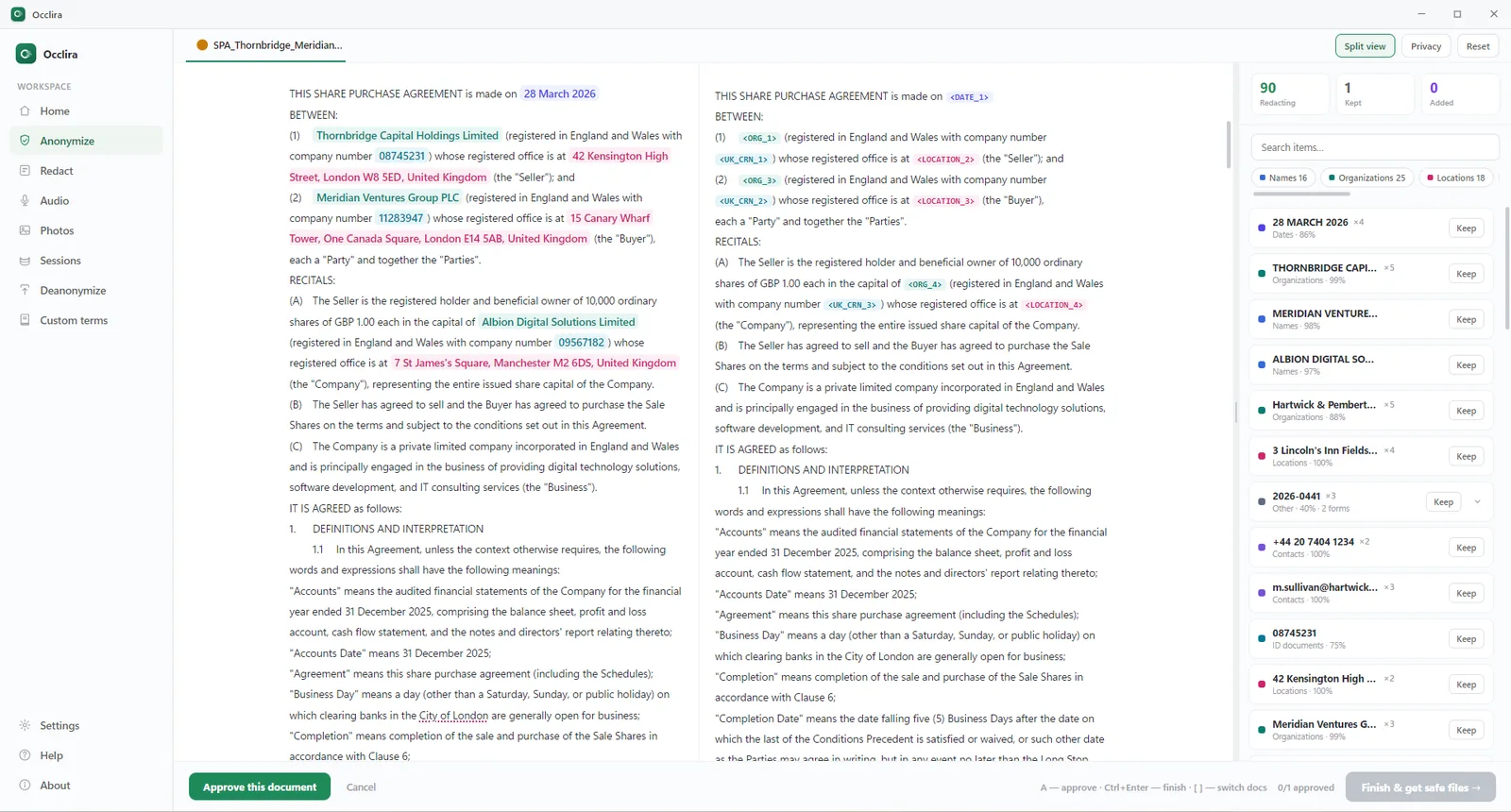
One honest caveat: because the mapping lets you restore the originals, this is pseudonymization in GDPR terms — strong local minimization, but the mapping on your device is still personal data. Treat it as a control, not a loophole. It helps you comply; it does not guarantee compliance by itself. The step-by-step is in anonymize text before ChatGPT.
Frequently asked questions
Not in the everyday sense. Your conversations are stored on OpenAI’s servers, and on the personal plans they train the models until you switch that off. OpenAI names four cases in which its authorized staff and vetted providers may open user content: abuse investigations, support requests, legal matters and model improvement. Other users do not ordinarily see your chats unless you share a link; OpenAI, an admin on ChatGPT Enterprise and a court can.
For ordinary questions, yes — the risk is not the app, it is what you put into it. Every failure mode is about content: pasting into a personal account, training defaults, a breach at OpenAI or one of its vendors, court-ordered production, a share link that goes public. Keep the identifiers out and what remains is far less damaging if it leaks.
Not the way a conversation with your lawyer or doctor is. Temporary Chat, deletion and the training toggle change how your text is used inside OpenAI; none of them creates a protected channel. A court can still order chats preserved and handed over, which is what happened in the New York Times litigation.
On the infrastructure question, yes: encryption at rest and in transit, a completed SOC 2 audit and SAML SSO on business plans. That is protection against outsiders, not against the provider. No OpenAI documentation claims end-to-end encryption, and it would be incompatible with the staff access OpenAI itself describes.
By design: authorized OpenAI personnel and vetted providers in the four cases OpenAI lists, anyone holding a share link, an Enterprise admin through the Compliance API, and the other side of a lawsuit after a production order. By accident, twice: a March 2023 library bug briefly showed some users other people’s chat titles and first messages, and in mid-2025 shared chats could be indexed by search engines. The November 2025 breach at OpenAI’s analytics vendor Mixpanel is a different case — it exposed account profile data, not chats.
It depends whose account it is. On a personal one the chat sits outside your employer’s controls and inside OpenAI’s training set by default. That is the pattern that made Samsung restrict generative AI on company PCs in 2023. On a company workspace OpenAI does not train on the data by default, but the workspace is your employer’s and Enterprise admins get an audit log: private from OpenAI and private from your employer are different questions.
Not in raw form. What you paste is transmitted and stored, trained on by default on personal plans, and reachable by a breach or a court order. It is far safer on an anonymized copy — review what remains — because the task rarely needs the real names to be done well.
They make it less persistent, not private. The chat stays out of your history and creates no memories, but OpenAI may keep a copy for up to 30 days for safety reasons. Since 27 August 2026 you can also save a Temporary Chat, and saving turns it into an ordinary chat that follows your account-level settings.
On one axis, yes: business tiers are not trained on by default, admins control retention, and OpenAI will sign a data-processing agreement. What it cannot change: the file still leaves your computer, vendors stay part of the chain, and a court order outranks any setting. On Enterprise your own admin also gains an audit log you never had on a personal plan.
Client or patient personal data, trade secrets and source code, privileged or regulated material, credentials, and anything whose exposure would breach a duty or embarrass you. If you need help with a document like that, anonymize it first and work on the copy.
Use AI on sensitive files, safely
Anonymize locally, then use any AI tool on the copy. Free for 14 days on Windows and macOS (Apple Silicon).
More: what is PII? · for law firms · is ChatGPT HIPAA compliant? · how to redact in Word · how your data is handled