Redacted bank statement: what you can hide, what the recipient needs to see, and how to redact it properly
A redacted bank statement is a copy with details permanently removed while your name, address, statement period, balance and income lines stay visible. Usually that means the full account number (its last four digits can stay), the sort code or routing number, and the payees of transactions the recipient need not see. What you hide depends on the recipient. Redacting never changes a figure, and a black box over a PDF is not redaction unless the text underneath is gone. (The last-four convention: Federal Rule of Civil Procedure 5.2(a) for federal civil filings and Bankruptcy Rule 9037, both subject to their exemptions and court orders; Fannie Mae Selling Guide B3-4.2-01; IRS, about tax transcripts; all read 22 September 2026.)
What a redacted bank statement is (and what it is not)
Redacting takes information out of a copy; editing changes what the copy says. The second, done to mislead a landlord, lender or visa officer, can fall under fraud law. Section 2 of the Fraud Act 2006 (England, Wales and Northern Ireland) covers anyone who “dishonestly makes a false representation” intending to make a gain, to cause loss “or to expose another to a risk of loss”. Section 3 adds dishonestly failing to disclose, with the same intent, “information which he is under a legal duty to disclose”. In the US, 18 U.S.C. § 1014 applies to whoever “knowingly makes any false statement or report … for the purpose of influencing in any way the action of” the lenders and agencies it lists. A black bar says something was withheld; a changed balance says something false. Redact what the recipient has no need for, not what they are entitled to see, and keep the unredacted original. (Sources: Fraud Act 2006, s. 2 and s. 3, legislation.gov.uk; 18 U.S.C. § 1014, Cornell LII. General information, not legal advice.)
What to redact on a bank statement — and what to leave visible
Three unrelated rulebooks land on the same number. Federal civil filings covered by FRCP 5.2 (and bankruptcy filings under Rule 9037) generally show only “the last four digits of the financial-account number”, subject to the rules’ exemptions and court orders; Fannie Mae wants statements that “include at least the last four digits of the account number”; IRS transcripts show the “Last four digits of any account or telephone number”. These sources share the convention; no law makes it universal.
| On the statement | Hide it? | Why | Source |
|---|---|---|---|
| Full account number | Hide all but the last four digits | Court-filing rules and IRS transcripts show only the last four digits; Fannie Mae requires at least those four. | FRCP 5.2(a); Fannie Mae; IRS |
| Sort code (UK) or routing number (US) | Usually yes | None of the official lists quoted here asks for it. | Home Office; Fannie Mae |
| IBAN, card numbers, reference numbers and internal identifiers | Usually, if the recipient doesn’t need them | None of the official lists quoted here asks for them. | Home Office; Fannie Mae |
| Unrelated transactions | For a landlord, usually yes; for a UK mortgage, ask first; not under Fannie Mae rules | A payee can name a clinic or a friend. Black out the payee and reference; keep the date, amount and running balance so the totals still add up. | Fannie Mae |
| Other accounts on the same statement | Usually yes | Share the account you were asked about: UK GDPR data minimization. | ICO |
| Your name and address | Keep | The official lists name the account holder; proof of address needs the address. | Home Office; HSBC |
| Bank name and logo | Keep | Home Office: “the name of the bank or building society”. | Home Office; Fannie Mae |
| Statement period or issue date | Keep | Fannie Mae: “the time period covered by the statement”. | Fannie Mae; Home Office |
| Opening and closing balance | Keep | Home Office: “balance on the account”. | Home Office; Fannie Mae |
| The income lines you were asked for | Keep | Citizens Advice: statements are asked for “to show your income”. | Citizens Advice |
What you can hide depends on who is asking
Ask the recipient in writing what they need before you open a redaction tool. “Not addressed” below means the source says nothing about redaction. (Sources: MoneyHelper and the CFPB block automated requests, so we read them in the Internet Archive’s captures of 2 September 2025 and 14 October 2025.)
| Recipient | What they need to see | What you can hide | Source |
|---|---|---|---|
| Landlord or letting agent (England) | Your income | “make sure you cover over your account numbers for security”; our suggestion: also the sort code and unrelated payees | Citizens Advice |
| Landlord or property manager (US) | No federal rule sets a list; ask which figures they need | Our suggestion: account number except the last four, the routing number, unrelated payees | CFPB; FTC (screening reports only) |
| Mortgage broker or lender (UK) | “bank statements of your current account for the last three to six months” | No official source says; ask first | MoneyHelper |
| Mortgage lender (US, Fannie Mae rules) | Bank, you as account holder, period, every deposit and withdrawal, ending balance | Digits before the last four; do not hide transactions | Fannie Mae B3-4.2-01 |
| UK visa: sponsored or endorsed work routes | Examples, “information like”: issue date, your name, the bank, the balance; downloads accepted | Not addressed; the account number is not listed | Home Office |
| UK visa: Student route | Your name, the bank, “how much money is in the account”; no more than 31 days old; “You must have had enough money for 28 days in a row.” | Not addressed | Home Office |
| Proof of address (HSBC upload) | The page with your name and current address, dated within 4 months | Don’t redact: HSBC wants “The whole document is visible.” Use another document, or ask first. | HSBC |
| UK employer: DBS identity check | A statement “Issued in last 3 months”: posted, or printed, stamped and signed by the bank | Not addressed; internet print-offs are refused for ID | DBS guidelines |
| US federal civil or bankruptcy filing | Generally only “the last four digits of the financial-account number” | Required, subject to the rules’ exemptions and court orders | FRCP 5.2(a); FRBP 9037 |
No UK lender, broker, FCA or UK Finance page we found says whether a redacted statement is accepted for a mortgage, so ask the broker first. For a visa, keep every listed field and never black out balances or dates; the Skilled Worker pages ask for evidence of “personal savings”, “for example bank statements”, with no list of their own. (Source: gov.uk, Skilled Worker documents.)
A bank may issue a masked document instead: Chase offers an Address Information Letter that “Includes masked account (e.g. xxxxx1234)” and a US Immigration Bank letter with the “Last 4 digits of account number (full account number will not be provided)”. Ask your bank whether it has an equivalent. (Source: Chase, consumer verification requests.)
Can landlords ask for bank statements?
Nothing we found in US federal law stops a landlord from asking for bank statements with a rental application, or sets what they may see. The CFPB’s tenant-screening page and the FTC and CFPB’s 2023 request for comment are about screening reports; neither mentions bank statements. Check your state’s rules. If a bank statement for an apartment application is there to show income and a balance, a redacted copy shows both. (Sources: CFPB, read in the Internet Archive’s capture of 14 October 2025; FTC.)
In England, the legal check is Right to Rent, and how you prove it “depends on your nationality and your immigration status”; the gov.uk page does not mention bank statements. Statements are asked for to show income, and that is where Citizens Advice says to cover account numbers. The UK GDPR principle behind sharing less is data minimization: personal data “adequate, relevant and limited to what is necessary” for the purpose. (Sources: gov.uk, prove your right to rent; ICO, the principles.)
How to redact a bank statement (step by step)
To redact a bank statement PDF properly, start from the bank’s own file and finish with a test.
- Download the statement as a PDF. Download it from online banking rather than photographing a paper copy: a text PDF can be searched afterwards to help check that the numbers are gone. The Home Office accepts electronic downloads; a DBS identity check does not accept internet print-offs.
- Work on a copy. Keep the original unredacted and unchanged. It is what you produce if the recipient later asks to see more.
- Ask what the recipient needs. In writing: which months, which account, whether the transactions matter. A letting agent checking income may need only the income lines.
- Mark what goes. The account number except its last four digits, the sort code or routing number, IBAN, card and reference numbers, and the payee and reference of each unrelated transaction; keep its date, amount and running balance. Check every page, headers and footers included.
- Apply a real redaction. Use a tool that deletes the text: Redact plus the separate sanitize step in Acrobat Pro, Redaction Selection in Preview on a Mac, Apply All Redactions in Xodo PDF Studio, or an image-only burn such as Occlira’s Redact mode. A drawn rectangle or black highlight is not redaction.
- Check that it worked. Search the file for the full account number, then for its first four digits. Copy the area under a black bar and paste it into a plain-text editor: if text appears, it was only covered. Check the file properties for a title or author you did not intend. An image-only PDF has no text layer, so a search proves nothing there: open it in an editor and try to select, move or delete each bar.
- Rename and send. Name the file as a redacted copy, send it only to the person who asked, and say that you redacted it.
Adobe says redaction “permanently hides sensitive information from a PDF document”, but “Hidden data, such as metadata or embedded content, must be sanitized separately.” In Preview, “once you close the document, the redaction becomes permanent” — one more reason for step 2. (Sources: Adobe, quoted from the Internet Archive’s capture of 16 September 2026, the live page blocking automated requests; Apple, Preview User Guide; Xodo; Home Office; DBS.)
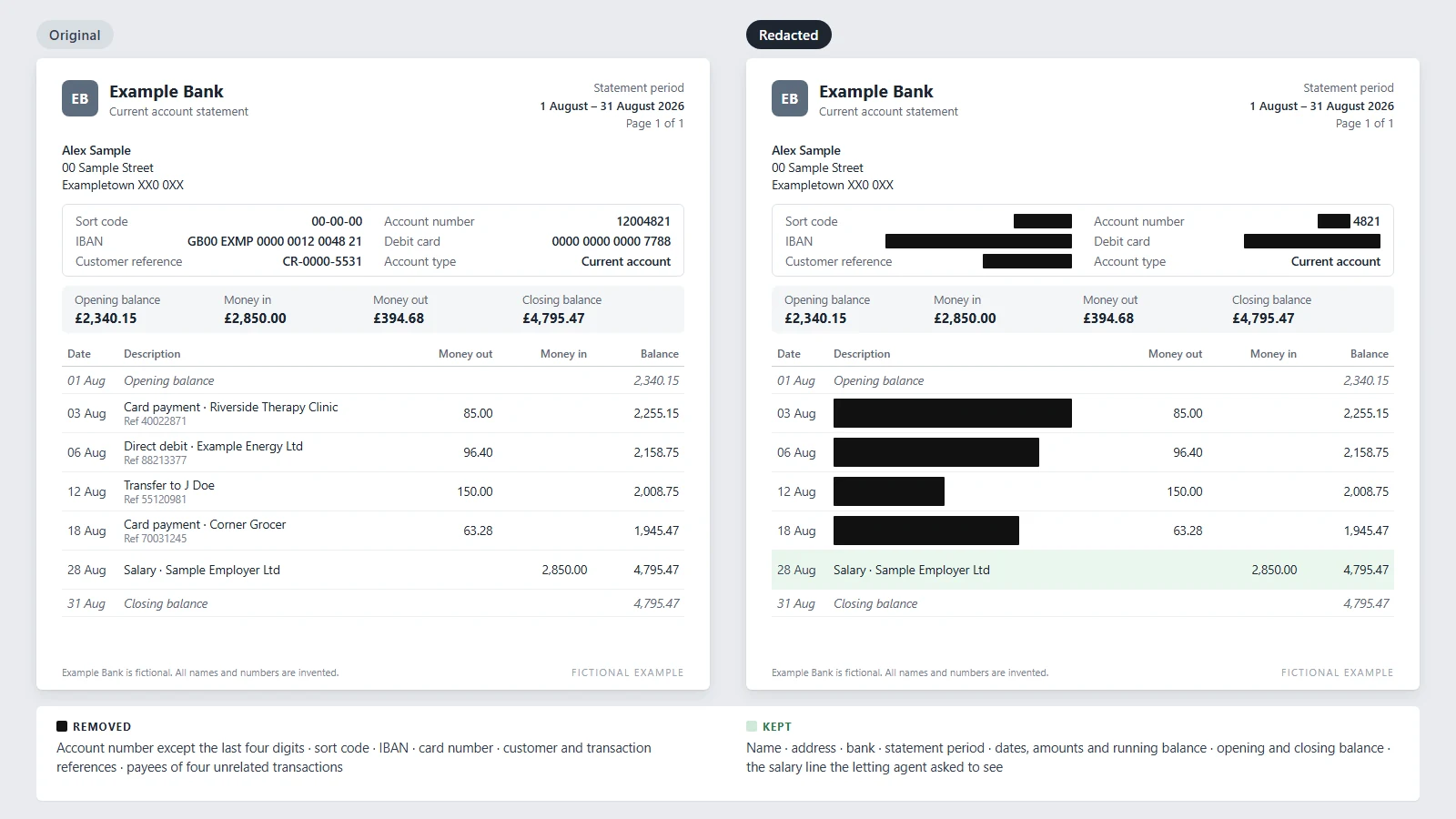
Redacted bank statement example
A fictional statement from a fictional bank, prepared for a letting agent who asked to see income.
The black-box mistake: when a redacted PDF isn’t redacted
The simplest failure needs no skill to exploit: a black rectangle or highlight sits over text that is still in the file. In January 2019, BuzzFeed News reported on a court filing in Paul Manafort’s case: “By scrolling over the redacted text, and copying it and pasting it to another document … the full text shows up.” An account number under a drawn box is exposed the same way. Blacking out in Word and then exporting has its own trap: an NSA paper summarized by the Federation of American Scientists warns that “merely converting an MS Word document to PDF does not remove all [sensitive] metadata automatically.” (Sources: BuzzFeed News; FAS, “NSA: Redacting with Confidence”, a 2006 summary of a 2005 paper.)
Where the file goes is a separate question. Smallpdf’s how-to steps start with “Open Redact PDF and upload your file”, and its app says a deleted document is “permanently removed from our servers”. Xodo says its web tools work “locally on your device”. Read the tool’s own page before a statement goes in: “locally on your device” and “our servers” are not the same thing (local vs cloud redaction). (Sources, each vendor’s own page: Smallpdf; Xodo.)
Redacting a W-2 or a tax return
A landlord or lender may also ask for a W-2 or a tax return, and both carry your Social Security number; ask the recipient before you redact either. The IRS rule is written for employers: they may truncate the SSN “on employee copies of Forms W-2”, replacing the first five digits with asterisks or Xs, but “Do not truncate the employees’ SSN on Copy A”, the copy filed with the Social Security Administration, and “An employer’s EIN may not be truncated on any form.” So for a redacted W-2 you share, use your employee copy: mask the first five SSN digits so it reads XXX-XX-1234, and leave the EIN, the wages and the employer’s name. For a redacted tax return, mask each SSN the same way and any account number to its last four digits, and keep the income figures. In a federal civil filing, Rule 5.2(a) requires that masking unless an exemption applies or the court orders otherwise. (Sources: IRS, General Instructions for Forms W-2 and W-3; FRCP 5.2(a).)
If the recipient only needs to verify income, ask whether an IRS transcript will do. Transcripts “partially mask your personally identifiable information to protect you. Financial data will remain fully visible to allow for tax preparation, tax representation or income verification.” (Sources: IRS, get transcript; IRS, about tax transcripts.)
A single monthly statement is your salary, your rent, your pharmacy and the names of the people you pay, in one file. You redact it so the recipient sees less; uploading all of it to someone else’s server to get there is the contradiction. And by hand it is slow — slow enough that a Monzo customer asked the bank’s community forum in January 2019 for statements that download already redacted. (Source: Monzo Community, a customer’s feature request, not a Monzo product.)
Redact a bank statement on your own computer
Occlira is a desktop app for Windows and macOS (Apple Silicon). Its Redact mode takes the statement as a PDF (a downloaded text PDF, or a scan it reads with on-device OCR) or as an image, and shows a box for each term of personal data it detects. Keep or drop each box, add a term it missed, and draw a box by hand over anything else, such as a transaction line.
Burning writes <stem>_redacted.pdf beside the untouched original: an image-only PDF with no
text layer and none of the source metadata or annotations, so the copy-paste test has nothing to find. It is
irreversible. The app then extracts the text again and checks that no selected term can still be found; on a
scan that check runs through OCR and is advisory, so the last look is yours. The trade-off: nothing in the
result is selectable.
Detection runs offline; the app goes online only to activate the license (via Polar), download its model and check for updates. It does not decide what a lender or the Home Office accepts — the recipient does. For an Excel (XLSX) file of transactions you want to keep working with, Anonymize mode swaps identifiers for placeholders instead: pseudonymization, not anonymization, since a mapping on your computer reverses it. It helps; it does not guarantee compliance.
Checklist before you send a redacted bank statement
- The recipient told you in writing which months, which account and which fields they need.
- You redacted a copy; the original is saved, unchanged.
- Name, bank, period or issue date and balances are readable; if the lender follows Fannie Mae rules, every transaction too.
- If the recipient accepts a masked statement: only the last four digits of the account number show, on every page, and nothing else you marked in step 4 can be read.
- A search for the full account number and its first four digits finds nothing; the copy-paste test comes back empty.
- The file properties carry no title, author or old file name you did not intend.
- No figure, date or payee was edited, and the file name says the copy is redacted.
Frequently asked questions
A copy of your statement with some details permanently removed, while the parts the recipient needs, such as your name, balance and income, stay readable. Which details go depends on who asked: a landlord, a mortgage lender, a visa officer and a court want different things.
Generally yes: US federal filing rules call for it, and Citizens Advice tells renters in England to cover account numbers. The risk is altering figures to mislead, which can be fraud under the Fraud Act 2006 in England, Wales and Northern Ireland. In the US, 18 U.S.C. § 1014 covers false statements made to influence the lenders and agencies it lists. General information, not legal advice.
Usually, once the recipient confirms they don’t need them: the full account number except the last four digits, the sort code or routing number, IBAN, card and reference numbers, and the payees of unrelated transactions. Leave your name, address, the bank, the period, balances and income lines, and every transaction if the lender follows Fannie Mae rules.
Nothing we found in US federal law stops it: CFPB and FTC pages cover tenant-screening reports, not your statements, so check your state’s rules. In England, Right to Rent concerns immigration status, not statements. Either way, you can offer a redacted copy showing income and balance.
Ask before you redact. Under Fannie Mae’s rules the account number can be masked to its last four digits, but every deposit and withdrawal must stay. We found no UK lender, FCA or UK Finance guidance on redacted statements, so ask your broker which lenders accept one.
The guidance does not say. For sponsored or endorsed work routes, a statement should show “information like” the issue date, your name, the bank and the balance. Student-route evidence must show your name, the bank and the amount, be no more than 31 days old and show you held enough money for 28 days in a row. Neither list includes the account number. Keep every listed field visible.
Ask the organization first. A proof-of-address check reads your name, current address and the date, so those must stay. HSBC’s upload rules want the page showing them, dated within four months, with the whole document visible: do not assume a redacted copy will pass there, so use another proof of address or ask HSBC. A DBS identity check refuses statements printed from the internet.
Ask the recipient first, and work on your employee copy. Black out the first five digits of your Social Security number so it reads XXX-XX-1234, as the IRS lets employers do on employee copies, and leave the EIN, wages and employer’s name. Use a tool that deletes the text, then search for your full SSN. For an income check, an IRS transcript partially masks your identifiers.
In another viewer, search for the full account number, then its first four digits. Copy what sits under each black bar into Notepad or TextEdit: any text that appears was only hidden. For an image-only PDF, where a search proves nothing, open it in an editor and try to move or delete each bar.
It depends where the file is processed. Some tools start with an upload to the vendor’s servers; others say they work locally in the browser. Read the tool’s own page first, or use software that processes the file on your own computer.
Redact a statement without uploading it
Mark the account number, the references and the payees nobody asked about, burn the boxes into an image-only PDF and check the result, all on your own computer. Free for 14 days on Windows and macOS (Apple Silicon); the license is one-time, from €149 per seat.
More: how to redact an email · remove metadata from a Word document · what is PII? · how your data is handled