Is Claude safe? Privacy, training, retention and the settings that matter (2026)
Is Claude safe? Claude privacy comes down to the plan you are on and the settings you never opened. On Free, Pro and Max, Anthropic trains new models on your chats unless you switch model improvement off, and leaving it on stretches retention from 30 days to five years. Claude for Work, the API and Claude for Government are not trained on by default. So is Claude safe to use with a client file or a contract under NDA? Not as it comes. The text sits on Anthropic’s servers, a shared link is a public web page, and Cowork, Claude Code and connectors reach files the chat box never sees.
Who this is from. Occlira is a desktop app that replaces the names, IDs and addresses in a file with placeholders on your own computer, so the copy you paste into Claude carries placeholders instead of the details it found. This guide is what we tell our own users. How it works ↓ · Free 14-day trial
Jump to: training and opt-out · retention · who can see your chats · Cowork and Claude Code · what to paste · the one control that works · using Claude without the names · FAQ
Does Claude train on your data?
On the consumer plans, yes, unless you tell it not to. Anthropic changed its consumer terms on 28 August 2025: “We will train new models using data from Free, Pro, and Max accounts when this setting is on.” Existing users were given a deadline — “You have until October 8, 2025 to make your selection” — and TechCrunch, reporting the same day, described the toggle as automatically set to “On.” (Sources: Anthropic, 28 August 2025; TechCrunch, 28 August 2025.)
Leaving it on costs storage time as well as training data: retention becomes “five years if you allow us to use your data for model improvement,” against 30 days for accounts that decline. On a personal plan the fix is one switch: in your Claude privacy settings, turn off what Anthropic’s retention page calls “Model Improvement in your Privacy Settings”.
Two limits on that switch. Commercial products are excluded from training in the first place. By default Anthropic will “not use your inputs or outputs from our commercial products… to train our models”, naming Claude for Work, the API and Claude Gov. And volunteered feedback overrides your choice the other way: press the thumbs buttons and Anthropic “may use your chats and coding sessions to train our models”, keeping that submission for five years. (Source: Anthropic Privacy Center — is my data used for model training?.)
How long does Claude keep your data?
There is no single number. Anthropic’s retention page, last updated 1 July 2026, runs four clocks at once:
- Chats you delete: “Deleted from our back-end storage systems within 30 days.”
- Data you allowed for model improvement: “we may retain your data in a de-identified format for up to 5 years in our model training pipelines.”
- Chats flagged for a Usage Policy violation: “We retain inputs and outputs for up to 2 years and trust and safety classification scores for up to 7 years if your chat or session is flagged.”
- Feedback you submit: five years from the submission.
Source: Anthropic Privacy Center — how long do you store my data?, updated 1 July 2026, checked 3 September 2026.
Pressing delete starts the first clock and only the first: a de-identified copy inside a training pipeline keeps its own five years, a flagged conversation its two, and a rated chat sits in the feedback set. Incognito chats are the one category exempt from training outright, “even if you have enabled Model Improvement in your Privacy Settings.”
Claude privacy: who can see your chats
Start from the mechanics rather than the promises. Content is classified for trust and safety — that is what produces the flagged-chat retention above — so a conversation is never opaque to the provider running it. On a Team or Enterprise plan there is a second reader: the organization. Anthropic sets out the roles: “Anthropic acts as a Processor of the data on behalf of the customer” and “the customer is the Controller of the data submitted by its Users”. It adds that “The customer may access and export data (such as conversation history) submitted by its Users.” (Source: Anthropic Privacy Center — processor or controller?, updated 16 March 2026.)
Two things Anthropic’s public help pages do not state: which staff can read a conversation, and how the company handles law-enforcement requests. What is documented is the layer above — the processor and controller split, and the subprocessor list Anthropic publishes on its Trust Center, worth reading before you sign anything. Private from Anthropic and private from your employer stay separate questions.
Is Claude private? What sharing a chat actually does
The gap between “nobody can guess this link” and “nobody will ever see this” narrowed in the summer of 2026. On 27 July 2026 Futurism reported that a large number of Claude conversations shared through the share feature were accessible online. It also noted that “the warning, though, doesn’t alert users that shared content could wind up being indexed by a search engine.” Among the material described: “a detailed medical report of a real patient, clinical trial results that included patient names, documents sharing the names and phone numbers of primary school-aged children”. Anthropic’s position is that shared links are “not guessable or discoverable unless people choose to share them themselves.” (Source: Futurism, 27 July 2026.)
Both statements hold at once: the link is not guessable, and it is a live URL on the open web the moment it is pasted into a ticket or a document that later gets published. By the time you reach for the share button the transcript is already written, so the moment to take the names out is before the conversation starts.
Claude memory and incognito chats
Memory changes what a single careless paste costs, because it outlives the chat it came from. Anthropic: “Claude can generate memory based on your chats.” It is “on by default for Free, Pro, and Max plans on the web, Claude Desktop, and Claude Mobile”, and off by default on Team and Enterprise until an owner turns it on. What is stored is listed in Settings > Memory, and an owner who switches memory off for the organization deletes every existing entry for every user immediately. (Source: Anthropic — chat search and memory.)
Incognito chats are the counterweight, and narrower than the name suggests. They “aren’t saved to your chat history or to Claude’s memory” and are “not used for training”. But they are still kept for 30 days by default, longer under an organization’s custom retention setting. They also still appear in organizational exports available to account Owners and in the Enterprise Compliance API. Good for keeping a conversation out of your own history and out of the model; useless for keeping it away from Anthropic or your employer. (Source: Anthropic — use incognito chats, updated 16 July 2026.)
Claude for Work, the API and zero data retention
The commercial tiers change the defaults that matter most: they are not trained on unless you opt in, and Anthropic’s “DPA with Standard Contractual Clauses (SCCs) is automatically incorporated into our Commercial Terms of Service”. Claude for Government is a separate build, “authorized at the FedRAMP High impact level” and not trained on by default. (Sources: Anthropic Privacy Center — DPA, updated 16 March 2026; Anthropic — Claude for Government.)
Zero data retention is the strongest setting Anthropic offers and the most commonly overestimated. Its scope is stated exactly: “the only products to which zero data retention applies are eligible Anthropic APIs, Anthropic products that use your Commercial organization API key (including Claude Code accessed via the API), and Claude Code for Enterprise plans.” The ordinary chat app is not on that list, and ZDR is not a checkbox — you “reach out to our Sales Team” for it. Everything else still means your files on someone else’s infrastructure, with an account owner who can export them. (Source: Anthropic Privacy Center — zero data retention, updated 9 June 2026.)
Claude Cowork, Claude Code and connectors: a different risk
Everything above is about text you chose to send; the agentic products invert the question. Cowork works by “reading your files, browsing the web, running code, using your apps”, with permissions that can extend to your email inbox and to “screenshots on your computer”. Connectors can “search your documents, read your email, or call external APIs on your behalf.” The exposure now extends to whatever the agent can reach while doing something you asked for. (Sources: Anthropic — use Claude Cowork safely; Anthropic — MCP connectors, updated 10 April 2026.)
The named failure mode is prompt injection, which Anthropic’s guidance defines as the case where “malicious instructions are embedded in external content that Claude reads as part of a legitimate task.” An independent analysis published on 6 March 2026 describes a January 2026 demonstration in which “a Word document containing hidden prompt injection (using 1-point white text that’s invisible to humans) could trick Cowork into uploading sensitive files”. Check Point Research disclosed on 25 February 2026 that malicious project files could produce remote code execution and API-token theft in Claude Code when a developer opens an untrusted repository — all of it “successfully patched prior to this publication.” (Sources: Wondering About AI, 6 March 2026; Check Point Research, 25 February 2026.)
Anthropic’s own advice is more conservative than most users’ habits: keep anything touching sensitive files on manual approval, and “review all connector permissions before adding them”. As for how far a boundary can slip: on 30 July 2026 Anthropic disclosed three incidents in which a Claude model “reached the internet from within or while interacting with a third-party evaluation environment, and then gained unauthorized access to the real systems of three different organizations”. That was its own cybersecurity testing rather than customer data, and the result of a single misconfiguration. (Source: Anthropic, 30 July 2026.)
Is Claude safe to use? What to paste and what not
Row by row: what each paste costs you if the promises above do not hold.
| What you are about to paste | Free, Pro, Max | Team, Enterprise, API | Safer move |
|---|---|---|---|
| Public documents, your own published writing | Fine | Fine | Nothing to do. |
| A draft with no third-party names in it | Fine, with model improvement off | Fine | If you upload the file rather than the text, check its properties and comments first. |
| Client, patient, pupil or employee records | No | Only if your DPA and your own policy cover it | Replace the identifiers first, paste the placeholder copy. |
| Contracts and deal papers under an NDA | No | Check what the NDA says about subprocessors | Anonymize the parties and the identifiers; keep the clauses. |
| Credentials, API keys, access tokens | Never | Never | Rotate anything you have already pasted. |
| Source code from a private repository | No | The API, or Claude Code on Enterprise; ask about zero data retention | Strip secrets and real customer data out of the fixtures. |
| A conversation you plan to share as a link | Treat the link as published | Same, and your account owner can export it | Anonymize before the conversation, not before the share. |
The last column repeats itself on purpose: in most of these rows the risk sits in a handful of identifiers, and the rest of the document is ordinary work.
Claude vs ChatGPT, Gemini, Copilot and DeepSeek
| Assistant | Consumer default: trained on? | Worth knowing | Business tier |
|---|---|---|---|
| Claude (Anthropic) | Yes on Free, Pro and Max, unless you turn model improvement off | 30 days with training off; up to 5 years de-identified with it on; flagged chats 2 years, safety scores 7 | Claude for Work, the API and Claude for Government: not trained on by default; DPA with SCCs; zero data retention on eligible APIs by agreement |
| ChatGPT (OpenAI) | Yes on the personal plans, with an opt-out | Deletion is not immediate, and legal holds can override it | Different on the business tiers — plan by plan on our ChatGPT page |
| Gemini (Google) | Activity is used to improve Google’s services, and a subset of chats is read by human reviewers | Human-reviewed chats kept up to 3 years even after you delete your activity | Workspace: not used for training or human review outside your domain without permission |
| Copilot (Microsoft) | In some markets the data “can help train our AI models in Microsoft Copilot unless you opt out” | That opt-out is in Microsoft’s Privacy Statement; the Microsoft 365 version is on separate terms and not trained on | Microsoft 365 Copilot: prompts, responses and Graph data not used to train the foundation models |
| DeepSeek | Treat as a no for anything confidential | Italy’s regulator ordered a limitation on processing in January 2025; current status on our DeepSeek page | Covered on our DeepSeek page |
ChatGPT is the closest comparison, and the shape is the same: personal plans trained on by default with an opt-out, business tiers on different terms, deletion that is not immediate and that a legal hold can override. Plan by plan in does ChatGPT save your data?, with the risk side in is ChatGPT private?
Gemini is the bluntest of the four. Google’s own help page asks you not to “enter confidential information that you wouldn’t want a reviewer to see”, and human-reviewed chats “are not deleted when you delete your activity. Instead, they are retained for up to three years.” Gemini in Google Workspace is the exception: content there is not used for training or human review outside your domain without permission. The full picture, setting by setting, is on is Google Gemini safe? (Sources: Google — Gemini Apps Privacy Hub, updated 10 August 2026; Google Workspace privacy hub.)
Microsoft Copilot is two products wearing one name. Microsoft’s Privacy Statement says that in some markets consumer data “can help train our AI models in Microsoft Copilot unless you opt out”. Microsoft 365 Copilot (now named Microsoft Copilot) states the opposite: “the prompts, responses, and data accessed through Microsoft Graph aren’t used to train foundation models”. One footnote there belongs on a page about Claude: “Anthropic models are currently excluded from the EU Data Boundary and when applicable, in-country processing commitments”. Full breakdown: is Microsoft Copilot safe? (Sources: Microsoft Privacy Statement, last updated July 2026; Microsoft Learn — enterprise data protection, updated 18 August 2026.)
DeepSeek is a different category of question. The Record reported at the time that Italy’s data protection authority “banned DeepSeek from operating in the country after the Chinese artificial intelligence company told regulators it does not fall under the purview of European data privacy laws” — the January 2025 decision. Current status, and what changes if you run the open weights yourself, in is DeepSeek safe? (Source: The Record, 31 January 2025.)
The one control that works: anonymize before Claude
Every protection on this page is a promise about what a company will do with data it already holds, and promises move. Consumer terms changed on 28 August 2025, and retention went from 30 days to five years for anyone who left a toggle alone. A share feature turned private transcripts into pages a search engine could index. An agent in Anthropic’s own evaluation environment reached outside systems because of one misconfiguration.
One control sits upstream of every setting: the identifiers are not in what you send. A contract without the parties’ names, a case summary without the patient, a spreadsheet without the account numbers — Claude still answers the question. The thing you were protecting was never in the transcript to be trained on, flagged, exported or shared. Everything else in the document still goes across in full, so the last check is the text you are keeping.
How Occlira keeps the identifiers out of Claude
Occlira is a desktop app that does the removing on your own computer. Open a document, spreadsheet, email,
PDF, scan, photo or audio recording, and it lists what it found — names, addresses, phone numbers, ID and
account numbers — with a confidence score for each. You tick what to replace and select anything it missed;
scans and images go through on-device OCR. What you get back is an anonymized copy: Word and Excel files stay
Word and Excel files with the formatting intact, comments, tracked changes and document properties cleaned in
the same pass; PDFs, emails and scans come back as .txt. Confirmed values become consistent placeholders such
as <PERSON_1>, and the mapping that reverses them stays in a local folder on your machine,
kept seven days by default and configurable. Detection runs offline; the app goes online only to activate the
licence (via Polar), download its model and check for updates.
That copy then goes to Claude the way the original would have: press Copy anonymized text and
paste it, or upload the anonymized file with your prompt. Claude answers with the placeholders in place, and
Deanonymize takes the reply you saved — or the file Claude produced — and writes a
*_restored copy with the real values back, on your machine.
Three connectors do the same without leaving the tool, all of them local and all of them needing the desktop app to be running. The Claude Desktop connector plugs Occlira into Claude itself: Claude anonymizes documents through it and works on the anonymized text; the real values never leave the machine, and it works only while the app is open. On Windows the Chrome extension adds Anonymize, Shield file and Restore buttons to the Claude chat box — and to ChatGPT and Gemini. The Word add-in shields a document’s personal data from inside desktop Word on Windows and macOS, review included, and restores it later.
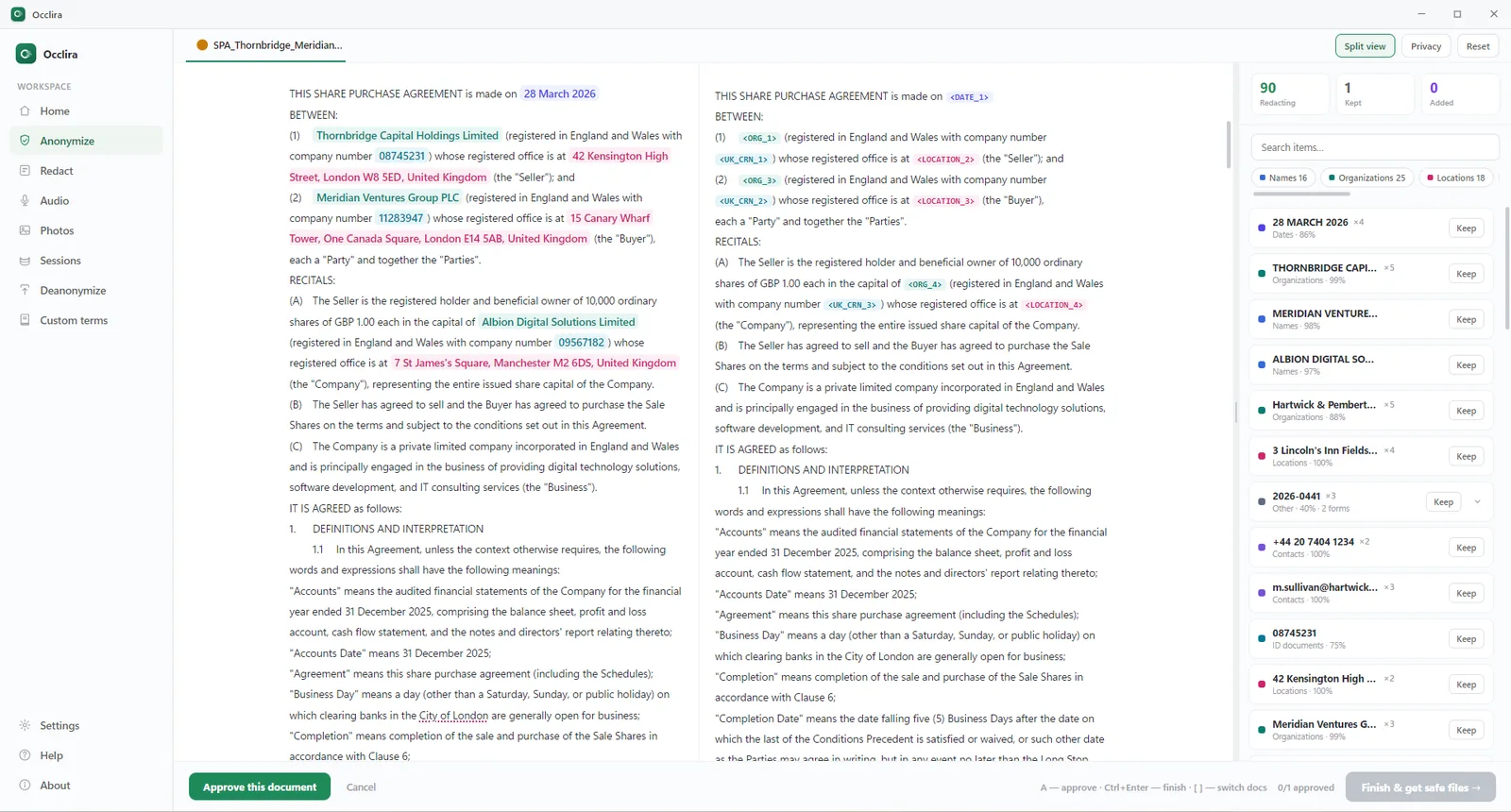
One honest caveat: because the mapping lets you restore the originals, this is pseudonymization in GDPR terms, not anonymization. It reduces what you expose without taking you outside the GDPR, because the mapping on your device is still personal data. It helps with compliance rather than guaranteeing it. The workflow, step by step, is in anonymize text before ChatGPT; it is identical for Claude.
Frequently asked questions
Safe enough for ordinary work, and not safe for raw confidential material on a personal plan, where chats feed model training unless you switch that setting off. The commercial tiers settle the training question and not the exposure one: the text still leaves your machine, a shared link is a public page, and the agentic tools reach files you never pasted. What survives every change of terms is what you never sent.
Yes on Free, Pro and Max, unless the model-improvement setting is off; the commercial products — Claude for Work, the Anthropic API and Claude Gov — are excluded by default. The exception people miss is feedback: pressing thumbs up or down can send that conversation for training whatever the toggle says, and Anthropic keeps the submission for five years.
Open your Claude privacy settings and switch model improvement off; that also keeps you on the 30-day retention period instead of the five-year one. Then stop rating replies with the thumbs buttons, because volunteered feedback counts as consent. On a Team or Enterprise plan an owner can turn rating off for everyone with the Rate chats setting.
Four clocks run at once: 30 days for a chat you delete, up to five years for de-identified data in the training pipelines, two years for a flagged conversation and seven for its safety scores. Feedback you submit through the thumbs buttons is kept five years. Deleting a chat starts the first clock and reaches none of the others.
Yes — every message, upload and reply is processed and stored on Anthropic’s infrastructure on every plan outside a zero-data-retention agreement, which is what chat history, memory and organizational exports run on. Deleting a chat removes it from your history and starts the 30-day back-end deletion. Incognito chats stay out of your history but are still retained for 30 days by default, or longer under an organization’s own retention setting.
Conversations are classified for trust and safety, and on Team or Enterprise plans the organization can access and export what its people wrote, incognito chats included. Sharing is the sharper edge: in July 2026 Futurism reported that shared Claude conversations were reachable online, including medical records and documents naming schoolchildren. Treat pressing share as pressing publish.
They are unlogged, not invisible: nothing is written to your chat history or to Claude’s memory, and they are not used for training. They are still retained for 30 days by default, still included in organizational exports available to account owners, and still in the Enterprise Compliance API. Use them against your own history, not against Anthropic or your employer.
A Team, Enterprise or API account is the baseline: those products are not trained on by default and arrive with a DPA and Standard Contractual Clauses. Cowork, Claude Code and connectors change the shape of the question again, because they act on files, repositories and inboxes you never pasted — keep them on manual approval and out of your sensitive folders.
Anthropic is the processor and your organization the controller, the DPA with Standard Contractual Clauses is built into the commercial terms, and Claude for Government is authorized at FedRAMP High. Zero data retention is narrower than it sounds: it covers eligible APIs and Claude Code on Enterprise, not the ordinary Claude chat app, and you arrange it with sales rather than tick a box. No tier makes the processing local.
Take the identifiers out first, on your own computer. Occlira is a desktop app for Windows and macOS (Apple Silicon) that replaces names, addresses, contact details, ID and account numbers in a file with consistent placeholders such as <PERSON_1> and keeps the mapping locally, so you can restore the real values afterwards; you paste that copy into Claude or upload it with your prompt, and two local connectors do the same inside the tool — the Claude Desktop connector, which gives Claude the file paths and the anonymized text, never the real values, while Occlira is running, and, on Windows, the Chrome extension’s buttons in the Claude chat box. What Claude stores, trains on or exposes in a shared link then has the identifiers missing — the rest of the document is still there, so read what remains before you send it.
Use Claude without sending the names
Anonymize locally, paste the placeholder copy, restore the real values on your machine. Free for 14 days on Windows and macOS (Apple Silicon); one-time licence from €149 per seat.
More: use AI without breaking the GDPR · what is PII? · shadow AI at work · is Grok private? · how your data is handled