Is Microsoft Copilot safe and confidential? The consumer app, Microsoft 365 Copilot and GitHub Copilot compared (2026)
Is Copilot safe? Ask which Copilot first: four products share the name, so “is Microsoft Copilot safe to use?” has four answers rather than one. The consumer app released on 18 August 2026 says prompts, responses and file contents “aren’t used to train foundation models”. Human review is documented for the older app, whose Privacy FAQ offers no opt-out from it. The new app publishes no retention period — you export or delete the activity history yourself. At work, Microsoft 365 Copilot does not use your prompts, responses or Microsoft Graph data to train foundation LLMs, and it keeps data in your tenant — except web queries sent to Bing and third-party agents. Its weak spot is retrieval: it can surface any file your permissions allow, including the overshared ones. GitHub Copilot splits by plan: GitHub may use individual-plan interactions for training since 24 April 2026 unless you switch it off. Either way, take the identifiers out of a confidential document first.
Who this is from. Occlira is a desktop app that replaces the names, IDs and addresses in a file with placeholders on your own computer, so the copy you hand to Copilot carries placeholders instead of the details it found. This guide is what we tell our own users. How it works ↓ · Free 14-day trial
Jump to: which Copilot · the consumer app · what it stores · Microsoft 365 Copilot and oversharing · what went wrong · is it confidential? · GitHub Copilot · what to paste at work · vs ChatGPT, Claude and Gemini · anonymizing first · FAQ
Which Copilot are you asking about?
“Is Copilot safe?” is really four questions, because four products carry the name. That is why the advice online contradicts itself: a post about a work tenant answers nothing about the free app on your phone.
| Product | Who it is for | Trains on your data? | Where the data lives | Who can see it |
|---|---|---|---|---|
| Copilot app and copilot.microsoft.com (Free or Pro) | Anyone with a personal Microsoft account | New app (18 August 2026): no. Older app: yes — voice and conversation activity fed AI training. | Microsoft’s consumer services; conversation activity is listed in the Microsoft privacy dashboard | Microsoft; on the older app’s FAQ, some conversations go to human review. Not other users. |
| Microsoft 365 Copilot, now renamed Microsoft Copilot | Work or school (Microsoft Entra) accounts | No — “Prompts, responses, and data accessed through Microsoft Graph aren’t used to train foundation LLMs” | In your tenant, encrypted at rest; retention set by your admins in Purview | You, for anything you already have view permission on; your admins, through Content search or Purview |
| GitHub Copilot | Developers, on Free/Pro/Pro+/Max individually or on Business/Enterprise | No on Business and Enterprise, by contract. Individual plans: GitHub may use interactions since 24 April 2026. | GitHub’s services; no primary GitHub page we could open states retention per plan | GitHub; Business and Enterprise data is covered by GitHub’s Data Protection Agreement |
| Microsoft Security Copilot | Security and IT teams | A separate Microsoft product for security and IT operations — out of scope here | — | — |
Sources: Microsoft Copilot activity history and the Privacy FAQ for Microsoft Copilot (the older app); Microsoft Learn — data, privacy and security for Microsoft 365 Copilot; GitHub Copilot policies. All checked 11 September 2026.
The fourth row is there because it keeps surfacing in searches for this question. Security Copilot “delivers agentic automation and AI-driven insights across Security and IT” — not the product you were about to paste a contract into. (Source: Microsoft Security Copilot, accessed 11 September 2026.)
Copilot privacy in the consumer app: training, human review and the 18 August 2026 split
Microsoft runs two consumer privacy documents at once, and which applies depends on your build. The activity-history page states that “an updated version of the Microsoft Copilot app for web, desktop, and mobile devices is available as of August 18, 2026”. Anyone still on the old one is told that “this article does not apply to you”. Most of the Copilot privacy advice in the search results was written before that app shipped.
On the new app the training answer is a clean no: “Prompts, responses, and your file contents when using the Microsoft Copilot app aren’t used to train foundation models.” Feedback is optional, and is not used “to train the foundation models used by Copilot” either. What the page does not give is a retention period.
The older app’s Privacy FAQ reads differently. “Microsoft uses data from Bing, MSN, Copilot, and interactions with ads on Microsoft for AI training. This includes de-identified search and news data, interactions with ads, and your voice and conversation activity with Copilot.” The FAQ then lists who is left out: organizational Entra ID sign-ins, Microsoft 365 Personal and Family Copilot users, signed-out users, under-18s and anyone who has opted out. For the older app the switch is documented: select your profile icon, then your profile name, then Privacy > Training on conversation activity — Microsoft’s privacy-controls page says it “applies only to the older version of the Microsoft Copilot app”; the new app’s privacy pages describe memory and personalization controls and no training toggle. Certain markets are excluded too, with no user data used “for generative AI model training… until further notice”.
Human review sits in that same older-app FAQ. “Some Copilot conversations are subject to both automated and human review for product improvement and digital safety purposes,” it says, and “an opt-out of human review is not available.” Nor is all of that reading done inside Microsoft: the same FAQ says the company partners “with external research organizations to review and evaluate Copilot conversations”. The new app’s activity-history page says nothing about review either way. None of it reaches the public — “nothing you say to Copilot will be made public. Your conversations and data will never be shared with other users.”
The rest is in the smaller print. The Privacy Statement, last updated September 2026, notes that Copilot “also uses prompts and related data to provide and improve services, including relevant advertising”. With personalization on, Copilot “remembers key details you share, such as your name, interests, and goals”, though not for signed-out users or in six named markets. Vision is the tightest of them: images you capture with it “are processed only to respond to your request and aren’t used to train AI models or personalize your experience”. (Sources: Copilot activity history; Privacy FAQ for Microsoft Copilot (the six markets are Brazil, China excluding Hong Kong, Israel, Nigeria, South Korea and Vietnam); Copilot privacy controls, the page carrying the opt-out path for the older app; Microsoft Privacy Statement, all accessed 11 September 2026.)
Does Copilot store your data?
Yes, in every version. What changes is how long, and who sets the clock.
- Consumer app, older build. “By default, we store conversation activity for 18 months”, and you can delete conversations or the whole history at any time. An uploaded file or image is “stored securely for a short time (no longer than 18 months) and then automatically deleted”. Vision is the exception: screenshots and camera images “aren’t stored after your session ends”.
- Consumer app, new build. No period is published. You manage it instead: signed in with a Microsoft account, you “can view, access, export and delete Copilot activity history” from the privacy dashboard.
- Microsoft 365 Copilot. Interactions stay in your tenant, where the data “is encrypted while it’s stored and isn’t used to train foundation LLMs”. Admins “can use Content search or Microsoft Purview” to view and manage it, and Purview to set retention policies. Microsoft sets no expiry; your organization does.
- GitHub Copilot. No primary GitHub page we could open states retention per plan — the Trust Center serves a script-rendered shell to a plain fetch — so treat retention tables quoted elsewhere as unverified.
A figure circulates that we could not trace. Nightfall’s post of 24 January 2025 says “Microsoft states that prompt and response data may be retained for up to 30 days for service improvement purposes.” No Microsoft page checked here carries that number, so read it as Nightfall’s summary. (Sources: Privacy FAQ; Privacy Statement; Microsoft 365 Copilot privacy; Nightfall, 24 January 2025. Checked 11 September 2026.)
Microsoft 365 Copilot security: enterprise data protection and the oversharing problem
Start with the naming, because it confuses everything downstream: “Microsoft 365 Copilot is now named Microsoft Copilot, and Microsoft 365 Copilot Chat is now named Microsoft Copilot Chat… There are no changes to security, compliance, and privacy for organizations.” Same product, same terms — and now the same name as the consumer app.
Under enterprise data protection the promises are specific. “Your data is private: We won’t use your data except as you instruct.” Prompts, responses and data reached through Microsoft Graph “aren’t used to train foundation LLMs”. Copilot inherits your sensitivity labels, retention policies and audit, and where Purview Information Protection encrypts a file it “honors the usage rights granted to the user”. The contrast with Azure OpenAI is worth quoting: “While abuse monitoring, which includes human review of content, is available in Azure OpenAI, Microsoft Copilot services have opted out of it.” The same pages add caveats. Models “provided by Anthropic as a subprocessor are currently excluded from the EU Data Boundary”. And HIPAA support is conditional: it applies “for properly configured implementations”. The tenant is not the whole story, either: web queries go to the Bing search service, which “operates separately from Microsoft 365 and has different data-handling practices covered by the Microsoft Services Agreement”, and with agents you are told to “check the privacy statement and terms of use of the agents” yourself. (Sources: Microsoft Learn — Microsoft 365 Copilot privacy and enterprise data protection, both last updated 18 August 2026, accessed 11 September 2026.)
Then the sentence that decides the real risk: “Microsoft Copilot only surfaces organizational data to which individual users have at least view permissions.” As a security promise it reassures. As an inventory question it warns, because Copilot can surface, summarize and quote anything in that set — including the files nobody remembers sharing.
Microsoft says as much itself. Its September 2025 oversharing guidance: “any gaps in governance… become amplified.” Concentric’s data risk report, refreshed 23 April 2026, sizes the gaps: “16% of business-critical data is overshared, with an average of 802 thousand files at risk per organization.” It adds a labeling problem — “Copilot outputs don’t consistently inherit security labels from source files.” Oleria, in March 2025, was blunter: “With 95% of permissions going unused, AI assistants can accidentally expose sensitive data to the wrong people.” (Sources: Microsoft Tech Community, 2 September 2025 — a year old; Concentric AI, refreshed 23 April 2026; Oleria, 20 March 2025. Checked 11 September 2026.)
The fixes are governance work, not a switch. SharePoint Advanced Management shows where you stand before a rollout: “the site permissions baseline report helps you understand your organization’s overall access exposure.” The stopgap many tenants leaned on is going away — “Restricted SharePoint Search is retiring. Starting July 31, 2026, new enablement is blocked.” It was never a wall anyway: Microsoft states that it “isn’t a security boundary and doesn’t change any permissions on SharePoint sites”. (Sources: Microsoft Learn — SharePoint and Copilot best practices; Restricted SharePoint Search. Accessed 11 September 2026.)
What has actually gone wrong: the February 2026 email bug and EchoLeak
On 18 February 2026 TechCrunch reported that “Microsoft has confirmed that a bug allowed its Copilot AI to summarize customers’ confidential emails for weeks without permission”. The fault, trackable by admins as CW1226324, meant that “draft and sent email messages with a confidential label applied are being incorrectly processed by Microsoft 365 Copilot chat”. The labels were doing their job; the plumbing was not. Microsoft would not say how many customers were affected. (Source: TechCrunch, 18 February 2026, reporting a fix already rolling out and crediting Bleeping Computer with the first report; accessed 11 September 2026.)
The year before, Aim Labs disclosed EchoLeak (CVE-2025-32711). Aim Security’s CTO described the zero-click flaw as showing “how attackers can automatically exfiltrate the most sensitive information from Microsoft 365 Copilot’s context without requiring any user interaction whatsoever”. Microsoft said it had been addressed “before our customers were impacted”, and that no customer action was required. (Sources: Cybersecurity Dive and TechRepublic, June 2025, accessed 11 September 2026.)
Is Copilot confidential? The UK question
“Confidential” and “private from Microsoft” are different claims, and UK buyers are told the first while hearing the second. The tenant-boundary version is what partners sell: what you enter into Copilot “does not leave the security boundary of your organisation”, writes Compete366, and Copilot “follows your organization’s existing permissions, enforced by Microsoft Entra ID”, says TrustedTechTeam. Both are accurate about Microsoft 365 Copilot. Neither answers whether you were entitled to put that document in front of an AI. (Sources: Compete366, 28 July 2025; TrustedTechTeam, 17 December 2025. Checked 11 September 2026.)
For solicitors the regulator has said it plainly. The SRA’s warning notice on the misuse of AI, published 17 August 2026, states that “both paid for and free-to-use AI tools may not provide the contractual, and technical safeguards needed to maintain client confidentiality”. It cites a 2026 Upper Tribunal ruling: “to put client letters and decision letters from the Home Office into an open source AI tool, such as ChatGPT, is to place this information on the internet in the public domain”. The example is the SRA’s own, and it is ChatGPT rather than Copilot.
The Law Society’s guidance of 1 October 2025 lists both “GitHub Copilot” and “Microsoft’s Copilot” among the tools solicitors use. It advises against feeding “confidential information into generative AI tools, especially if you lack direct control and oversight over the tool’s development and deployment”. For a free online service where you have no operational relationship with the vendor other than use, it is absolute: “do not put any confidential data into the tool.” Spellbook, in June 2026, lands in the same place — unless you use an enterprise version with specific safeguards, “Copilot isn’t ideal for confidential or privileged conversations.” The ICO’s UK GDPR guidance on AI and data protection is under review and still carries its 15 March 2023 update, so Copilot specifics are not there. This is general information, not legal advice; the professional-duties version is on ChatGPT for lawyers. (Sources: SRA warning notice, 17 August 2026; The Law Society, 1 October 2025; Spellbook, updated 20 June 2026; ICO. All checked 11 September 2026.)
Is GitHub Copilot safe? What changed on 24 April 2026
Plan type decides it. “GitHub does not use Copilot Business or Copilot Enterprise customer data to train AI models,” the documentation says; that data “is protected under GitHub’s Data Protection Agreement, which prohibits such use without customer authorization.”
The individual plans moved the other way this spring. “Starting on April 24, 2026, if you have a Copilot Free, Copilot Pro, Copilot Pro+, or Copilot Max plan, GitHub may use your interactions with GitHub features and services… to train and improve AI models.” The opt-out is one dropdown in your settings: select “Allow GitHub to use my data for AI model training” and click Disabled. Cannot find it? Then “verify that you are not signed in with an account that has a Copilot Business or Copilot Enterprise license.” (Source: GitHub Docs — managing Copilot policies, accessed 11 September 2026.)
The everyday risk in code is not the model, though. Copilot may include code and context from your open files in a request — remove secrets from anything it can reach: customer records in a test fixture, a key in a config, a client’s name in a comment. Not a new worry: the GitHub community discussion “Is Github Copilot safe privacy wise?” dates from November 2021 and still surfaces in the results.
Is Copilot safe to use at work? What to paste and what not
Your employer’s policy outranks this table, and on a work tenant admins can view your Copilot interactions with Content search or Microsoft Purview.
| What you want to put in | Consumer Copilot app | Microsoft 365 Copilot | What to do instead |
|---|---|---|---|
| Published or public material | Fine | Fine | Nothing to do. |
| An internal draft with no third-party names in it | Check your employer’s policy first | Only if your organization permits it | If you upload the file instead of the text, clear its comments and properties first. |
| Client, patient, pupil or employee records | No | Only if your DPA, labels and permissions genuinely cover it | Replace the identifiers, then work on the placeholder copy. |
| Privileged, regulated or secret material — legal advice, health records, credentials, code holding keys | No | Only with your compliance team’s sign-off | Anonymize it, or keep it out of the prompt entirely. |
Which leaves the case that actually comes up: the document you need help with, carrying a dozen names, two account numbers and an address. Most of the controls above belong to somebody else — Microsoft’s own terms, your admin’s permissions, a sensitivity label that a bug ignored for weeks in February. GitHub’s training switch is yours to set, but it covers GitHub and nothing else. What stays with you everywhere is what the text says when it arrives.
Copilot vs ChatGPT, Claude and Gemini
| Service | Trained on by default? | How long it is kept |
|---|---|---|
| Microsoft Copilot app (personal account, new app) | No, per the app released 18 August 2026; the older app fed conversation activity into AI training | No period published; you export or delete activity history yourself |
| Microsoft 365 Copilot (work) | No | Under your organization’s Microsoft 365 retention settings |
| ChatGPT — Free, Go, Plus, Pro | Yes, until you switch off “Improve the model for everyone” | Until you delete a chat, then purged within 30 days, with exceptions |
| Claude — Free, Pro, Max | Yes, unless you turn model improvement off | Set by the same choice — the detail is on our Claude page |
| Gemini app (personal) | Yes, while Keep Activity is on; a subset of chats is read by human reviewers | Human-reviewed chats kept up to 3 years even after you delete your activity |
| Gemini in Google Workspace | No, not without your permission | Under your Workspace settings |
Sources: the Microsoft and GitHub documents linked above; for the other assistants, our own sourced pages — does ChatGPT store your data, is Claude safe, is Google Gemini safe, is ChatGPT private and the assistant comparison there.
Among the four consumer apps here, only Copilot’s own page says prompts and file contents are not used for foundation-model training. The advantage is narrow: each stores what you send, and none is private from its provider.
The control that stays with you: anonymize before Copilot
Occlira is a desktop app for Windows and macOS (Apple Silicon) that does the removal on your own computer. Detection runs on-device; the app reaches the network only to activate the license (via Polar), download its model and check for updates. Open a document, spreadsheet, email, PDF or scan and it flags the personal data — names, addresses, phone numbers, ID and account numbers, dates — with a confidence score on each. You decide what goes, and you add anything it missed by selecting it.
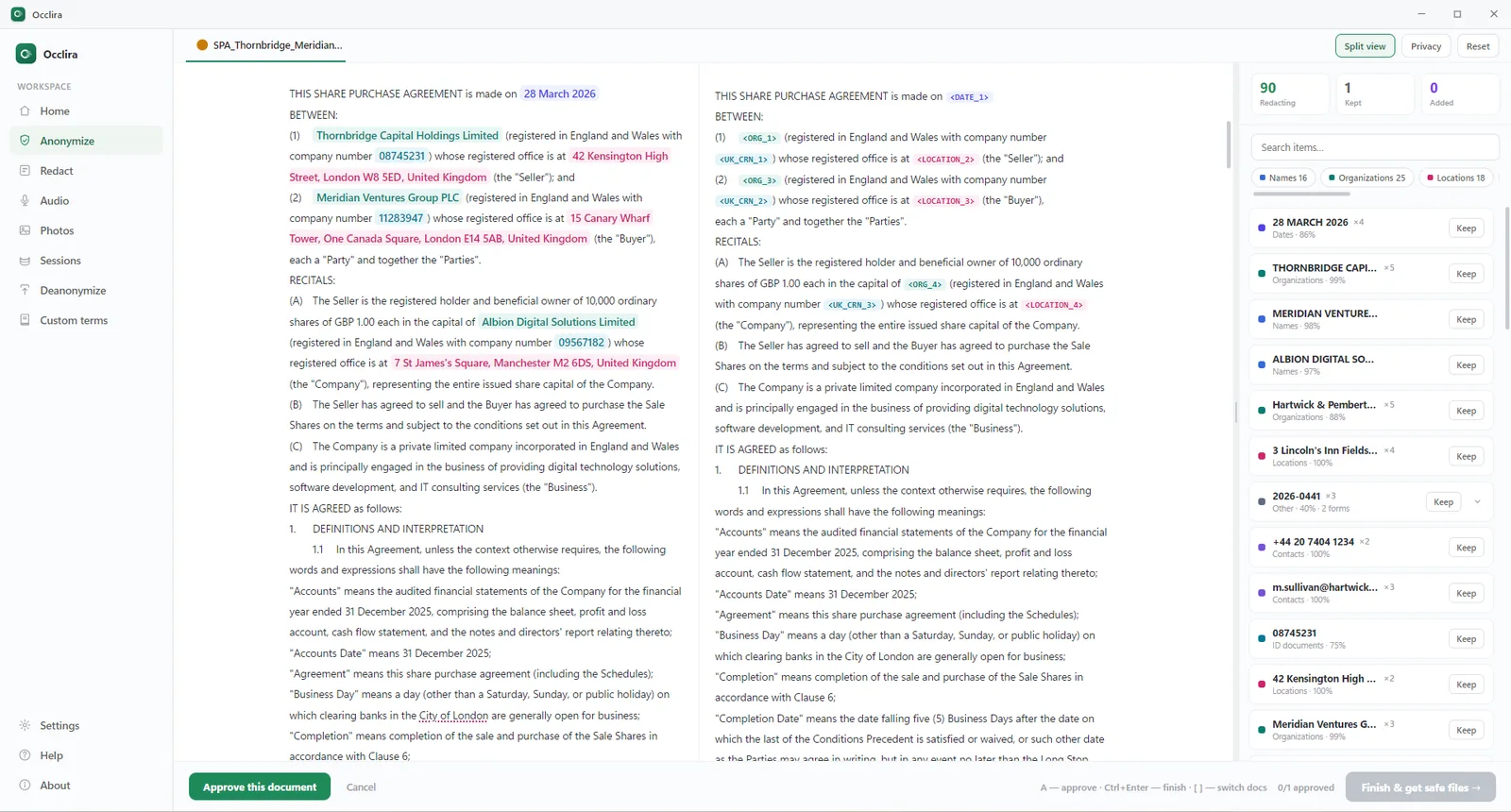
What comes back is an anonymized copy. Word and Excel files stay Word and Excel files, formatting intact, and
their hidden layer — comments,
tracked changes, document properties — is cleaned in the same pass. PDFs, emails and scans come back as
anonymized .txt files, with on-device OCR for the scans. Confirmed values
become consistent placeholders such as <PERSON_1>, and the mapping that reverses them stays
in a local folder, kept seven days by default and configurable.
From there, two routes into Copilot. Press “Copy anonymized text” and paste it into the
Copilot box, or attach the anonymized
file with your prompt. The answer comes back with the placeholders still in it. Save the reply as a file and
Deanonymize writes a *_restored copy with the real values. For Copilot in Word the closer fit is the Word add-in: it shields the document’s
personal
data from inside desktop Word on Windows and macOS, review included. You anonymize the draft, invoke Copilot
on the placeholder text, and restore afterwards, with the desktop app running.
Our Chrome extension puts Anonymize and Restore buttons inside ChatGPT, Claude and Gemini,
not Copilot, which is why Copilot users work from the copy the app produces.
One honest caveat. Because the mapping lets you restore the originals, this is pseudonymization in GDPR terms, not anonymization. It reduces what you expose without taking the data outside the GDPR, and it does not settle a duty of confidence on its own. It helps with compliance rather than guaranteeing it, and it is not legal advice. It complements your account settings, your tenant’s permissions and your organization’s approval; it does not replace them. Step by step: anonymize text before ChatGPT, which works the same way for Copilot.
Frequently asked questions
Safe enough for ordinary work, not for confidential material without controls. The new consumer build does not train on your prompts but keeps an activity history; human review is documented for the older app only. Microsoft 365 Copilot does not train foundation LLMs on your prompts or Graph data and keeps them in your tenant, yet it can surface any file your permissions allow. Answer it per product.
With Microsoft 365 Copilot in your own tenant, yes for most internal work: prompts, responses and Graph data are not used to train foundation LLMs, though web queries go to Bing under separate terms and agents carry their own. The exposure is retrieval, not training — a badly permissioned SharePoint site turns into searchable prose. Work documents in the free consumer app may breach your employer’s policy.
It depends on the product, the contract, the configuration and your professional duties. Microsoft says conversations are “never shared with other users”, and at work the data stays in your tenant — but Microsoft processes it, the older app’s FAQ documents human review, and colleagues reach whatever their permissions cover. The SRA warned in August 2026 that AI tools may lack the safeguards client confidentiality needs.
Yes. The older consumer app stores conversation activity for 18 months by default, and uploaded files no longer than that. The new app publishes no period and gives you export and delete controls in the Microsoft privacy dashboard. At work, interactions sit encrypted in your tenant under the retention policy your admins set.
It depends which one. The Copilot app released 18 August 2026: no — prompts, responses and file contents “aren’t used to train foundation models”. The older app: yes, voice and conversation activity fed AI training unless you were excluded or opted out. Microsoft 365 Copilot: no. GitHub Copilot: may use individual-plan interactions since 24 April 2026.
Private from other users, not from Microsoft. Nothing you type is made public or shared with other users, but it is stored and Microsoft processes it. On the older app’s Privacy FAQ some conversations go to human reviewers with no opt-out, and Microsoft says it partners “with external research organizations to review and evaluate Copilot conversations”. Treat it as a service that reads everything you give it.
On Business and Enterprise, GitHub contractually does not train on your data. On Free, Pro, Pro+ and Max, GitHub may use your interactions to train models since 24 April 2026 unless you set “Allow GitHub to use my data for AI model training” to Disabled. Copilot can still draw on whatever your open files hold.
A Microsoft Q&A thread from May 2025 asks exactly that. The accepted answer points at the account rather than the plan: with an eligible work or school account, “your data is not used to train Microsoft’s foundation models” and prompts and responses stay inside “your organization’s boundaries”. A Pro license alone does not buy that.
For work documents, Microsoft 365 Copilot inside your own tenant is a stronger position than a personal ChatGPT account — because of the contract and the admin controls, not the model. Consumer to consumer, the current Copilot app says it does not train on prompts, while ChatGPT’s personal plans train until you opt out.
Yes. Open the file in the desktop app, review what it flagged, and the names, IDs and addresses become consistent placeholders. Copy the anonymized text into any Copilot, or shield the document inside desktop Word before you invoke Copilot there. Deanonymize restores the real values from the answer file, locally. That is pseudonymization, not anonymization.
The Free-versus-Pro answer comes from the Microsoft Q&A thread of 29 May 2025 and its accepted answer of 3 June 2025, accessed 11 September 2026.
Use Copilot without handing over the names
Anonymize the document locally, work with the placeholder copy in whichever Copilot you have, restore the real values on your own machine. Free for 14 days on Windows and macOS (Apple Silicon); one-time license from €149 per seat.
More: anonymize text before ChatGPT · use AI without breaking the GDPR · ChatGPT for lawyers · shadow AI at work · what is PII?